

Waterfall City CommunityPortal
Real Estate Development Interactive Social
The Waterfall Estate Community companion app has been completely redeveloped.
- Downloads
- 2.8K+
- on Google Play
- Price
- Free
- No in-app purchases
- Updated
- Oct 10
- 2024 · v3.4.0
Screenshots


About Waterfall City CommunityPortal
Version 3 of the Waterfall Estate Community Portal application has been completely redeveloped. View all content in-app, log in and see the updated features!
* Login
- The Login page requires the user to enter their email and password credentials
- The user must agree to the terms and conditions as set out by the estate before they can continue with the login process
- The user can use the “Remember Me” function to store their credentials on the device, which will prefill their login fields the next time they launch the app
* Dashboard
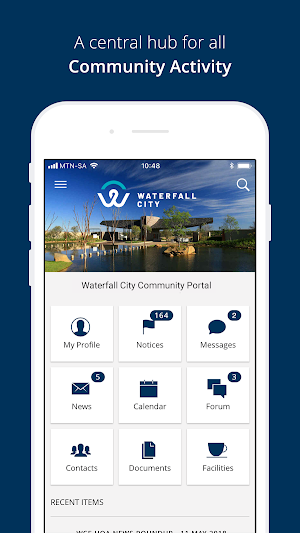
- The Dashboard page is the first page that is presented to the user after login.
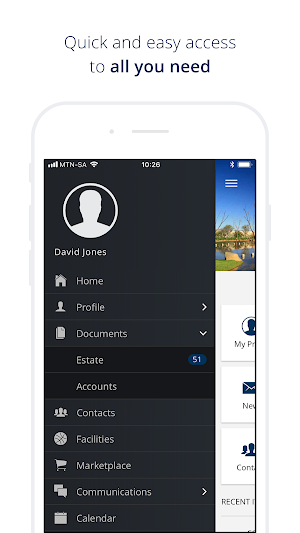
- From here the user can access the most prominent features that the app provides. Other features can be accessed from the side menu.
- Recent Items are the most recent items available in the News, Notices, Messages, and Events categories.
The following are accessible from the Dashboard
* Profile
- The Profile page allows the user to view and edit information related to their portal profile.
- Any information that is changed here will reflect on the web portal as well.
- Owners / Residents / Non-Residents / Staff
- Allows the user to view the different types of users associated with their profile
- Accessible from the side menu
* Notices
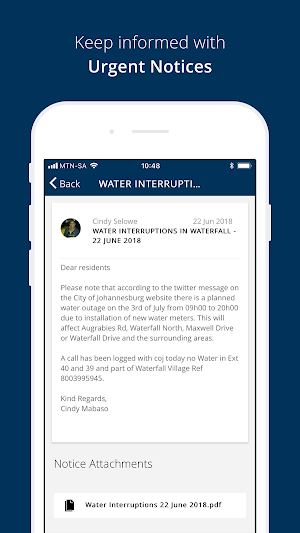
- The Notices page allows the user to view important notifications that the estate provides.
* Documents
- The Documents page allows the user to view important documents that the estate provides.
* Contacts
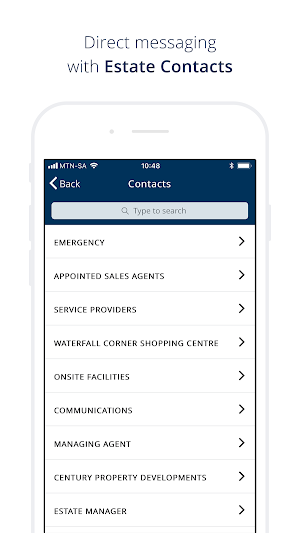
- The Contacts page allows the user to view the contact information of people and organizations affiliated with the estate.
- The user can also save any contact information on this page to their device contact list.
* Messages
- The Messages page allows the user to send and receive messages to certain contacts that are affiliated with the estate.
* Forum
- The Forum page allows the user to view and post messages to discussion forums that are supplied by the estate.
* Calendar
- The Calendar page allows the user to view and save events to their device calendar that are provided by the estate.
* Facilities
- The Facilities page allows the user to view the details of all the facilities that the estate provides.
* News
- The News page allows the user to view important news articles that relate to the estate
The following are accessible from the side menu
* Marketplace
- The Marketplace page allows the user to view vendors that are affiliated with the estate.
* Polling
- The Polls page allows the user to view and participate in polls provided by the estate
- Accessible from the side menu
* Settings
- The Settings page allows the user to manage several notifications settings.
- Only accessible from the side menu
* Help
- The Help page provides the user with several help topics and answers to frequently asked questions.
* Search
- The Search page allows the user to search across all topics.
* Logout
- The user can log out from the side menu.
* Login
- The Login page requires the user to enter their email and password credentials
- The user must agree to the terms and conditions as set out by the estate before they can continue with the login process
- The user can use the “Remember Me” function to store their credentials on the device, which will prefill their login fields the next time they launch the app
* Dashboard
- The Dashboard page is the first page that is presented to the user after login.
- From here the user can access the most prominent features that the app provides. Other features can be accessed from the side menu.
- Recent Items are the most recent items available in the News, Notices, Messages, and Events categories.
The following are accessible from the Dashboard
* Profile
- The Profile page allows the user to view and edit information related to their portal profile.
- Any information that is changed here will reflect on the web portal as well.
- Owners / Residents / Non-Residents / Staff
- Allows the user to view the different types of users associated with their profile
- Accessible from the side menu
* Notices
- The Notices page allows the user to view important notifications that the estate provides.
* Documents
- The Documents page allows the user to view important documents that the estate provides.
* Contacts
- The Contacts page allows the user to view the contact information of people and organizations affiliated with the estate.
- The user can also save any contact information on this page to their device contact list.
* Messages
- The Messages page allows the user to send and receive messages to certain contacts that are affiliated with the estate.
* Forum
- The Forum page allows the user to view and post messages to discussion forums that are supplied by the estate.
* Calendar
- The Calendar page allows the user to view and save events to their device calendar that are provided by the estate.
* Facilities
- The Facilities page allows the user to view the details of all the facilities that the estate provides.
* News
- The News page allows the user to view important news articles that relate to the estate
The following are accessible from the side menu
* Marketplace
- The Marketplace page allows the user to view vendors that are affiliated with the estate.
* Polling
- The Polls page allows the user to view and participate in polls provided by the estate
- Accessible from the side menu
* Settings
- The Settings page allows the user to manage several notifications settings.
- Only accessible from the side menu
* Help
- The Help page provides the user with several help topics and answers to frequently asked questions.
* Search
- The Search page allows the user to search across all topics.
* Logout
- The user can log out from the side menu.
What’s new
Version 3.4.0 · Updated October 10, 2024
Android SDK Upgrade
Alternatives to Waterfall City CommunityPortal
Looking for apps like Waterfall City CommunityPortal? Here are 6 similar Android apps on Google Play. The highest rated is HepGenç (5.0/5), and all 6 are free to download.
-
HepGenç 5.0
-
ChatGPT Video: AI Maker
-
Dooram - Social Watch Party
-
Crestini Chat
-
Fandomera 5.0
-
ROVSTA 5.0
| App | Rating | Price | Installs | Last updated | Compare |
|---|---|---|---|---|---|
| Waterfall City CommunityPortal | – | Free | 1,000+ | Oct 10, 2024 | |
| HepGenç | 5.0 / 5 | Free | 1,000+ | Nov 11, 2026 | Compare |
| ChatGPT Video: AI Maker | – | Free | 500,000+ | Nov 5, 2026 | Compare |
| Dooram - Social Watch Party | – | Free | 1,000+ | Oct 21, 2026 | Compare |
| Crestini Chat | – | Free | 100+ | – | Compare |
| Fandomera | 5.0 / 5 | Free | 10,000+ | Nov 3, 2026 | Compare |
| ROVSTA | 5.0 / 5 | Free | 1,000+ | – | Compare |
Similar apps on Google Play
- HepGenç
- ChatGPT Video: AI Maker
- Dooram - Social Watch Party
- Crestini Chat
- Fandomera
- ROVSTA
- JoinMeIn
- XploristNet Admin
- UNAP
- okmam
- Gang - See who likes you
- PetaPet – Community Pet
- Hellobreeder
- Oya - Match Your Vibe
- 느린천사 - 발달장애 아이를 키우는 사람들의 커뮤니티
- Tiyya - Video Chat & Connect
- 470
- FynoHub
- YolaCall - Lively Call & Meet
- Wave
- Miya - Live Video Call
- AvioHub
- TanshaAPp2
- Sada: Arabic Social App
- Migoer米果儿 —全球华人的社交生态平台