
Tapping Click - Auto Clicker
Wang Wei Developers Tools Contains ads
A multiple Tapping tool that simulates clicks repeatedly on your phone screen📱.
- Downloads
- 5.9K+
- on Google Play
- Price
- Free
- No in-app purchases
- Updated
- Sep 2
- 2026 · v1.2
Screenshots
About Tapping Click - Auto Clicker
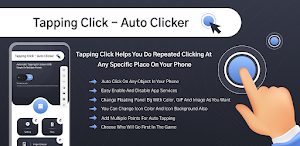
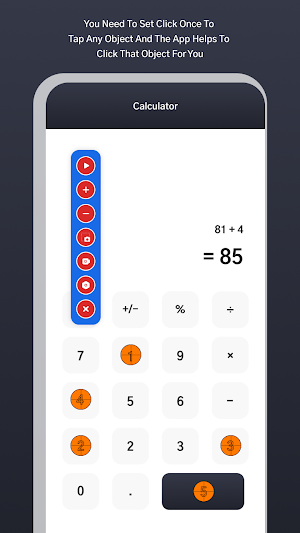
Tapping Click - Auto Clicker has features to support click anywhere and free your hands with multi target areas on your screen simultaneously that NOT require root access.
Now you no need to set click once to tap on any object to win games and getting infinite click on that object for you which helps in playing a game.
Easily you can do repeated clicking at any specific place on your phone with customizable floating panel style.
This app has features to support multiple clicking points and multiple swipes for your phone.
Auto Clicker helps with automatically tap screen on selected points which all customizable with background, background color and icon color for floating panel.
Easy to place points as you want and app do the work for you.
Features :-
👉 A customizable floating panel style to use as you want for auto clicker.
👉 Auto clicking for any object in your phone.
👉 No need to tap on one place repeatedly.
👉 Easy to add multiple points on screen for auto tapping.
👉 You can also set numerous swipes and click using floating panel on screen.
👉 A customizable floating panel settings which easy to fit for auto clicker.
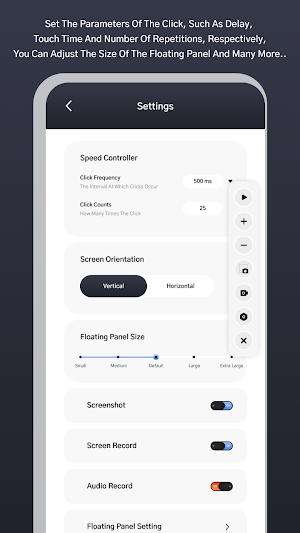
👉 Click frequency for time intervals.
👉 Floating panel set vertically or horizontally as you want.
👉 Set size for floating panel as user want.
👉 Set screenshot and screen recording button in floating panel.
👉 Change floating panel background with solid color, gradient color, background photo and GIFs as user want.
👉 Change floating panel icon color with background color and gradient color.
👉 Different floating panel pointer available for free to use.
👉 Change floating panel pointer color with solid color.
👉 Change floating panel pointer text color also.
👉 Show all captured screenshot and recordings at one place.
👉 Auto clicker for next and previous repeatedly clicks.
👉 You can do repeated clicks and swipes at any location with any time interval.
♂️ Permission Used In App :-
💡 App needs to use AccessibilityService API ✔️ ?
- This app enables Accessibility Service from user to enable core features such as simulating clicks, swipes, tap, pinch and perform other gestures on your screen and foreground service to capture screenshot over the apps.
- This app doesn't collect or share any private information through the interface of AccessibilityService API.
- App strictly maintain user privacy.
Now you no need to set click once to tap on any object to win games and getting infinite click on that object for you which helps in playing a game.
Easily you can do repeated clicking at any specific place on your phone with customizable floating panel style.
This app has features to support multiple clicking points and multiple swipes for your phone.
Auto Clicker helps with automatically tap screen on selected points which all customizable with background, background color and icon color for floating panel.
Easy to place points as you want and app do the work for you.
Features :-
👉 A customizable floating panel style to use as you want for auto clicker.
👉 Auto clicking for any object in your phone.
👉 No need to tap on one place repeatedly.
👉 Easy to add multiple points on screen for auto tapping.
👉 You can also set numerous swipes and click using floating panel on screen.
👉 A customizable floating panel settings which easy to fit for auto clicker.
👉 Click frequency for time intervals.
👉 Floating panel set vertically or horizontally as you want.
👉 Set size for floating panel as user want.
👉 Set screenshot and screen recording button in floating panel.
👉 Change floating panel background with solid color, gradient color, background photo and GIFs as user want.
👉 Change floating panel icon color with background color and gradient color.
👉 Different floating panel pointer available for free to use.
👉 Change floating panel pointer color with solid color.
👉 Change floating panel pointer text color also.
👉 Show all captured screenshot and recordings at one place.
👉 Auto clicker for next and previous repeatedly clicks.
👉 You can do repeated clicks and swipes at any location with any time interval.
♂️ Permission Used In App :-
💡 App needs to use AccessibilityService API ✔️ ?
- This app enables Accessibility Service from user to enable core features such as simulating clicks, swipes, tap, pinch and perform other gestures on your screen and foreground service to capture screenshot over the apps.
- This app doesn't collect or share any private information through the interface of AccessibilityService API.
- App strictly maintain user privacy.
What’s new
Version 1.2 · Updated September 2, 2026
Known bug fixed.
Alternatives to Tapping Click - Auto Clicker
Looking for apps like Tapping Click - Auto Clicker? Here are 6 similar Android apps on Google Play. The highest rated is Shake To Lock Unlock Screen (3.4/5), and all 6 are free to download.
-
Shake To Lock Unlock Screen 3.4
-
Mouse & Cursor For Big Phone
-
Bank Balance Checker & Enquiry
-
Battery Sound Alert Alarm
-
Dictionary - Photo Translator
-
Birds Call Sound And Ringtones
| App | Rating | Price | Installs | Last updated | Compare |
|---|---|---|---|---|---|
| Tapping Click - Auto Clicker | – | Free | 5,000+ | Sep 2, 2026 | |
| Shake To Lock Unlock Screen | 3.4 / 5 | Free | 1,000,000+ | Apr 15, 2026 | Compare |
| Mouse & Cursor For Big Phone | – | Free | 10,000+ | Jul 21, 2025 | Compare |
| Bank Balance Checker & Enquiry | – | Free | 5,000+ | Oct 9, 2025 | Compare |
| Battery Sound Alert Alarm | – | Free | 1,000+ | Sep 10, 2026 | Compare |
| Dictionary - Photo Translator | – | Free | 1,000+ | Sep 3, 2026 | Compare |
| Birds Call Sound And Ringtones | – | Free | 10+ | Nov 25, 2023 | Compare |