

Media24 Manager
Qoob Creation Business
Schedule campaigns, watch every screen live, and prove what actually played.
- Price
- Free
- No in-app purchases
- Updated
- Aug 17
- 2026 · v1.0.0
Screenshots
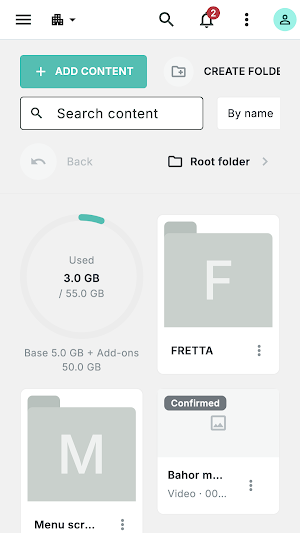
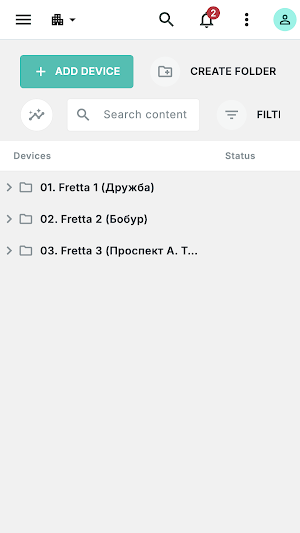
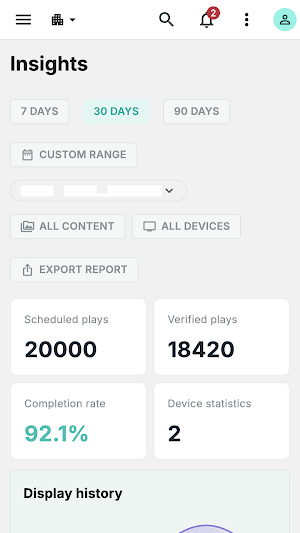
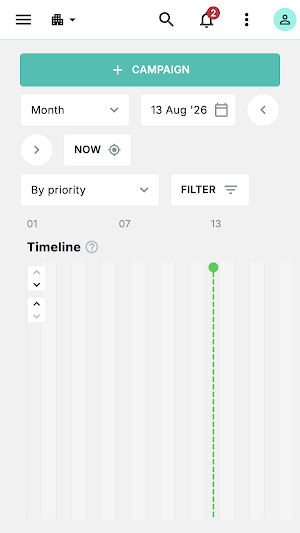


About Media24 Manager
Media24 Manager puts your entire digital signage network in your pocket.
Build a campaign, schedule it, send it to your screens, and confirm it really played — from anywhere.
Plan and publish
• Build campaigns from your own images and video
• Schedule by date, by day of the week, or by dedicated hours
• Order several campaigns into one rotation, with priority you control
• Target screens by folder, by tag, or by location on the map
• Review everything on a media-plan calendar before it goes live
Know your screens
• See which screens are online, what each one is playing, and when it last reported in
• Ask any screen for a live snapshot of what it is showing right now
• Restart playback, reload content, adjust volume or reboot — remotely, one screen or many
• Organise screens into folders and tag them however your business works
Proof it played
• Per-campaign and per-screen delivery reports
• Daily play history you can hand to a client
• Export to XLSX, download it or send it by email
Built for teams
• Several organisations under one sign-in, switched in a tap
• Roles and folder permissions, so people see only their own scope
• A readable event log of who changed what, and when
• Two-factor authentication and session management
Works the way your screens do
Screens keep playing from their local cache when the network drops, and pick your changes up as soon as it returns.
Uzbek, Russian and English throughout.
Media24 Manager requires a Media24 account. Screens run the separate Media24 Player app on Android displays.
Build a campaign, schedule it, send it to your screens, and confirm it really played — from anywhere.
Plan and publish
• Build campaigns from your own images and video
• Schedule by date, by day of the week, or by dedicated hours
• Order several campaigns into one rotation, with priority you control
• Target screens by folder, by tag, or by location on the map
• Review everything on a media-plan calendar before it goes live
Know your screens
• See which screens are online, what each one is playing, and when it last reported in
• Ask any screen for a live snapshot of what it is showing right now
• Restart playback, reload content, adjust volume or reboot — remotely, one screen or many
• Organise screens into folders and tag them however your business works
Proof it played
• Per-campaign and per-screen delivery reports
• Daily play history you can hand to a client
• Export to XLSX, download it or send it by email
Built for teams
• Several organisations under one sign-in, switched in a tap
• Roles and folder permissions, so people see only their own scope
• A readable event log of who changed what, and when
• Two-factor authentication and session management
Works the way your screens do
Screens keep playing from their local cache when the network drops, and pick your changes up as soon as it returns.
Uzbek, Russian and English throughout.
Media24 Manager requires a Media24 account. Screens run the separate Media24 Player app on Android displays.
What’s new
Version 1.0.0 · Updated August 17, 2026
New release
Alternatives to Media24 Manager
Looking for apps like Media24 Manager? Here are 4 similar Android apps on Google Play. The highest rated is Illumine - Childcare App (4.5/5), and all 4 are free to download.
-
Pipedrive – Sales CRM 4.0
-
Zoho Projects 4.1
-
Illumine - Childcare App 4.5
-
Stylework: Explore Workspaces
| App | Rating | Price | Installs | Last updated | Compare |
|---|---|---|---|---|---|
| Media24 Manager | – | Free | 0+ | Aug 17, 2026 | |
| Pipedrive – Sales CRM | 4.0 / 5 | Free | 500,000+ | Oct 23, 2026 | Compare |
| Zoho Projects | 4.1 / 5 | Free | 500,000+ | Oct 8, 2026 | Compare |
| Illumine - Childcare App | 4.5 / 5 | Free | 50,000+ | – | Compare |
| Stylework: Explore Workspaces | – | Free | 50,000+ | Aug 27, 2026 | Compare |
Compare Media24 Manager with the top alternatives: ratings, updates, ASO score and keyword gaps →