

OZ Player – HD Video Player
OZ Dev Video Players & Editors Contains ads
Powerful HD video player with PiP, subtitles, gestures & all formats support
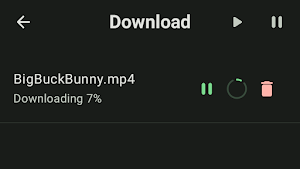
- Downloads
- 29.6K+
- on Google Play
- Price
- Free
- No in-app purchases
- Updated
- Feb 10
- 2026 · v1.2.0
Screenshots


About OZ Player – HD Video Player
🚀 Key Features
🔹 Advanced Video Player
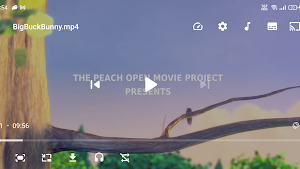
Smooth playback for all popular video formats (MP4, MKV, AVI, MOV, FLV…)
Hardware acceleration for better performance
🔹 Smart Gesture Controls
Swipe left to adjust brightness
Swipe right to control volume
Swipe horizontally to seek through the video
Pinch to zoom in / zoom out
🔹 Playback Controls
Playback speed control (slow / fast)
Resize video: Fit / Stretch / Crop / 100%
Volume boost
Lock controls to avoid accidental touches
🔹 Picture-in-Picture (PiP) Mode
Watch videos while using other apps
🔹 Background Play
Continue listening to audio when the app is minimized
🔹 Subtitle Support
External subtitles supported (long press on subtitle icon)
Compatible with common subtitle formats
🔹 Offline Video Management
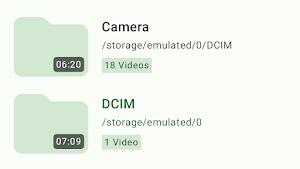
Powerful media selector
Browse videos by folder, file, or tree view
Easily organize your video library
🔹 Modern & Clean Design
User-friendly interface
Fresh green theme
Optimized for phones and tablets
✅ Why Choose OZ Player?
✔ Fast & lightweight
✔ No unnecessary complexity
✔ Gesture-based controls
✔ Designed for daily use
Download OZ Player – HD Video Player now and enjoy your videos like never before.
🔹 Advanced Video Player
Smooth playback for all popular video formats (MP4, MKV, AVI, MOV, FLV…)
Hardware acceleration for better performance
🔹 Smart Gesture Controls
Swipe left to adjust brightness
Swipe right to control volume
Swipe horizontally to seek through the video
Pinch to zoom in / zoom out
🔹 Playback Controls
Playback speed control (slow / fast)
Resize video: Fit / Stretch / Crop / 100%
Volume boost
Lock controls to avoid accidental touches
🔹 Picture-in-Picture (PiP) Mode
Watch videos while using other apps
🔹 Background Play
Continue listening to audio when the app is minimized
🔹 Subtitle Support
External subtitles supported (long press on subtitle icon)
Compatible with common subtitle formats
🔹 Offline Video Management
Powerful media selector
Browse videos by folder, file, or tree view
Easily organize your video library
🔹 Modern & Clean Design
User-friendly interface
Fresh green theme
Optimized for phones and tablets
✅ Why Choose OZ Player?
✔ Fast & lightweight
✔ No unnecessary complexity
✔ Gesture-based controls
✔ Designed for daily use
Download OZ Player – HD Video Player now and enjoy your videos like never before.
What’s new
Version 1.2.0 · Updated February 10, 2026
fix minor bug on android tv
Alternatives to OZ Player – HD Video Player
Looking for apps like OZ Player – HD Video Player? Here are 4 similar Android apps on Google Play. The highest rated is SynkedUP (4.9/5), and 3 of the 4 are free to download.



| App | Rating | Price | Installs | Last updated | Compare |
|---|---|---|---|---|---|
| OZ Player – HD Video Player | – | Free | 10,000+ | Feb 10, 2026 | |
| Loomi AI: Interior Design | – | – | – | Jan 8, 2026 | Compare |
| Owner.com | 4.7 / 5 | Free | 5,000+ | Oct 22, 2026 | Compare |
| Socie | 4.8 / 5 | Free | 50,000+ | Oct 19, 2026 | Compare |
| SynkedUP | 4.9 / 5 | Free | 1,000+ | Oct 12, 2026 | Compare |