

Sullivan Lite(blind,visually impaired,low vision)
TUAT Corp. Tools Contains ads
Discover the world with Sullivan Lite. Let it become your eyes to seeing it.
- Downloads
- 100+
- on Google Play
- Price
- Free
- No in-app purchases
- Updated
- May 7
- 2021 · v1.0.0
Screenshots


About Sullivan Lite(blind,visually impaired,low vision)
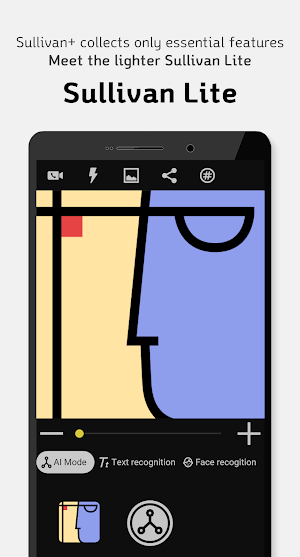
Sullivan Lite is a visual-aid app provided by TUAT Corp. to enhance the accessibility of the visually impaired and low vision users and informs users who need visual aids about information perceived via the smartphone camera.
Sullivan Lite provides a lighter and more convenient use by collecting the most used functions among the various functions provided in the existing Sullivan Plus app. It is implemented with the basic camera UI/UX familiar to Android users, so it can be used easily, and as it is light, it can be used quickly without delay even on low-specification devices. In addition, Sullivan Lite has been supported for those who have wanted to use Sullivan Plus on a large screen such as a tablet, so you can enjoy a convenient life with Sullivan Lite on a wider variety of devices.
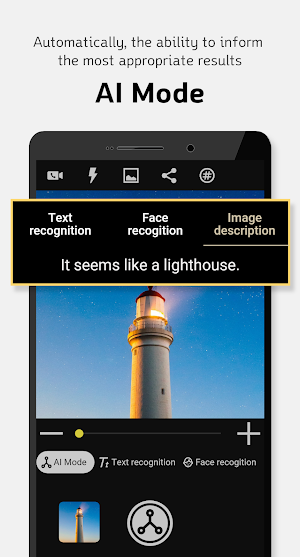
■ With only one shot, you can get the help that suits the situation.
AI mode-AI automatically finds the best results that fit the taken photos.
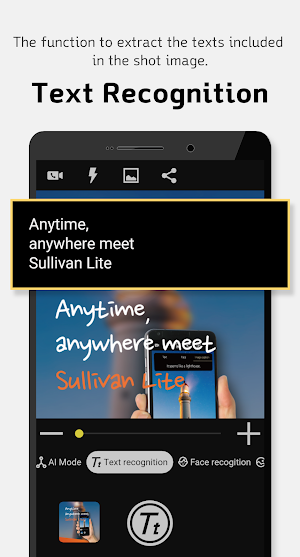
■ Did you experience difficulty checking the contents of various documents such as mail, magazines, and newspapers?
Text Recognition-Finds a text and tells you by sound. Point the camera on the place you want text recognition.
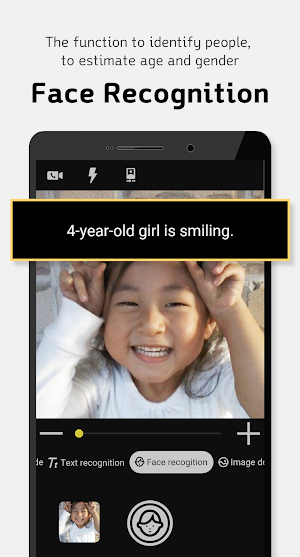
■ When you meet a new person, it tells you which person he or she is.
Face Recognition- It recognizes a person photographed with a camera and tells the person's age and gender.
■ Have you ever wondered what your surroundings look like?
Image Description - Identifies objects around you and creates a sentence that describes the identified scene.
■ It also helps those who are uncomfortable due to low vision, not total visual impairment.
Magnifying glass function- Using the zoom function of the camera, it enlarges or reduces an object or text or inverts the color.
[Main functions]
1. AI mode
2. Text recognition
3. Face recognition
4. Image description
5. Magnifier
[Access Rights Guide]
Camera - Use camera API to control the camera and take photos.
Storage - Temporarily save the captured image and delete it after the image analysis.
Phone Call - Make a video call to the phone number selected in the address book.
※ Sullivan Lite can be used only on Android 5.0 or higher.
Sullivan Lite provides a lighter and more convenient use by collecting the most used functions among the various functions provided in the existing Sullivan Plus app. It is implemented with the basic camera UI/UX familiar to Android users, so it can be used easily, and as it is light, it can be used quickly without delay even on low-specification devices. In addition, Sullivan Lite has been supported for those who have wanted to use Sullivan Plus on a large screen such as a tablet, so you can enjoy a convenient life with Sullivan Lite on a wider variety of devices.
■ With only one shot, you can get the help that suits the situation.
AI mode-AI automatically finds the best results that fit the taken photos.
■ Did you experience difficulty checking the contents of various documents such as mail, magazines, and newspapers?
Text Recognition-Finds a text and tells you by sound. Point the camera on the place you want text recognition.
■ When you meet a new person, it tells you which person he or she is.
Face Recognition- It recognizes a person photographed with a camera and tells the person's age and gender.
■ Have you ever wondered what your surroundings look like?
Image Description - Identifies objects around you and creates a sentence that describes the identified scene.
■ It also helps those who are uncomfortable due to low vision, not total visual impairment.
Magnifying glass function- Using the zoom function of the camera, it enlarges or reduces an object or text or inverts the color.
[Main functions]
1. AI mode
2. Text recognition
3. Face recognition
4. Image description
5. Magnifier
[Access Rights Guide]
Camera - Use camera API to control the camera and take photos.
Storage - Temporarily save the captured image and delete it after the image analysis.
Phone Call - Make a video call to the phone number selected in the address book.
※ Sullivan Lite can be used only on Android 5.0 or higher.
What’s new
Version 1.0.0 · Updated May 7, 2021
Sullivan Lite App released
Alternatives to Sullivan Lite(blind,visually impaired,low vision)
Looking for apps like Sullivan Lite(blind,visually impaired,low vision)? Here are 4 similar Android apps on Google Play. The highest rated is Sullivan+ (blind, low vision) (4.4/5), and all 4 are free to download.
-
Supersense - AI for Blind 4.0
-
VisitReport
-
EnVision: Daily Visualization 4.1
-
Sullivan+ (blind, low vision) 4.4
| App | Rating | Price | Installs | Last updated | Compare |
|---|---|---|---|---|---|
| Sullivan Lite(blind,visually impaired,low vision) | – | Free | 100+ | May 7, 2021 | |
| Supersense - AI for Blind | 4.0 / 5 | Free | 10,000+ | Dec 1, 2020 | Compare |
| VisitReport | – | Free | 10,000+ | Oct 9, 2026 | Compare |
| EnVision: Daily Visualization | 4.1 / 5 | Free | 10,000+ | Sep 9, 2024 | Compare |
| Sullivan+ (blind, low vision) | 4.4 / 5 | Free | 100,000+ | Aug 5, 2026 | Compare |