
Dunwick
Personalization
Analog watch face with chronograph layout, 6 complications, and 70+ colors
- Downloads
- 72+
- on Google Play
- Price
- $2.99
- No in-app purchases
- Updated
- Jul 26
- 2026
Screenshots


About Dunwick
Dunwick is the Wear OS analog watch face, with additional digital clock to make it hybrid.
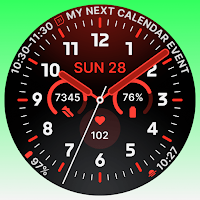
Dunwick's layout takes its cue from chronograph architecture. Full numerals ring the dial, a fine minute track runs the outer edge, and two arc sub-dials flank the center with a third circular register sitting below. Your next calendar event follows the curve of the top bezel in long text. The result reads as one composition rather than a dial with widgets dropped on top of it.
Six complication slots, all fully customizable. Three circular slots support the widest range of complication types available: ranged value, goal progress, weighted elements, short text, small image, and monochromatic image, so progress arcs, icons and plain numbers all render the way they were meant to. Two short-text slots sit at the lower periphery, and a long-text arc runs along the top. Assign steps, heart rate, battery, weather, an alarm, or anything else your watch supports. A single toggle clears every slot for AoD when you want the dial bare.
The center switches between two modes: date on its own, or date with digital time below it. Analog and digital in the same face.
Two background glow colors sit behind the dial, top and bottom, each on its own picker. Tune them for a soft gradient or switch them off entirely for a flat black dial.
Customization runs deep. Thirteen hour and minute hand styles, nine second hand designs, and nine independent color pickers with 70+ shades each, covering primary elements, hour marks, complication text, complication accents, hands, second hand, hand accents, and both background glows. Night mode shifts the entire dial to a red tint and restores your scheme when you switch it off. Six falvor presets give you a starting point.
When your wrist drops, Dunwick transitions into Always-on Display with an animated fade. Complications step aside, the dial settles, and what's left stays clean and unobtrusive. A flick of the wrist brings the full layout back instantly. The animation can be switched off if you prefer, and an AoD dim option keeps things comfortable in the dark.
Optional Time Flies companion app is also available to help you install your watch face or keep track of new releases.
Features:
Chronograph-style dial with full numerals and a fine minute track
Six customizable complication slots
Three circular slots with full complication type support: ranged value, goal progress, weighted elements, short text, small image, monochromatic image
Long-text arc for your next calendar event, plus two short-text slots
Hybrid center display: date, or date with digital time
Two background glow colors, top and bottom, switchable off
13 hand styles and 9 second hand styles
Nine independent color pickers, 70+ shades each
Night mode (red tint)
Hide-complications toggle
Animated Always-on Display transition, on or off
AoD dim on/off
Six presets
Built with WFF4 for Wear OS 5.1 and later
Dunwick's layout takes its cue from chronograph architecture. Full numerals ring the dial, a fine minute track runs the outer edge, and two arc sub-dials flank the center with a third circular register sitting below. Your next calendar event follows the curve of the top bezel in long text. The result reads as one composition rather than a dial with widgets dropped on top of it.
Six complication slots, all fully customizable. Three circular slots support the widest range of complication types available: ranged value, goal progress, weighted elements, short text, small image, and monochromatic image, so progress arcs, icons and plain numbers all render the way they were meant to. Two short-text slots sit at the lower periphery, and a long-text arc runs along the top. Assign steps, heart rate, battery, weather, an alarm, or anything else your watch supports. A single toggle clears every slot for AoD when you want the dial bare.
The center switches between two modes: date on its own, or date with digital time below it. Analog and digital in the same face.
Two background glow colors sit behind the dial, top and bottom, each on its own picker. Tune them for a soft gradient or switch them off entirely for a flat black dial.
Customization runs deep. Thirteen hour and minute hand styles, nine second hand designs, and nine independent color pickers with 70+ shades each, covering primary elements, hour marks, complication text, complication accents, hands, second hand, hand accents, and both background glows. Night mode shifts the entire dial to a red tint and restores your scheme when you switch it off. Six falvor presets give you a starting point.
When your wrist drops, Dunwick transitions into Always-on Display with an animated fade. Complications step aside, the dial settles, and what's left stays clean and unobtrusive. A flick of the wrist brings the full layout back instantly. The animation can be switched off if you prefer, and an AoD dim option keeps things comfortable in the dark.
Optional Time Flies companion app is also available to help you install your watch face or keep track of new releases.
Features:
Chronograph-style dial with full numerals and a fine minute track
Six customizable complication slots
Three circular slots with full complication type support: ranged value, goal progress, weighted elements, short text, small image, monochromatic image
Long-text arc for your next calendar event, plus two short-text slots
Hybrid center display: date, or date with digital time
Two background glow colors, top and bottom, switchable off
13 hand styles and 9 second hand styles
Nine independent color pickers, 70+ shades each
Night mode (red tint)
Hide-complications toggle
Animated Always-on Display transition, on or off
AoD dim on/off
Six presets
Built with WFF4 for Wear OS 5.1 and later
What’s new
Updated July 26, 2026
Fixed an issue where all progress complications displayed the same value instead of their own data.
User reviews

Love it! Thank you so much for a new face with progress circles :)
Alternatives to Dunwick
Looking for apps like Dunwick? Here are 6 similar Android apps on Google Play.
-
MJ171 Elegant Executive Analog
-
Pixel Watch Face
-
Orren Analog Watch Face
-
Avanta Elegant Watch Face
-
Key WF29 Analogue Watch Face
-
Key WF26 Hybrid Watch Face
| App | Rating | Price | Installs | Last updated | Compare |
|---|---|---|---|---|---|
| Dunwick | – | $2.99 | 50+ | Jul 26, 2026 | |
| MJ171 Elegant Executive Analog | – | 0.99 USD | 500+ | Aug 25, 2026 | Compare |
| Pixel Watch Face | – | 1.69 USD | 10+ | Aug 28, 2026 | Compare |
| Orren Analog Watch Face | – | 2.39 USD | 500+ | – | Compare |
| Avanta Elegant Watch Face | – | 1.99 USD | 1,000+ | Jul 22, 2026 | Compare |
| Key WF29 Analogue Watch Face | – | 0.49 USD | 500+ | Aug 13, 2026 | Compare |
| Key WF26 Hybrid Watch Face | – | 0.49 USD | 500+ | Aug 13, 2026 | Compare |
Compare Dunwick with the top alternatives: ratings, updates, ASO score and keyword gaps →
Similar apps on Google Play
- MJ171 Elegant Executive Analog
- Pixel Watch Face
- Orren Analog Watch Face
- Avanta Elegant Watch Face
- Key WF29 Analogue Watch Face
- Key WF26 Hybrid Watch Face
- Engraved Time Watch Face
- Analog Watch Face
- Classic D22 Watch Face
- WES24 - Nine Eleven Turbo Face
- Firefighter
- Key027 Hybrid Watch Face
- ApeX WatchFace
- Elegant Style Watch Face
- Karvel Watch Face
- Renn Digital Watch Face
- Classic Analog Watch Face B&R
- Sport RB70 Watch Face
- Elegant - Analog I watch face
- CLA027 Sporty Hybrid
- Crimson Pulse Watch Face
- Regal Time Watch Face
- SuperNova Watch Face
- Renn Analog Watch Face
- IWF CC gA | ISACWATCH