
Privacy Screen
Flash Software Solution Tools Contains ads
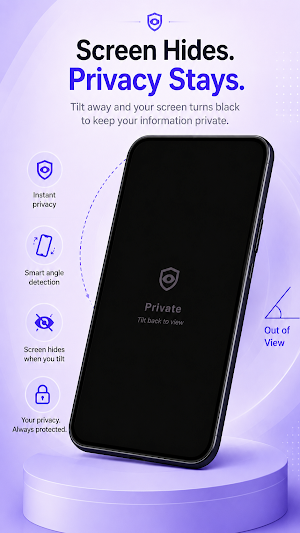
Tilt your phone away and the screen instantly goes dark. Privacy, no spying.
- Downloads
- 6.8K+
- on Google Play
- Price
- Free
- No in-app purchases
- Updated
- Aug 1
- 2026 · v1.4
Screenshots

About Privacy Screen
Keep your screen yours.
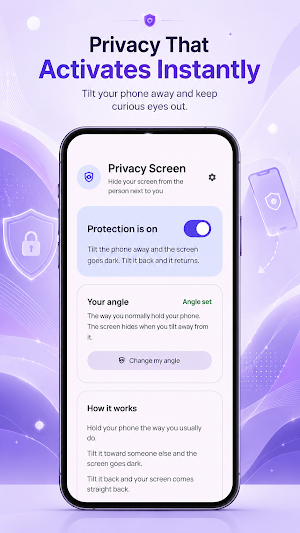
Someone glances over. You tilt your phone away — and the screen instantly fades to black. Tilt it back, and everything returns. That's Privacy Screen: a fast, physical way to hide what you're reading the moment you need to.
No filter to stick on your phone. No subscription. No account. Nothing to press in the moment — the tilt is the switch.
HOW IT WORKS
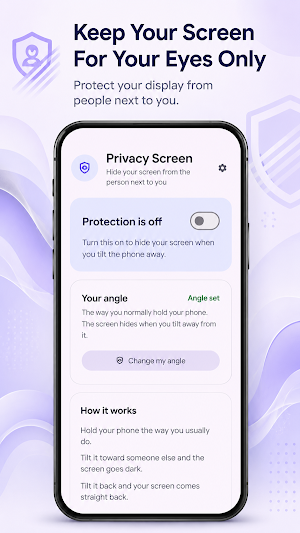
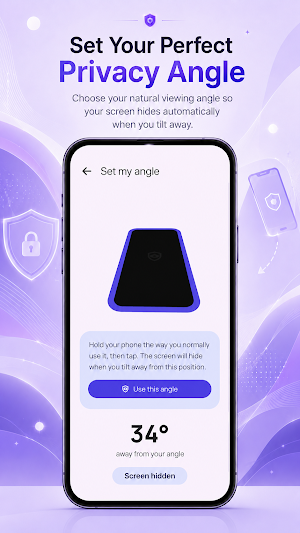
1. Set your angle — hold your phone the way you normally do and calibrate once. Privacy Screen never guesses.
2. Turn on protection whenever you want it.
3. Tilt to hide, tilt back to view. Past your chosen angle, a near-black cover fades in. Tilt back and it fades away.
WHY YOU'LL LIKE IT
• Instant and automatic — no buttons to press when it matters. The tilt does it.
• You're in control — set your exact holding angle and adjust sensitivity, from a big deliberate tilt to the slightest movement.
• Smooth, not jarring — the cover fades gently and stays steady, so it won't flicker.
• Light and dark themes — System, Light, or Dark to match your phone.
• Easy on battery — it reads one motion sensor and nothing else.
BUILT FOR PRIVACY — REALLY
Privacy Screen runs entirely on your device. It cannot see, read, store, or send anything on your screen. It has no internet permission, collects no data, and shows no ads. All it does is darken your own display when you tilt away.
PERFECT FOR
• Reading messages, email, or banking apps in public
• Crowded trains, buses, and commutes
• Open-plan offices and shared desks
• Anywhere a curious glance is one seat away
PERMISSIONS
• Display over other apps — lets the privacy cover appear over whatever you're using. Without it, the screen can't be hidden.
• Notification — shows a small ongoing reminder while protection is active, so you always know it's on.
Set your angle once, switch it on, and stop wondering who's looking. Your screen, for your eyes.
Someone glances over. You tilt your phone away — and the screen instantly fades to black. Tilt it back, and everything returns. That's Privacy Screen: a fast, physical way to hide what you're reading the moment you need to.
No filter to stick on your phone. No subscription. No account. Nothing to press in the moment — the tilt is the switch.
HOW IT WORKS
1. Set your angle — hold your phone the way you normally do and calibrate once. Privacy Screen never guesses.
2. Turn on protection whenever you want it.
3. Tilt to hide, tilt back to view. Past your chosen angle, a near-black cover fades in. Tilt back and it fades away.
WHY YOU'LL LIKE IT
• Instant and automatic — no buttons to press when it matters. The tilt does it.
• You're in control — set your exact holding angle and adjust sensitivity, from a big deliberate tilt to the slightest movement.
• Smooth, not jarring — the cover fades gently and stays steady, so it won't flicker.
• Light and dark themes — System, Light, or Dark to match your phone.
• Easy on battery — it reads one motion sensor and nothing else.
BUILT FOR PRIVACY — REALLY
Privacy Screen runs entirely on your device. It cannot see, read, store, or send anything on your screen. It has no internet permission, collects no data, and shows no ads. All it does is darken your own display when you tilt away.
PERFECT FOR
• Reading messages, email, or banking apps in public
• Crowded trains, buses, and commutes
• Open-plan offices and shared desks
• Anywhere a curious glance is one seat away
PERMISSIONS
• Display over other apps — lets the privacy cover appear over whatever you're using. Without it, the screen can't be hidden.
• Notification — shows a small ongoing reminder while protection is active, so you always know it's on.
Set your angle once, switch it on, and stop wondering who's looking. Your screen, for your eyes.
What’s new
Version 1.4 · Updated August 1, 2026
Bug fixes
Alternatives to Privacy Screen
Looking for apps like Privacy Screen? Here are 6 similar Android apps on Google Play. The highest rated is Avigilon Unity Video (4.6/5), and all 6 are free to download.
-
Clony: AI Voice & Face Cloning 4.2
-
Sage AI - AI Coach & Assistant 2.5
-
Rogervoice Phone Call Captions 4.5
-
Glissandoo
-
Ride with GPS: Bike Navigation 4.6
-
Avigilon Unity Video 4.6
| App | Rating | Price | Installs | Last updated | Compare |
|---|---|---|---|---|---|
| Privacy Screen | – | Free | 5,000+ | Aug 1, 2026 | |
| Clony: AI Voice & Face Cloning | 4.2 / 5 | Free | 1,000,000+ | Jul 29, 2026 | Compare |
| Sage AI - AI Coach & Assistant | 2.5 / 5 | Free | 100,000+ | Jun 29, 2026 | Compare |
| Rogervoice Phone Call Captions | 4.5 / 5 | Free | 100,000+ | Oct 23, 2026 | Compare |
| Glissandoo | – | Free | 50,000+ | Sep 28, 2026 | Compare |
| Ride with GPS: Bike Navigation | 4.6 / 5 | Free | 1,000,000+ | Oct 19, 2026 | Compare |
| Avigilon Unity Video | 4.6 / 5 | Free | 10,000+ | Apr 28, 2026 | Compare |
Compare Privacy Screen with the top alternatives: ratings, updates, ASO score and keyword gaps →
Similar apps on Google Play
- Clony: AI Voice & Face Cloning
- Sage AI - AI Coach & Assistant
- Rogervoice Phone Call Captions
- Glissandoo
- Ride with GPS: Bike Navigation
- Avigilon Unity Video
- Trails Offroad: Offline Maps
- BFF: Make Friends & Meet Up
- Radiate
- My Allied Portal
- Expand: Beyond Meditation
- Summons Partner+
- nomadtable: travel friends
- SPYPOINT