
Chromis: Ultimate Photo Editor
IDCT Bartosz Pacho%C5%82ek Photography In-app purchases Contains ads
Remove backgrounds with on-device AI. Layers, filters, collages. Private.
- Downloads
- 217+
- on Google Play
- Price
- Free
- In-app purchases
- Updated
- Aug 5
- 2026 · v1.3.0
Screenshots


About Chromis: Ultimate Photo Editor
AI THAT RUNS ON YOUR PHONE
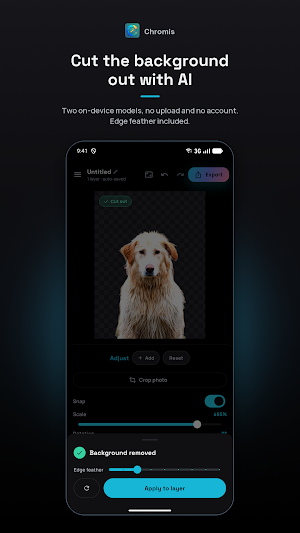
• One tap removes the background and leaves your subject on transparency. Pick between two models: Android's built in segmentation, or an open source U2-Net inside the app.
• Tap an object you want gone. Fill in rebuilds the background behind it, so removing someone leaves scenery rather than a hole. Erase cuts it to transparency instead.
• Refine it: auto clean up stray specks, soften the cut edge, or fix it by hand with an erase and restore brush.
• Every model ships inside the app, so all of this works offline.
LAYERS
• Stack photos, captions and speech bubbles on one canvas.
• Drag to move, pinch to scale and rotate.
• Snapping lines a layer up with the edges, centres and size of the other layers and of the canvas, with a guide on what it caught.
• Scale, Rotation, Horizontal, Vertical and Opacity sliders drive any layer, so one too small to grab or buried under another is never stranded.
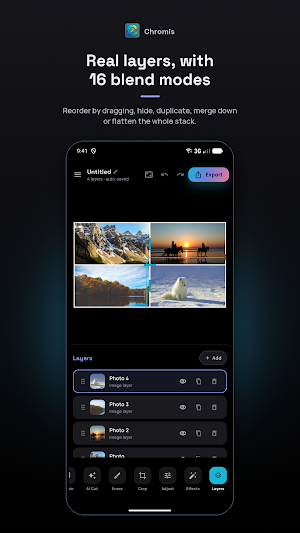
• Reorder by dragging, hide, duplicate, rename or delete from the Layers panel.
• 16 blend modes, from Multiply to Luminosity.
• Drop shadow and outline on any layer. On a cut out subject both follow its silhouette, not a rectangle.
• Merge two layers, or flatten the whole stack into one photo.
COLOUR AND LIGHT
• 14 one tap looks: Vivid, Punch, Chrome, Warm, Cool, Sunset, Dawn, Dusk, Fade, Matte, Retro, Sepia, Mono and Noir, each with a strength slider.
• Brightness, contrast and saturation from 0 to 200 percent, and hue across the full circle.
• HDR that lifts shadows and brings out local detail.
• Vignette with its own size, softness and colour.
• Nothing is baked in. Your original file is never modified.
TEXT AND COMIC BUBBLES
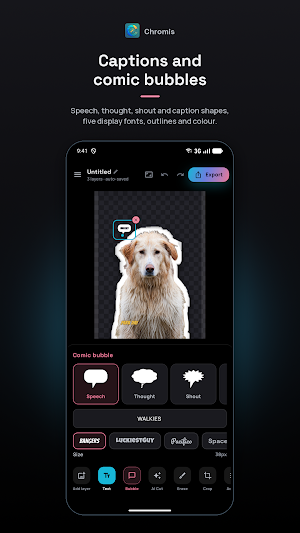
• Captions in five display fonts, or import your own .ttf or .otf file.
• Set size and colour, and outline the text with its own thickness and colour.
• Five bubble shapes: Speech, Thought, Shout, Caption and Whisper. Drag the tail to aim it at whoever is talking.
PHOTO GRID COLLAGES
• 2 to 5 photos across 18 layouts.
• Drag a divider and it trades space between exactly those two cells.
• Border up to 80 px, rounded corners up to 60 px, nine frame colours.
• Every tool works inside a cell, so you can cut out a subject in one collage photo.
• Shuffle the photos, or drag one onto another to swap them.
PROJECTS
• Bring photos in from your gallery, your camera, or the clipboard.
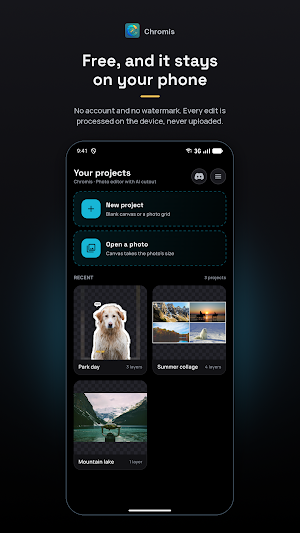
• Every edit saves itself. Carry on later.
• Home keeps your recent projects with live previews. Search, rename, duplicate or delete them.
CANVAS AND EXPORT
• Start from a photo at its own size, from a preset such as square, portrait or story, or a size you type.
• Crop freehand, or to 1:1, 4:5, 9:16, 16:9, 3:2 or 2:3.
• Export PNG, JPG or WebP at 100, 75, 50 or 25 percent of the canvas.
• PNG and WebP keep transparency. Save to your gallery or send straight to another app.
• Undo and redo anything.
LIGHT AND DARK
Both follow your phone, or pick one in Settings. Dark is pure black for AMOLED; light is pure white and readable outdoors.
FREE, WITH ONE OPTIONAL PURCHASE
Every tool is free. Ads pay for it: a banner on the home screen, a short rewarded ad before an export, and one per editing session for the AI tools. No full screen ad ever interrupts you.
One optional purchase removes every ad for good. It unlocks nothing else, because nothing else is locked.
PRIVACY
• No account, no sign in, no camera or location access. Photos arrive through the Android photo picker, which hands over only the one you chose.
• Internet is used for ads and purchases. Saving to your gallery asks for storage only on Android 9 and older; newer versions need no permission.
• Your photos are never uploaded to be edited. Every AI tool runs on device.
Runs on Android 8.0 and newer, on phones and tablets, in portrait and landscape.
What’s new
Version 1.3.0 · Updated August 5, 2026
• Remove an object and the background is rebuilt behind it, on your phone. Pick Fill in or Erase before you tap. • Snap: layers line up with each other's edges, centres and size, and with the canvas. Toggle it in Adjust. • Scale, Rotation, Horizontal and Vertical sliders now drive any layer, so a caption too small to grab is never stranded. • Dark is pure black now, so an AMOLED pixel stays off; light is pure white and readable outdoors.
User reviews

I really appreciate this app, because it's the best photo editing app I've ever found.Thus,it doesn't have any subscription in any feature you need or want to use.One thing I noticed about this app is that when you have to use a feature(not all of the features) you'll just gonna watch an advertisement then you will ...
Alternatives to Chromis: Ultimate Photo Editor
Looking for apps like Chromis: Ultimate Photo Editor? Here are 3 similar Android apps on Google Play. All of them are free to download.


| App | Rating | Price | Installs | Last updated | Compare |
|---|---|---|---|---|---|
| Chromis: Ultimate Photo Editor | – | Free | 100+ | Aug 5, 2026 | |
| Whaaack! | – | Free | 10+ | Sep 14, 2026 | Compare |
| Sticker Maker | – | Free | 500+ | Jul 20, 2026 | Compare |
| Wingman AI | – | Free | 500+ | Mar 4, 2026 | Compare |