

Output Messenger
Srimax Software System Business
Private and Secure Instant Messenger for Team
- Rating
- 3.3
- 606 ratings
- Downloads
- 105K+
- on Google Play
- Price
- Free
- No in-app purchases
- Updated
- Sep 29
- 2026 · v1.0.127
Screenshots
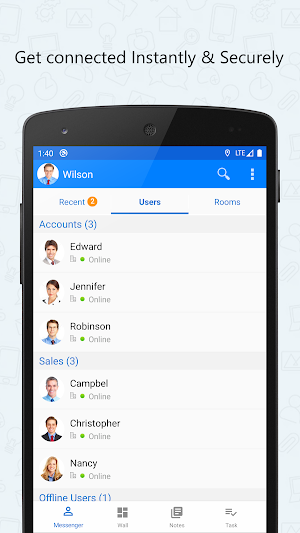
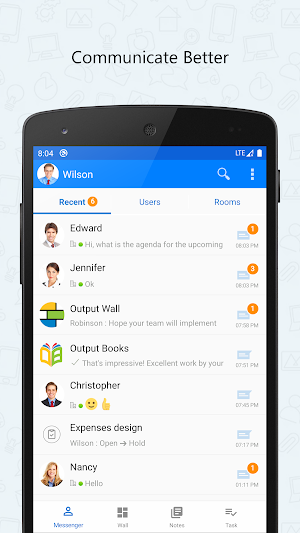
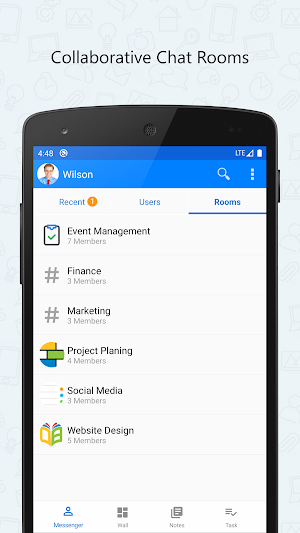
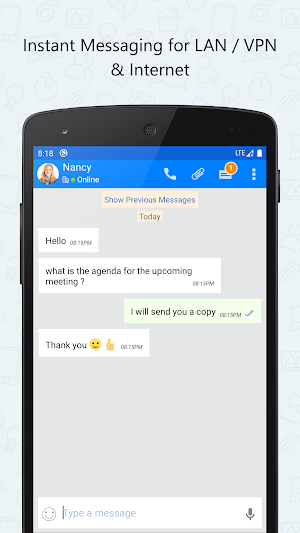


About Output Messenger
Output Messenger is designed to use as a private secure messenger for your Office. This intranet messenger improves internal communications, business productivity and relationships with colleagues inside Office.
IMPORTANT:
This app requires a Server application to be installed and running in your server.
The Public IP Address or Domain name of the server running host should be provided in this app to connect with server.
For more details on purchasing & installing Output Messenger:
http://www.outputmessenger.com/
This Android Mobile app extends the power of Output LAN Messenger to your Smartphone & Tablet bringing Instant Messaging, Group Chat, File Transfer and several other features. Software features are tailor made to improve collaboration between teams to work together efficiently within office campus's and remote sites. The On-premises server and high level encryption technology ensures privacy and confidentiality for internal communication in the small, medium and corporate environments, hospitals with HIPAA regulations, and in the government and banking sectors.
Android App & Desktop Features:
• One to One Private Text Chat
• Group Chat, Chat Room, Chat Group
• Send Files
• Send Voice Message
• Take Photo, Video and Send
• Scribble Pad
• Send Buzz
• OTR – Off the Record Messaging
• Read Notification
• Online Status
Additional Features for Desktop:
• Desktop Sharing Screen Sharing
• Voice & Video Calls & Conferencing
• Remote Desktop Screen Sharing
• Announcements, Internal Mailing, Sticky Notes, Remainders
Why this LAN Messenger?
• Easy to Use
• Quick Installation by anyone within 1 minute • Works in LAN, WAN, Wifi, VPN, Multiple Sub Networks, Terminal Service and Internet • Works in Windows, Mac, Linux, Browser, Free App for iOS and Android Phones & Tablets • Customizable Chat Server & Client Settings
IMPORTANT:
This app requires a Server application to be installed and running in your server.
The Public IP Address or Domain name of the server running host should be provided in this app to connect with server.
For more details on purchasing & installing Output Messenger:
http://www.outputmessenger.com/
This Android Mobile app extends the power of Output LAN Messenger to your Smartphone & Tablet bringing Instant Messaging, Group Chat, File Transfer and several other features. Software features are tailor made to improve collaboration between teams to work together efficiently within office campus's and remote sites. The On-premises server and high level encryption technology ensures privacy and confidentiality for internal communication in the small, medium and corporate environments, hospitals with HIPAA regulations, and in the government and banking sectors.
Android App & Desktop Features:
• One to One Private Text Chat
• Group Chat, Chat Room, Chat Group
• Send Files
• Send Voice Message
• Take Photo, Video and Send
• Scribble Pad
• Send Buzz
• OTR – Off the Record Messaging
• Read Notification
• Online Status
Additional Features for Desktop:
• Desktop Sharing Screen Sharing
• Voice & Video Calls & Conferencing
• Remote Desktop Screen Sharing
• Announcements, Internal Mailing, Sticky Notes, Remainders
Why this LAN Messenger?
• Easy to Use
• Quick Installation by anyone within 1 minute • Works in LAN, WAN, Wifi, VPN, Multiple Sub Networks, Terminal Service and Internet • Works in Windows, Mac, Linux, Browser, Free App for iOS and Android Phones & Tablets • Customizable Chat Server & Client Settings
What’s new
Version 1.0.127 · Updated September 29, 2026
Redesigned all major sections. Bug & crash fixes.
User reviews
Helps to Easily communicate with your team members.i like this app latest swipe and reply feature

👍

good

Excellent

Just love this app and it's features

Good
Frequently asked questions
What is Output Messenger?
Output Messenger is a private secure messenger designed for office use, improving internal communications, productivity, and relationships with colleagues.
What is the requirement to use Output Messenger?
Output Messenger requires a Server application to be installed and running on your server. You need to provide the Public IP Address or Domain name of the server hosting the application for connectivity.
Where can I find more details about purchasing and installing Output Messenger?
You can find more details about purchasing and installing Output Messenger at http://www.outputmessenger.com/.
What features does the Android Mobile app of Output Messenger offer?
The Android Mobile app extends the features of Output LAN Messenger to your Smartphone & Tablet. It includes Instant Messaging, Group Chat, File Transfer, and more.
What are the additional features available for the Desktop version of Output Messenger?
The Desktop version offers features like Desktop Sharing, Screen Sharing, Voice & Video Calls & Conferencing, Remote Desktop Screen Sharing, Announcements, Internal Mailing, Sticky Notes, and Reminders.
Why should I choose Output Messenger over other LAN messengers?
Output Messenger is easy to use and can be quickly installed. It works in LAN, WAN, Wifi, VPN, Multiple Sub Networks, Terminal Service, and Internet. It is compatible with Windows, Mac, Linux, Browser, iOS, and Android devices. The chat server and client settings are also customizable.
Alternatives to Output Messenger
Looking for apps like Output Messenger? Here are 6 similar Android apps on Google Play. The highest rated is twinme+ - secure messenger (4.7/5), and 5 of the 6 are free to download.
-
Messenger SMS - Text messages 4.2
-
Dive SMS: Message & Messenger 4.5
-
Mixin Crypto Wallet Messenger 4.7
-
twinme+ - secure messenger 4.7
-
Chomp SMS 4.3
-
Textra SMS 4.4
| App | Rating | Price | Installs | Last updated | Compare |
|---|---|---|---|---|---|
| Output Messenger | 3.3 / 5 | Free | 100,000+ | Sep 29, 2026 | |
| Messenger SMS - Text messages | 4.2 / 5 | Free | 5,000,000+ | Oct 5, 2026 | Compare |
| Dive SMS: Message & Messenger | 4.5 / 5 | Free | 100,000+ | Jan 7, 2026 | Compare |
| Mixin Crypto Wallet Messenger | 4.7 / 5 | Free | 100,000+ | Oct 25, 2026 | Compare |
| twinme+ - secure messenger | 4.7 / 5 | 4.99 USD | 1,000+ | Oct 5, 2026 | Compare |
| Chomp SMS | 4.3 / 5 | Free | 10,000,000+ | Sep 24, 2026 | Compare |
| Textra SMS | 4.4 / 5 | Free | 10,000,000+ | Oct 22, 2026 | Compare |
Compare Output Messenger with the top alternatives: ratings, updates, ASO score and keyword gaps →