

Mindless: Mindful Screen Time
Mindless LLC Productivity In-app purchases
AI Journal, Focus & Wellness
- Downloads
- 110+
- on Google Play
- Price
- Free
- In-app purchases
- Updated
- Aug 5
- 2026 · v1.0.0
Screenshots


About Mindless: Mindful Screen Time
You don't have a phone problem. You have a scrolling problem.
Mindless helps you understand why you reach for your phone - and actually do something about it.
-- THE PAUSE THAT CHANGES EVERYTHING --
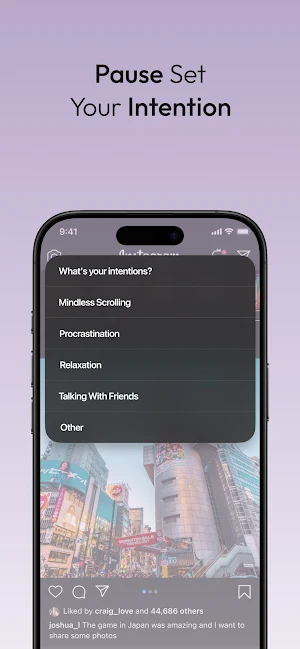
Every time you open an app you want to use less, Mindless asks one question: what's your intention?
That single pause breaks the autopilot. Knowing your screen time is 4 hours won't change your behaviour. Understanding the emotion behind it will.
-- AI JOURNALING --
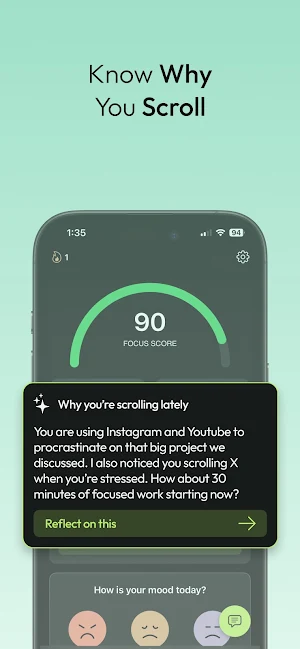
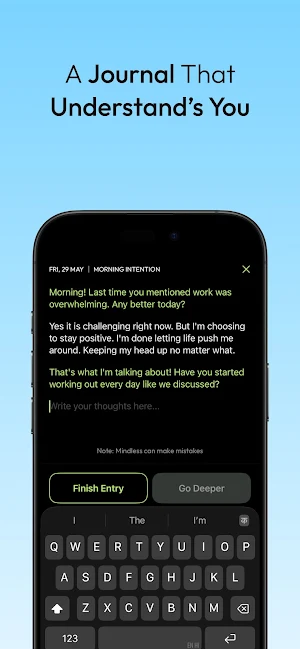
Write about your day. The AI doesn't just store your words - it reflects them back with follow-up questions that help you see what you couldn't see alone. It helps you connect the dots between your scrolling and what's really going on: stress, boredom, anxiety, avoidance.
When you're ready to go deeper, Therapy Mode asks the questions that help you find words for feelings you couldn't name.
-- MOOD CHECK-INS --
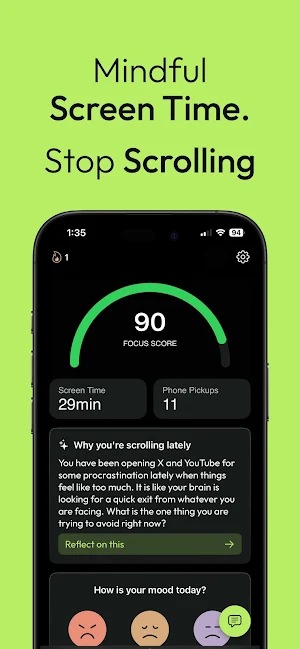
Quick emotional check-ins through the day reveal connections you'd never spot on your own. Maybe you always scroll after hard conversations. Maybe Sunday nights are when you lose hours. Mindless tracks it all.
-- YOUR ACCOUNTABILITY COACH --
The AI on your home screen watches your patterns and gently calls them out. Not mean. Not preachy. Like a friend who sees your blind spots and helps you stay aware. When your screen time spikes, it asks why. When you hit a goal, it celebrates with you.
-- CONNECTED INTELLIGENCE --
Everything connects: journal entries, mood data, intentions and usage patterns. The AI remembers your history and builds a complete picture of your digital habits.
-- APP BLOCKING --
Block a distracting app outright, or set a soft block that opens only after you state an intention. Add schedules and daily time limits for the apps that take the most from you.
-- HOW IT WORKS --
1. Choose which apps trigger an intention check
2. When you open them, pause and state your intention
3. Journal when you feel like it - even 60 seconds helps
4. Check in with your mood through the day
5. Watch the patterns you never knew existed appear
-- ACCESSIBILITY SERVICE USAGE --
Mindless uses Android's Accessibility Service API for its app blocking feature. This is required so Mindless can detect when a selected app is opened and enforce the blocking rules you configured.
Mindless uses Accessibility Service to:
• Detect which app is currently in the foreground
• Check whether the opened app is blocked in your active profile
• Show a blocking screen or return you away from the blocked app
• Keep your configured blocking rules active while switching apps
What Mindless does NOT do:
• It does not read your messages
• It does not read typed text, passwords, or keystrokes
• It does not record audio or video
• It does not collect or sell personal data
• It does not share your data with third parties
All blocking and profile logic runs locally on your device.
The Accessibility Service is optional and must be enabled manually by you in Android Settings.
Mindless also uses Usage Access to show your screen-time insights and to enforce daily time limits.
Without these permissions the rest of Mindless still works - app blocking does not.
-- SUBSCRIPTION --
A Mindless subscription is required for full access to features and content. Payment is charged to your Google Play account at confirmation of purchase. Subscriptions renew automatically unless cancelled at least 24 hours before the end of the current period. Manage or cancel anytime in Google Play > Subscriptions.
-- IMPORTANT --
Mindless is designed for self-reflection and awareness. It is not a medical device and not a substitute for professional mental health care. If you are facing serious mental health concerns, please consult a qualified professional.
-- CONTACT --
Questions or need support? Email [email protected] - we're here to help.
Terms of Use: https://mindless.so/terms-of-use
Privacy Policy: https://mindless.so/privacy-policy
Stop counting minutes. Start understanding yourself.
Mindless helps you understand why you reach for your phone - and actually do something about it.
-- THE PAUSE THAT CHANGES EVERYTHING --
Every time you open an app you want to use less, Mindless asks one question: what's your intention?
That single pause breaks the autopilot. Knowing your screen time is 4 hours won't change your behaviour. Understanding the emotion behind it will.
-- AI JOURNALING --
Write about your day. The AI doesn't just store your words - it reflects them back with follow-up questions that help you see what you couldn't see alone. It helps you connect the dots between your scrolling and what's really going on: stress, boredom, anxiety, avoidance.
When you're ready to go deeper, Therapy Mode asks the questions that help you find words for feelings you couldn't name.
-- MOOD CHECK-INS --
Quick emotional check-ins through the day reveal connections you'd never spot on your own. Maybe you always scroll after hard conversations. Maybe Sunday nights are when you lose hours. Mindless tracks it all.
-- YOUR ACCOUNTABILITY COACH --
The AI on your home screen watches your patterns and gently calls them out. Not mean. Not preachy. Like a friend who sees your blind spots and helps you stay aware. When your screen time spikes, it asks why. When you hit a goal, it celebrates with you.
-- CONNECTED INTELLIGENCE --
Everything connects: journal entries, mood data, intentions and usage patterns. The AI remembers your history and builds a complete picture of your digital habits.
-- APP BLOCKING --
Block a distracting app outright, or set a soft block that opens only after you state an intention. Add schedules and daily time limits for the apps that take the most from you.
-- HOW IT WORKS --
1. Choose which apps trigger an intention check
2. When you open them, pause and state your intention
3. Journal when you feel like it - even 60 seconds helps
4. Check in with your mood through the day
5. Watch the patterns you never knew existed appear
-- ACCESSIBILITY SERVICE USAGE --
Mindless uses Android's Accessibility Service API for its app blocking feature. This is required so Mindless can detect when a selected app is opened and enforce the blocking rules you configured.
Mindless uses Accessibility Service to:
• Detect which app is currently in the foreground
• Check whether the opened app is blocked in your active profile
• Show a blocking screen or return you away from the blocked app
• Keep your configured blocking rules active while switching apps
What Mindless does NOT do:
• It does not read your messages
• It does not read typed text, passwords, or keystrokes
• It does not record audio or video
• It does not collect or sell personal data
• It does not share your data with third parties
All blocking and profile logic runs locally on your device.
The Accessibility Service is optional and must be enabled manually by you in Android Settings.
Mindless also uses Usage Access to show your screen-time insights and to enforce daily time limits.
Without these permissions the rest of Mindless still works - app blocking does not.
-- SUBSCRIPTION --
A Mindless subscription is required for full access to features and content. Payment is charged to your Google Play account at confirmation of purchase. Subscriptions renew automatically unless cancelled at least 24 hours before the end of the current period. Manage or cancel anytime in Google Play > Subscriptions.
-- IMPORTANT --
Mindless is designed for self-reflection and awareness. It is not a medical device and not a substitute for professional mental health care. If you are facing serious mental health concerns, please consult a qualified professional.
-- CONTACT --
Questions or need support? Email [email protected] - we're here to help.
Terms of Use: https://mindless.so/terms-of-use
Privacy Policy: https://mindless.so/privacy-policy
Stop counting minutes. Start understanding yourself.
What’s new
Version 1.0.0 · Updated August 5, 2026
Mindless is now on Android. Block distracting apps, set daily time limits, and pause before you scroll. See your screen time, journal with AI, and track your mood and sleep. Tell us what you think: [email protected]
Alternatives to Mindless: Mindful Screen Time
Looking for apps like Mindless: Mindful Screen Time? Here are 6 similar Android apps on Google Play. All of them are free to download.
-
All Around Plumbing
-
Limit - App Blocker & Focus
-
ADNet
-
Nag Bot Accountability Partner
-
Simple To Do List
-
TaskFlex: Planner & Tasks
| App | Rating | Price | Installs | Last updated | Compare |
|---|---|---|---|---|---|
| Mindless: Mindful Screen Time | – | Free | 100+ | Aug 5, 2026 | |
| All Around Plumbing | – | Free | 1+ | – | Compare |
| Limit - App Blocker & Focus | – | Free | 500+ | Aug 17, 2026 | Compare |
| ADNet | – | Free | 5+ | Sep 11, 2026 | Compare |
| Nag Bot Accountability Partner | – | Free | 100+ | Jul 24, 2026 | Compare |
| Simple To Do List | – | Free | 10+ | Sep 26, 2026 | Compare |
| TaskFlex: Planner & Tasks | – | Free | 5+ | – | Compare |
Similar apps on Google Play
- All Around Plumbing
- Limit - App Blocker & Focus
- ADNet
- Nag Bot Accountability Partner
- Simple To Do List
- TaskFlex: Planner & Tasks
- FM360
- Reflex Training: Reaction Time
- DeepToDo
- Minimalist Focus: Launcher
- CRM app - Associate
- Eye Bag Mobile
- TenGate Portal
- PDF Scanner - Scany
- Rolla Chat
- Zones: World Clock & Timezone
- LA CAGOLE
- NetworQ
- Cybix
- Sales Tracker - Invoicing
- SparkReset
- Globe Co
- Safe Families
- Manaja
- Cloud Download