
Measure, Ruler, Bubble Level
Tools for millions Tools In-app purchases Contains ads
Ruler App, vernier caliper, digital building level, Bubble Level, measuring tape
- Downloads
- 130K+
- on Google Play
- Price
- Free
- In-app purchases
- Updated
- Sep 28
- 2026 · v1.0.27
Screenshots

About Measure, Ruler, Bubble Level
Now there is no need to have a bunch of measuring tools in your pocket, you only need a smartphone or tablet. In our measurement app there is a screen ruler, tape measure, vernier caliper, construction level, rollometer. 5 tools in one measurement app fo free.
The on-screen bar contains a number of functions:
- length measurement
- Determination of thickness
- distance measurement
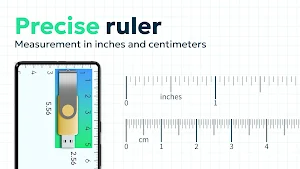
- Setting units: cm(centimeter) or inch.
The electronic on screen ruler (meter) allows you to make any measurements where you need to find the length, radius, distance, thickness, etc.
Digital Ruler - Measurement App:
- You can use measurement app, at school (the online ruler on the smartphone screen will measure the length of the sides of any figures and segments, help translate millimeters to centimeters or meters, or translate inches to centimeters, etc.);
- In repair and construction (roulette will make the required calculations of the parameters - length, width, thickness, radius, gaps, distances). A building digital or bubble level can be used to determine deviations from the vertical or horizontal axes.
- Tape measure app for android will help you in the workshop or garage even for a carpenter (electronic vernier caliper, screen ruler and leveler will become indispensable assistants);
- In sewing and pattern (smart virtual ruler will make it possible to line and mark the fabric).
These are not all areas of application. One screen ruler for measuring various parameters, a measuring tape and a vernier caliper can be used wherever calculations, distance measurements, leveling for unlevel surfaces. But easymeasure has no transparent mode or AR ruler.
The main advantage of the measurement app is its wide construction functionality. The digital building level tool is simple and easy to use.
How to use measurement app?
Screen rule
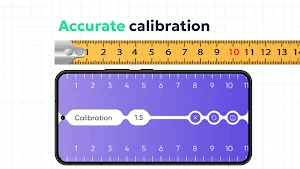
After launching the measurement app, a ruler will appear on the screen; by default, the optimal settings are set, taking into account the size of your phone. If necessary, the screen ruler can be calibrated.
Measurement app has several modes:
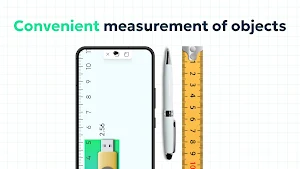
Measuring length, put the phone to the object to be measured, so that the beginning of the object is at the value 0 of the screen ruler and shifting the color separation border with your finger, move it to the end of the object being measured. The result will be displayed on the screen, accurate to hundredths of millimeters, in fact, you can use the on-screen ruler as a caliper.
Determination of thickness - 2 color divisions appear on the screen. The distance between the two color divisions will be displayed on the screen.
Measuring height and width. A rectangular red area appears on the screen, for which the height and width are displayed, you just need to match the measurable area with the object being measured.
It's easy to choose inches or centimeters in the measurement app!
In our measurement app every measurement can be saved! For each measurement, you can write the name of the measured object.
Level tool - Spirit level
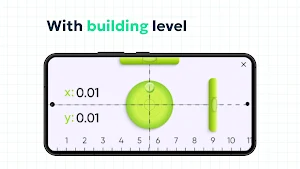
Working with the level tool is completely similar to working with a pro physical bubble level tool (spirit level), but in fact your smartphone uses a built-in gyroscope (level detector). The phone screen will display multiple levels: ihandy level tool for measuring horizontal deviation (top-level), a precise level tool for measuring vertical deviation, a level tool that shows both vertical and horizontal deviation at once.
Also on the phone screen, the accuracy of hitting the bubble in the center is displayed in a numerical format on an x and y scale. If you need a very accurate measurement, you need to make sure x and y are both 0.
If you use only a horizontal water level tool, an additional element appears on the screen in the form of an intersection of lines, which shows how far you have deviated to the left or right.
Download the app for measuring roulette, with ilevel for Android right now!
The on-screen bar contains a number of functions:
- length measurement
- Determination of thickness
- distance measurement
- Setting units: cm(centimeter) or inch.
The electronic on screen ruler (meter) allows you to make any measurements where you need to find the length, radius, distance, thickness, etc.
Digital Ruler - Measurement App:
- You can use measurement app, at school (the online ruler on the smartphone screen will measure the length of the sides of any figures and segments, help translate millimeters to centimeters or meters, or translate inches to centimeters, etc.);
- In repair and construction (roulette will make the required calculations of the parameters - length, width, thickness, radius, gaps, distances). A building digital or bubble level can be used to determine deviations from the vertical or horizontal axes.
- Tape measure app for android will help you in the workshop or garage even for a carpenter (electronic vernier caliper, screen ruler and leveler will become indispensable assistants);
- In sewing and pattern (smart virtual ruler will make it possible to line and mark the fabric).
These are not all areas of application. One screen ruler for measuring various parameters, a measuring tape and a vernier caliper can be used wherever calculations, distance measurements, leveling for unlevel surfaces. But easymeasure has no transparent mode or AR ruler.
The main advantage of the measurement app is its wide construction functionality. The digital building level tool is simple and easy to use.
How to use measurement app?
Screen rule
After launching the measurement app, a ruler will appear on the screen; by default, the optimal settings are set, taking into account the size of your phone. If necessary, the screen ruler can be calibrated.
Measurement app has several modes:
Measuring length, put the phone to the object to be measured, so that the beginning of the object is at the value 0 of the screen ruler and shifting the color separation border with your finger, move it to the end of the object being measured. The result will be displayed on the screen, accurate to hundredths of millimeters, in fact, you can use the on-screen ruler as a caliper.
Determination of thickness - 2 color divisions appear on the screen. The distance between the two color divisions will be displayed on the screen.
Measuring height and width. A rectangular red area appears on the screen, for which the height and width are displayed, you just need to match the measurable area with the object being measured.
It's easy to choose inches or centimeters in the measurement app!
In our measurement app every measurement can be saved! For each measurement, you can write the name of the measured object.
Level tool - Spirit level
Working with the level tool is completely similar to working with a pro physical bubble level tool (spirit level), but in fact your smartphone uses a built-in gyroscope (level detector). The phone screen will display multiple levels: ihandy level tool for measuring horizontal deviation (top-level), a precise level tool for measuring vertical deviation, a level tool that shows both vertical and horizontal deviation at once.
Also on the phone screen, the accuracy of hitting the bubble in the center is displayed in a numerical format on an x and y scale. If you need a very accurate measurement, you need to make sure x and y are both 0.
If you use only a horizontal water level tool, an additional element appears on the screen in the form of an intersection of lines, which shows how far you have deviated to the left or right.
Download the app for measuring roulette, with ilevel for Android right now!
What’s new
Version 1.0.27 · Updated September 28, 2026
Release
User reviews

good

very convenient
Alternatives to Measure, Ruler, Bubble Level
Looking for apps like Measure, Ruler, Bubble Level? Here are 6 similar Android apps on Google Play. The highest rated is Ruler (4.4/5), and all 6 are free to download.
-
CSV File Viewer - Smart CSV 4.2
-
Ruler 4.4
-
All Data Transfer: Phone Clone
-
Ar Drawing & Sketch App
-
Ring Sizer by Jason Withers © 2.2
-
Polycam: 3D Scanner & Editor 3.6
| App | Rating | Price | Installs | Last updated | Compare |
|---|---|---|---|---|---|
| Measure, Ruler, Bubble Level | – | Free | 100,000+ | Sep 28, 2026 | |
| CSV File Viewer - Smart CSV | 4.2 / 5 | Free | 100,000+ | Oct 29, 2026 | Compare |
| Ruler | 4.4 / 5 | Free | 10,000,000+ | Jun 30, 2026 | Compare |
| All Data Transfer: Phone Clone | – | Free | 100,000+ | Sep 29, 2026 | Compare |
| Ar Drawing & Sketch App | – | Free | 100,000+ | Aug 25, 2026 | Compare |
| Ring Sizer by Jason Withers © | 2.2 / 5 | Free | 5,000,000+ | Aug 3, 2026 | Compare |
| Polycam: 3D Scanner & Editor | 3.6 / 5 | Free | 1,000,000+ | Oct 27, 2026 | Compare |
Similar apps on Google Play
- CSV File Viewer - Smart CSV
- Ruler
- All Data Transfer: Phone Clone
- Ar Drawing & Sketch App
- Ring Sizer by Jason Withers ©
- Polycam: 3D Scanner & Editor
- Renovate AI : House Design
- AI Home Design: Ideal House
- Apowersoft Background Eraser
- Sherwin-Williams Color Expert™
- Foodsage: Gluten & Celiac Diet
- Homestyler - Home Design Game
- Tiny Scanner - PDF Scanner App
- Congratulator: Wish Cards 2026
- Magnifier
- KIRI Engine: 3D Scanner App
- OneSoil Scouting: Farming Tool
- CamCard-AI Scanner, Transcribe
- ZWCAD Mobile - DWG Viewer
- HomeByMe
- magicplan
- Photo Scan App by Photomyne