

Rossmont inTouch
Rossmont Srl Lifestyle
Take control of your Rossmont Waver with the smartest Aquarium App
- Rating
- 1.5
- 69 ratings
- Downloads
- 1K+
- on Google Play
- Price
- Free
- No in-app purchases
- Updated
- Jun 16
- 2020 · v20.06.11
Screenshots
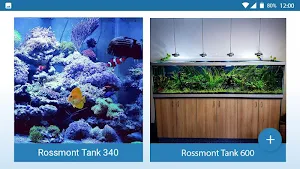
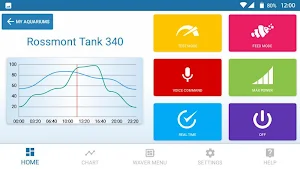
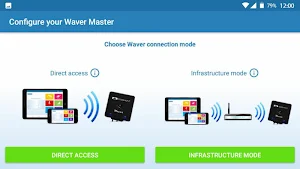


About Rossmont inTouch
Enjoy the new exclusive features designed for your aquarium and live a real reef simulation experience
Expand your aquarium by an unlimited number of devices and drive them all with just one app
VOICE COMMANDS
The world's first app that let you interact with your pumps using your voice
MULTI WAVER MANAGEMENT
Manage multiple devices with just one interface including them in your home wifi network
USER FRIENDLY SYSTEM
Quick actions, access into feed mode fastly, turn on/off your devices with a touch or with your voice
Instant access
Check the power % of your pumps in real time
CHOOSE YOUR CONNECTION MODE
Use your Waver in direct access mode (direct connection) or in infrastructure mode (by including your device into your home WLAN Wi-Fi network)
IMPORT/EXPORT
Share your graph and settings with anyone. Save a backup copy of your settings.
CALIBRATION FUNCTION
Set your min power % for your Riser return pump in sump mode and take immediately advantage of this exclusive function using the touch button on the center of your Waver
GRAPH AND PRESET HYBRID SYSTEM
24h graphic control: add, edit, or delete points as you wish and change your pumps flow rate in any moment of the day.
Presets: choose among several presets to follow your tank needs and create different wave types, simulating real reef currents
Presets have priority on graph and are easily adjustable in any moment.
... AND MUCH MORE
Custom background, safe access with ID and password, quick and free updates, video tutorials...
BETA RELEASE
Attention: this beta version may still have minor bugs with some smartphones or tablets devices. Before leaving a negative feedback, we invite you to contact our customer service RCS by e-mail at the address [email protected] . We'll reply you in the shortest time and we'll be glad to help you.
If you enjoyed with the app, we invite you to leave us a positive feedback. 5 star feedbacks help us growing and giving you better products day by day.
This beta app version doesn't include some features that will come with official version:
-Tap wave, a custom preset unique in its genre. Watch your pumps in action, set min and max power, touch your screen following the flashes rhythm and look at the wave in your tank changing in real time
-Selective advanced voice commands
-DHCP. Automatic infrastructure mode IP configuration
-Full multilanguage manual
-New functions and features
ATTENTION: Android devices in Direct connection require to “forget” the Waver's Rossmont Wifi network and re-connect to it (once re-appears in the list) when the Waver is rebooted, or the direct connection is lost (e.g. for device suspension) or signal is out of range.
To include Waver in your existing home Wifi network (infrastructure mode) in the IP address 192.168.9.75 replace the 9 (this number is called CLASS ID) with the same number of your home router/modem (usually it's 0, 1 or 2). Check it before applying the Infrastructure mode.
To include several Waver units, also the final number of the address (75) must be different on each unit
Eg. Modem IP = 192.168.1.1
Waver 1 = 192.168.1.75
Waver 2 = 192.168.1.83
Waver 3 = 192.168.1.95
Etc.
Keep your app always up to date and follow us on our social to learn the latest news
Facebook https://www.facebook.com
Twitter https://twitter.com/rossmontsrl
Subscribe to our YouTube channel and follow our video tutorials to create different wave types in the tanks. We'll constantly upload new videos and you'll learn how to better use our products.
YouTube https://www.youtube.com/channel/UCTJaGyRI3c7LdwbeJPK4P7g
Visit our web site and discover all our products
http://www.rossmont.com
Expand your aquarium by an unlimited number of devices and drive them all with just one app
VOICE COMMANDS
The world's first app that let you interact with your pumps using your voice
MULTI WAVER MANAGEMENT
Manage multiple devices with just one interface including them in your home wifi network
USER FRIENDLY SYSTEM
Quick actions, access into feed mode fastly, turn on/off your devices with a touch or with your voice
Instant access
Check the power % of your pumps in real time
CHOOSE YOUR CONNECTION MODE
Use your Waver in direct access mode (direct connection) or in infrastructure mode (by including your device into your home WLAN Wi-Fi network)
IMPORT/EXPORT
Share your graph and settings with anyone. Save a backup copy of your settings.
CALIBRATION FUNCTION
Set your min power % for your Riser return pump in sump mode and take immediately advantage of this exclusive function using the touch button on the center of your Waver
GRAPH AND PRESET HYBRID SYSTEM
24h graphic control: add, edit, or delete points as you wish and change your pumps flow rate in any moment of the day.
Presets: choose among several presets to follow your tank needs and create different wave types, simulating real reef currents
Presets have priority on graph and are easily adjustable in any moment.
... AND MUCH MORE
Custom background, safe access with ID and password, quick and free updates, video tutorials...
BETA RELEASE
Attention: this beta version may still have minor bugs with some smartphones or tablets devices. Before leaving a negative feedback, we invite you to contact our customer service RCS by e-mail at the address [email protected] . We'll reply you in the shortest time and we'll be glad to help you.
If you enjoyed with the app, we invite you to leave us a positive feedback. 5 star feedbacks help us growing and giving you better products day by day.
This beta app version doesn't include some features that will come with official version:
-Tap wave, a custom preset unique in its genre. Watch your pumps in action, set min and max power, touch your screen following the flashes rhythm and look at the wave in your tank changing in real time
-Selective advanced voice commands
-DHCP. Automatic infrastructure mode IP configuration
-Full multilanguage manual
-New functions and features
ATTENTION: Android devices in Direct connection require to “forget” the Waver's Rossmont Wifi network and re-connect to it (once re-appears in the list) when the Waver is rebooted, or the direct connection is lost (e.g. for device suspension) or signal is out of range.
To include Waver in your existing home Wifi network (infrastructure mode) in the IP address 192.168.9.75 replace the 9 (this number is called CLASS ID) with the same number of your home router/modem (usually it's 0, 1 or 2). Check it before applying the Infrastructure mode.
To include several Waver units, also the final number of the address (75) must be different on each unit
Eg. Modem IP = 192.168.1.1
Waver 1 = 192.168.1.75
Waver 2 = 192.168.1.83
Waver 3 = 192.168.1.95
Etc.
Keep your app always up to date and follow us on our social to learn the latest news
Facebook https://www.facebook.com
Twitter https://twitter.com/rossmontsrl
Subscribe to our YouTube channel and follow our video tutorials to create different wave types in the tanks. We'll constantly upload new videos and you'll learn how to better use our products.
YouTube https://www.youtube.com/channel/UCTJaGyRI3c7LdwbeJPK4P7g
Visit our web site and discover all our products
http://www.rossmont.com
What’s new
Version 20.06.11 · Updated June 16, 2020
Updated libraries for Android 10 compatibility. Improved connection stability. Infrastructure home Wifi search fixed on all devices. Changed FW default download folder.
User reviews

I cannot run the apps. Keeps crashing on me. Android 10. S10+. Thanks for replying this, I sent the mail already. Awesome developer. However I still need help. Only a day later, developer has fixed the problem and email me the solution. Good job. Finally i can use the waver.
When I first downloaded it there was some problems getting it working. I emailed them and they responded within hours. super happy with them and the support they gave me. I work for a local fish store and it's good to know how helpful they are with there customers.
It's cool
Great app and great customer service support by Rossmont
Alternatives to Rossmont inTouch
Looking for apps like Rossmont inTouch? Here are 6 similar Android apps on Google Play. All of them are free to download.
-
Couple Wallpapers
-
JBL Tour One M2 guide
-
Comunidade Reino Agape
-
MEVAM IBIRAPUERA SÃO PAULO
-
Kora Live
-
Canon Powershot V10 Guide
| App | Rating | Price | Installs | Last updated | Compare |
|---|---|---|---|---|---|
| Rossmont inTouch | 1.5 / 5 | Free | 1,000+ | Jun 16, 2020 | |
| Couple Wallpapers | – | Free | 1+ | Nov 20, 2023 | Compare |
| JBL Tour One M2 guide | – | Free | 10+ | Sep 12, 2023 | Compare |
| Comunidade Reino Agape | – | Free | 0+ | Nov 14, 2023 | Compare |
| MEVAM IBIRAPUERA SÃO PAULO | – | Free | 5+ | Nov 14, 2023 | Compare |
| Kora Live | – | Free | 50,000+ | Dec 23, 2025 | Compare |
| Canon Powershot V10 Guide | – | Free | 10+ | Oct 8, 2023 | Compare |
Compare Rossmont inTouch with the top alternatives: ratings, updates, ASO score and keyword gaps →
Similar apps on Google Play
- Couple Wallpapers
- JBL Tour One M2 guide
- Comunidade Reino Agape
- MEVAM IBIRAPUERA SÃO PAULO
- Kora Live
- Canon Powershot V10 Guide
- 0-100 Level Up
- Samsung Galaxy Watch 5 Guide
- Foundation Church Spencer
- Сахарок- сеть студий эпиляции
- JBL Live Pro 2 guide
- Crowns Barbers & Co.
- Trinity Church Victoria
- B.A.R.C
- Details Barbershop
- Montrose Auto Group
- Stance Barbershop
- Sony WF-1000XM5 Guide
- Jbl Tour Pro 2 Guide
- The Herbary
- IP METROPOLITANA BH
- Ortahaus Barber Co.
- Glow Beauty Boutique
- Designer Cuts Barbering Palace
- Royal House - St. Catharines