

Max Reader - News, RSS feeds
News & Magazines Contains ads
Read News with Speak aloud assistant + Offline reading with dictionary
- Rating
- 4.0
- 425 ratings
- Downloads
- 25.3K+
- on Google Play
- Price
- Free
- No in-app purchases
- Updated
- Mar 20
- 2026 · v4.0.11
Screenshots


About Max Reader - News, RSS feeds
Your news and knowledge app featuring a speak aloud assistant
Read news when without internet and access instant word definition
Unique Features:
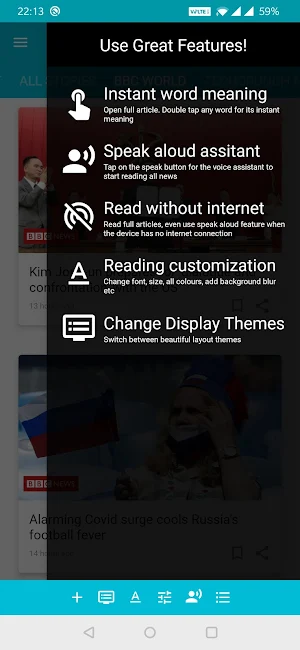
◆ Speak aloud assistant
◆ Read full articles without internet
◆ Double tap a word for instant meaning
◆ Amazon Kindle style reading customisation
◆ Modern design themes
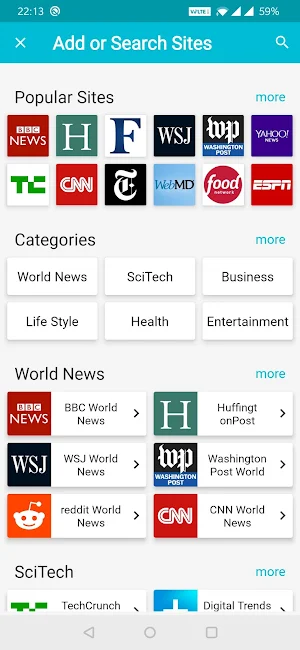
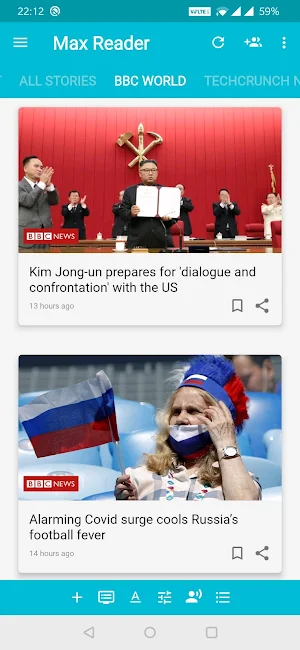
◆ Read top news websites in one place
Read Top news papers, news channels, news websites:
BBC News, CNN, New York Times, Wall Street Journal, Huffington Post, Forbes, TechCrunch, Yahoo news, Washington Post, Fox News, abcNews, Reuters, The guardian, Medical news today and many more.
Amazon Kindle style reading customisation:
◆ Switch between beautiful UI layouts
◆ Change text font, 20 dynamic text fonts to choose from
◆ Set your own color styling to match your reading comfort
◆ Adjust brightness
◆ Full Screen Immersive reading
Offline Dictionary Feature:
◆ View instant word definition without internet
◆ Download your language dictionary.
◆ Choose from 148 language dictionaries
◆ View dictionary definition, web definition, wikipedia entries, all in one dialog
Other Features:
◆ Add and watch YouTube News Channels
◆ One tap full screen reading
◆ Set news update interval
◆ Share multiple articles with friends in one step
◆ RSS feed reader with import and export options
Features description:
Themes Feature:
Switch between the beautiful themes any time. Customise your theme based on your preferences. Whats more, all your settings for each theme are saved automatically. So when you go back to a theme, all settings you used before are retained.
Dynamic Settings:
Dynamically adjust text size, change font style, change background colour or text colour, adjust brightness etc. If you want to just get back to default settings, simply click on the reset button. You can customise almost everything based on your reading preferences.
Dictionary access:
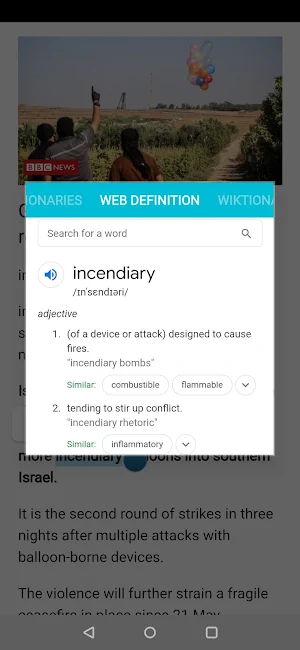
This feature is very useful for anyone who likes to see word definition instantly whenever they encounter a new word while reading any news article. A simple double tap on a word will pop up the dictionary and shows up word definition from both offline dictionary and web.
Read news when without internet and access instant word definition
Unique Features:
◆ Speak aloud assistant
◆ Read full articles without internet
◆ Double tap a word for instant meaning
◆ Amazon Kindle style reading customisation
◆ Modern design themes
◆ Read top news websites in one place
Read Top news papers, news channels, news websites:
BBC News, CNN, New York Times, Wall Street Journal, Huffington Post, Forbes, TechCrunch, Yahoo news, Washington Post, Fox News, abcNews, Reuters, The guardian, Medical news today and many more.
Amazon Kindle style reading customisation:
◆ Switch between beautiful UI layouts
◆ Change text font, 20 dynamic text fonts to choose from
◆ Set your own color styling to match your reading comfort
◆ Adjust brightness
◆ Full Screen Immersive reading
Offline Dictionary Feature:
◆ View instant word definition without internet
◆ Download your language dictionary.
◆ Choose from 148 language dictionaries
◆ View dictionary definition, web definition, wikipedia entries, all in one dialog
Other Features:
◆ Add and watch YouTube News Channels
◆ One tap full screen reading
◆ Set news update interval
◆ Share multiple articles with friends in one step
◆ RSS feed reader with import and export options
Features description:
Themes Feature:
Switch between the beautiful themes any time. Customise your theme based on your preferences. Whats more, all your settings for each theme are saved automatically. So when you go back to a theme, all settings you used before are retained.
Dynamic Settings:
Dynamically adjust text size, change font style, change background colour or text colour, adjust brightness etc. If you want to just get back to default settings, simply click on the reset button. You can customise almost everything based on your reading preferences.
Dictionary access:
This feature is very useful for anyone who likes to see word definition instantly whenever they encounter a new word while reading any news article. A simple double tap on a word will pop up the dictionary and shows up word definition from both offline dictionary and web.
User reviews

Super

OMG a thousand of rrs readers and this is the one can fetch the content of the tough news sites in reader mode properly. Keep it up guys, just add some gesture and this will be God

The best RSS reader on play store.

useful

Absolutely incredible. Perfect app for offline reading!

This has been a great app. Easy to use. Easy to add content to simple and wonderful
Alternatives to Max Reader - News, RSS feeds
Looking for apps like Max Reader - News, RSS feeds? Here are 6 similar Android apps on Google Play. The highest rated is ProPublica (4.3/5), and all 6 are free to download.
-
Inoreader: News & RSS reader 3.8
-
Feedly Classic 3.9
-
Feedly - Smarter News Reader 4.2
-
Ego Reader - RSS Reader 4.1
-
ProPublica 4.3
-
Pluma RSS Reader 3.9
| App | Rating | Price | Installs | Last updated | Compare |
|---|---|---|---|---|---|
| Max Reader - News, RSS feeds | 4.0 / 5 | Free | 10,000+ | Mar 20, 2026 | |
| Inoreader: News & RSS reader | 3.8 / 5 | Free | 500,000+ | Oct 20, 2026 | Compare |
| Feedly Classic | 3.9 / 5 | Free | 10,000+ | Dec 5, 2018 | Compare |
| Feedly - Smarter News Reader | 4.2 / 5 | Free | 5,000,000+ | Oct 6, 2026 | Compare |
| Ego Reader - RSS Reader | 4.1 / 5 | Free | 1,000+ | Nov 30, 2020 | Compare |
| ProPublica | 4.3 / 5 | Free | 100,000+ | Feb 11, 2025 | Compare |
| Pluma RSS Reader | 3.9 / 5 | Free | 10,000+ | Oct 29, 2026 | Compare |
Similar apps on Google Play
- Inoreader: News & RSS reader
- Feedly Classic
- Feedly - Smarter News Reader
- Ego Reader - RSS Reader
- ProPublica
- Pluma RSS Reader
- Readly Magazines & Newspapers
- Zenkit To Do
- Washington Post Select
- Cite: Listen to articles
- Epoch TV
- Noa: Audio articles
- KEXP
- Wiley Online Library
- Zenforms
- Marqly - Bookmark manager
- Tsacdop - Podcast Player