
KidLog
Software KIT SRL Parenting In-app purchases
Track your child’s app usage with clear timelines—private, simple, no blocking.
- Downloads
- 500+
- on Google Play
- Price
- Free
- In-app purchases
- Updated
- Mar 11
- 2026 · v1.2.1
Screenshots


About KidLog
📝 KidLog – App Usage Timeline for Parents
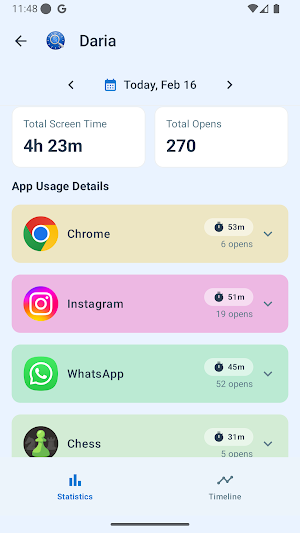
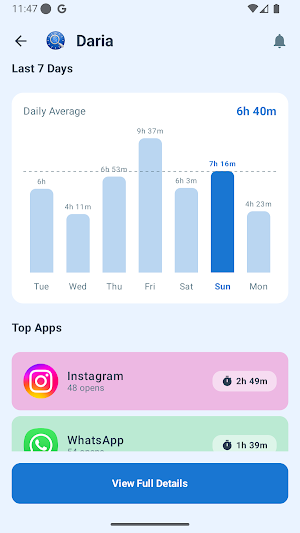
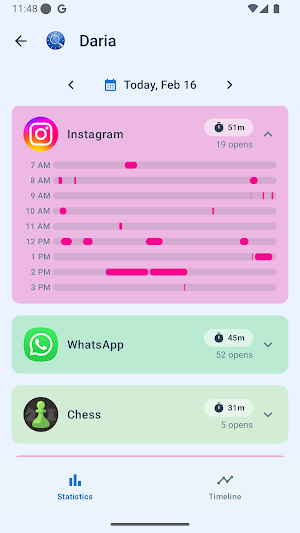
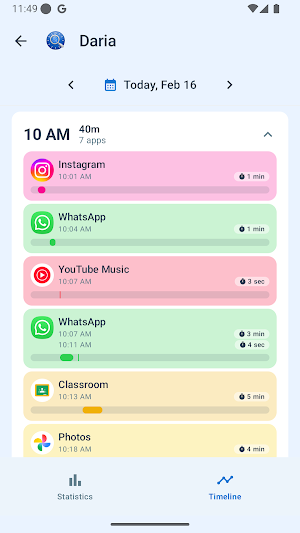
KidLog helps parents understand how their children use Android devices by providing a clear, visual timeline of which apps were used and when.
The app is designed for awareness and transparency only—it does not block apps, limit usage, or monitor content.
🔍 Core Functionality
KidLog shows:
• Which apps were opened on the device
• The time and duration of app usage
• A simple, easy-to-read timeline view for parents
Notifications for Parents
KidLog can notify parents when:
• App usage for a specific app exceeds a defined usage threshold
• App tracking is stopped or disabled on the child’s device
These notifications help parents stay informed about usage patterns and potential issues without actively monitoring the device.
KidLog does not:
• Block or restrict apps
• Enforce time limits or automatically stop usage
• Monitor screen content, messages, or keystrokes
• Record audio, video, or personal data
♿ Use of AccessibilityService API (Required Disclosure)
KidLog uses the Android AccessibilityService API to detect app foreground changes in order to accurately determine when an app is opened and closed, and to prevent children from disabling or force-stopping the KidLog application.
This is required because Android does not provide another reliable, system-level API to track real-time app usage transitions.
Specifically:
• AccessibilityService is used to identify the currently active app
• It helps prevent disabling or force-stopping the KidLog app (no other apps are affected)
• It does not read screen content, text input, or UI interactions
• It does not change system settings or user permissions
• It does not bypass Android privacy controls
Accessibility access is optional, clearly explained in-app, and must be explicitly enabled by the user.
🔔 Notifications & Alerts
• Notifications are informational only
• No automated actions are taken on the child’s device
• Alerts are based solely on app usage duration or tracking status
Notifications are intended to support awareness, not enforcement.
🔒 Privacy & Data Handling
• No content is collected—only app names and timestamps
• No personal data, messages, or media are accessed
• No data is shared with third parties
KidLog is designed to support healthy conversations between parents and children through visibility—not control.
👨👩👧 Who Is KidLog For
• Parents who want insight into device usage patterns
• Families looking for transparency instead of restrictions
• Users who value privacy-focused monitoring
⚠️ Important Notes
• KidLog is not an accessibility tool for users with disabilities
• KidLog does not use accessibility features for remote monitoring, recording, or automation
• Accessibility access is used only for its stated, limited purpose
KidLog helps parents understand how their children use Android devices by providing a clear, visual timeline of which apps were used and when.
The app is designed for awareness and transparency only—it does not block apps, limit usage, or monitor content.
🔍 Core Functionality
KidLog shows:
• Which apps were opened on the device
• The time and duration of app usage
• A simple, easy-to-read timeline view for parents
Notifications for Parents
KidLog can notify parents when:
• App usage for a specific app exceeds a defined usage threshold
• App tracking is stopped or disabled on the child’s device
These notifications help parents stay informed about usage patterns and potential issues without actively monitoring the device.
KidLog does not:
• Block or restrict apps
• Enforce time limits or automatically stop usage
• Monitor screen content, messages, or keystrokes
• Record audio, video, or personal data
♿ Use of AccessibilityService API (Required Disclosure)
KidLog uses the Android AccessibilityService API to detect app foreground changes in order to accurately determine when an app is opened and closed, and to prevent children from disabling or force-stopping the KidLog application.
This is required because Android does not provide another reliable, system-level API to track real-time app usage transitions.
Specifically:
• AccessibilityService is used to identify the currently active app
• It helps prevent disabling or force-stopping the KidLog app (no other apps are affected)
• It does not read screen content, text input, or UI interactions
• It does not change system settings or user permissions
• It does not bypass Android privacy controls
Accessibility access is optional, clearly explained in-app, and must be explicitly enabled by the user.
🔔 Notifications & Alerts
• Notifications are informational only
• No automated actions are taken on the child’s device
• Alerts are based solely on app usage duration or tracking status
Notifications are intended to support awareness, not enforcement.
🔒 Privacy & Data Handling
• No content is collected—only app names and timestamps
• No personal data, messages, or media are accessed
• No data is shared with third parties
KidLog is designed to support healthy conversations between parents and children through visibility—not control.
👨👩👧 Who Is KidLog For
• Parents who want insight into device usage patterns
• Families looking for transparency instead of restrictions
• Users who value privacy-focused monitoring
⚠️ Important Notes
• KidLog is not an accessibility tool for users with disabilities
• KidLog does not use accessibility features for remote monitoring, recording, or automation
• Accessibility access is used only for its stated, limited purpose
What’s new
Version 1.2.1 · Updated March 11, 2026
Bugfixes and improvements
Alternatives to KidLog
Looking for apps like KidLog? Here are 5 similar Android apps on Google Play. The highest rated is Aegis Authenticator - 2FA App (4.7/5), and 2 of the 5 are free to download.
-
Control+ 3.8
-
Aegis Authenticator - 2FA App 4.7
-
QmetaRam AI: Quantum Assistant
-
Bolt (Dev)
-
Foodsage: Autoimmune Scanner
| App | Rating | Price | Installs | Last updated | Compare |
|---|---|---|---|---|---|
| KidLog | – | Free | 500+ | Mar 11, 2026 | |
| Control+ | 3.8 / 5 | Free | 10,000+ | Sep 7, 2026 | Compare |
| Aegis Authenticator - 2FA App | 4.7 / 5 | Free | 1,000,000+ | Sep 6, 2026 | Compare |
| QmetaRam AI: Quantum Assistant | – | – | 5,000+ | Jun 2, 2026 | Compare |
| Bolt (Dev) | – | – | – | Jan 15, 2026 | Compare |
| Foodsage: Autoimmune Scanner | – | – | 1,000+ | Sep 29, 2026 | Compare |
Compare KidLog with the top alternatives: ratings, updates, ASO score and keyword gaps →