
ArUco Master
Tools
Fiducial marker test bench: detect, record and measure ArUco and AprilTag runs.
- Downloads
- 10+
- on Google Play
- Price
- Free
- No in-app purchases
- Updated
- Sep 2
- 2026 · v0.3.0
Screenshots
About ArUco Master
ArUco Master is Petiole's field instrument for fiducial markers — a test bench rather than a scanner. It detects markers from the live camera and from photos, records every run in a local database, and measures the calibration colour plates our imaging work depends on.
WHAT IT DOES
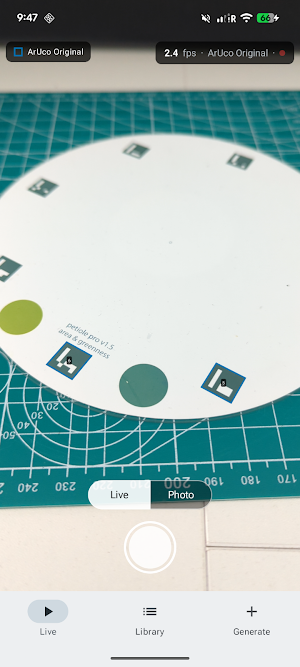
Live detection. Point the camera and the whole family set is searched at once — the ArUco dictionaries (4x4, 5x5, 6x6, 7x7, Original, MIP 36h12) and the AprilTag families. Each detection is drawn with its id, coloured by geometry group and dashed by backend, so what was found is readable without tapping anything. The heads-up display carries the running frame rate and the family count; coaching chips say when the frame is too dark or moving too fast.
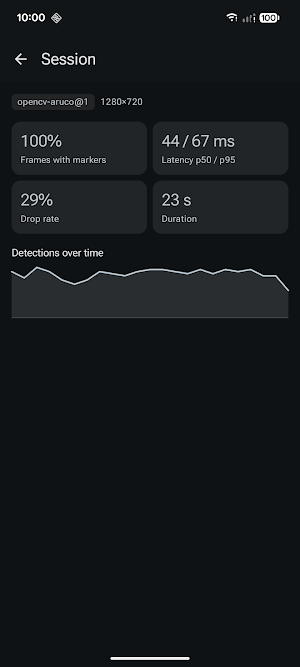
Recorded runs. Every live session, capture and import becomes a row in the Library with the numbers that matter afterwards: frames with markers, detection latency at p50 and p95, drop rate, duration, and a sparkline of detections over time. The question "at what pixel size does this dictionary stop being reliable on this phone" gets answered from recorded data instead of memory.
Photos and RAW. Import from the photo picker or any file the system can hand over — JPEG, PNG, WebP, HEIC and DNG — or capture in JPEG, RAW, or both at once. A photo set runs as one session and reports how many of its frames detected. Every result reconstructs its overlay on the original frame, zoomable, with the marker crops listed beside it.
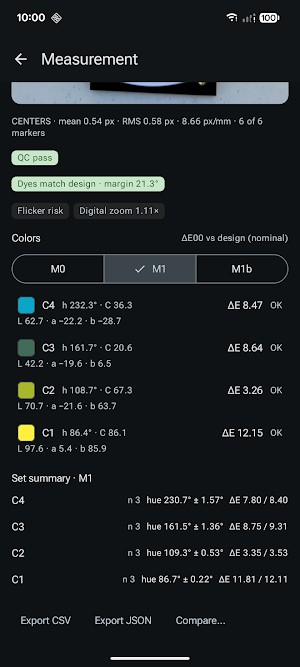
Plate measurement. Point it at a Petiole colour plate and it locates the plate from its markers, samples each patch, and reports the colour in CIE Lab with dE2000 against the reference set, per patch and summarised across the set. Plate designs and reference sets are managed in the app — the built-in plates, the ColorChecker with X-Rite pre- and post-2014 references, or your own imported design. A per-camera colour calibration can be fitted from a chart and applied to later runs.
Exports. Any measurement leaves as CSV or JSON, carrying full provenance on every row, written wherever you choose through the system file picker.
WHAT IT DOES NOT DO
It never goes online. The app holds no internet permission at all: frames, photos and measurements stay in app-private storage on the device, and the only way data leaves is a file you save yourself. Nothing is collected, nothing is shared, there are no accounts and no ads.
The Generate tab is a placeholder — marker sheet and mesh generation is not built yet.
REQUIREMENTS
Android 8.0 or newer. A camera is optional: without one, photo and RAW import still work end to end.
WHAT IT DOES
Live detection. Point the camera and the whole family set is searched at once — the ArUco dictionaries (4x4, 5x5, 6x6, 7x7, Original, MIP 36h12) and the AprilTag families. Each detection is drawn with its id, coloured by geometry group and dashed by backend, so what was found is readable without tapping anything. The heads-up display carries the running frame rate and the family count; coaching chips say when the frame is too dark or moving too fast.
Recorded runs. Every live session, capture and import becomes a row in the Library with the numbers that matter afterwards: frames with markers, detection latency at p50 and p95, drop rate, duration, and a sparkline of detections over time. The question "at what pixel size does this dictionary stop being reliable on this phone" gets answered from recorded data instead of memory.
Photos and RAW. Import from the photo picker or any file the system can hand over — JPEG, PNG, WebP, HEIC and DNG — or capture in JPEG, RAW, or both at once. A photo set runs as one session and reports how many of its frames detected. Every result reconstructs its overlay on the original frame, zoomable, with the marker crops listed beside it.
Plate measurement. Point it at a Petiole colour plate and it locates the plate from its markers, samples each patch, and reports the colour in CIE Lab with dE2000 against the reference set, per patch and summarised across the set. Plate designs and reference sets are managed in the app — the built-in plates, the ColorChecker with X-Rite pre- and post-2014 references, or your own imported design. A per-camera colour calibration can be fitted from a chart and applied to later runs.
Exports. Any measurement leaves as CSV or JSON, carrying full provenance on every row, written wherever you choose through the system file picker.
WHAT IT DOES NOT DO
It never goes online. The app holds no internet permission at all: frames, photos and measurements stay in app-private storage on the device, and the only way data leaves is a file you save yourself. Nothing is collected, nothing is shared, there are no accounts and no ads.
The Generate tab is a placeholder — marker sheet and mesh generation is not built yet.
REQUIREMENTS
Android 8.0 or newer. A camera is optional: without one, photo and RAW import still work end to end.
What’s new
Version 0.3.0 · Updated September 2, 2026
Hello World!
Alternatives to ArUco Master
Looking for apps like ArUco Master? Here are 2 similar Android apps on Google Play. The highest rated is Arrowhead Mobile Banking (4.9/5), and all 2 are free to download.

| App | Rating | Price | Installs | Last updated | Compare |
|---|---|---|---|---|---|
| ArUco Master | – | Free | 10+ | Sep 2, 2026 | |
| Vantix Law | 4.7 / 5 | Free | 5,000+ | Oct 1, 2026 | Compare |
| Arrowhead Mobile Banking | 4.9 / 5 | Free | 50,000+ | Sep 17, 2026 | Compare |
Compare ArUco Master with the top alternatives: ratings, updates, ASO score and keyword gaps →