
OTS Mobile
Irtaf3 Systems Business
Live operation command, safety, mapping and secure team coordination.
- Downloads
- 5+
- on Google Play
- Price
- Free
- No in-app purchases
- Updated
- Sep 13
- 2026 · v20.0.18
Screenshots
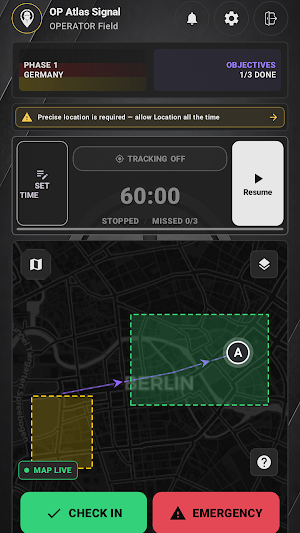
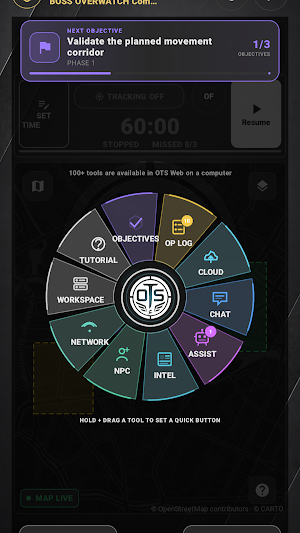
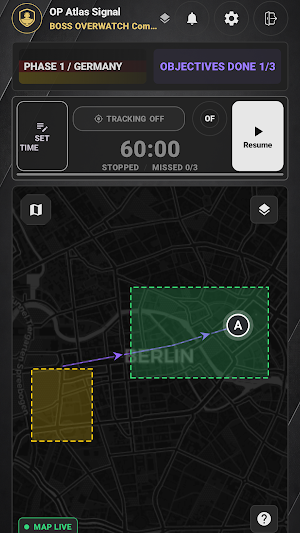
About OTS Mobile
OTS Mobile is the field companion for the private Operation Technology System workspace.
Authorized Operators and Overwatch personnel can work from the same operation record while away from a desktop:
• View the live tactical map, assigned routes, objectives, safety zones and current phase.
• Coordinate through operation-scoped Team Chat and OTS Assistant.
• Report inappropriate messages, attachments, people, live streams or Assistant responses in the app; authorized users can also block ordinary communication while mandatory safety alerts remain available.
• Complete objectives, record check-ins and review the operational log.
• Use Emergency / FOXTROT workflows with clear, persistent safety controls.
• Receive actionable alerts for team messages, missed check-ins, Emergency events, objective completion, phase changes and Assistant replies.
• Create evidence-grounded Area Briefs and use authorized intelligence tools.
• Access operation files, contacts, team details and Boss Workspace controls permitted by your role.
• Optionally run a consent-bound local network report that reads active connection metadata and voluntary mDNS/SSDP announcements; it does not scan ports, inspect traffic or attempt credentials.
• Optionally enable live Operator tracking after the required disclosure and Android location permissions. Active tracking always uses a visible foreground-service notification and can be stopped.
OTS Mobile uses encrypted HTTPS transport, operation-scoped authorization and revocable per-install sessions. Routine Op Log activity and successful check-ins stay quiet; notifications focus on meaningful operational events.
An OTS workspace account is required. Operational tools become available when the account is assigned to an operation.
PUBLIC-SOURCE AND HEALTH INFORMATION
Area Briefs may surface travel, consular, disaster, outbreak and public-health information from issuing authorities and organizations. Representative primary sources include US Travel Advisories (https://travel.state.gov/content/travel/en/traveladvisories/traveladvisories.html/), UK Foreign Travel Advice (https://www.gov.uk/foreign-travel-advice), German Federal Foreign Office travel guidance (https://www.auswaertiges-amt.de/en/ReiseUndSicherheit), WHO Disease Outbreak News (https://www.who.int/emergencies/disease-outbreak-news) and CDC Travelers' Health (https://wwwnc.cdc.gov/travel/notices). OTS Mobile also shows the original source link with each available item.
OTS Mobile is a private Irtaf3 Systems product. It does not represent, and is not affiliated with or endorsed by, any government entity.
OTS Mobile is not a medical device and does not diagnose, treat, cure or prevent any medical condition. Health notices are informational public-source orientation only. Consult a qualified healthcare professional for medical advice, diagnosis or treatment.
Each user must accept the current Terms, Acceptable Use Policy and Privacy Policy before creating or uploading shared content. Subscription access is provisioned and managed by the user’s organization; OTS Mobile contains no purchase or external billing flow.
Authorized Operators and Overwatch personnel can work from the same operation record while away from a desktop:
• View the live tactical map, assigned routes, objectives, safety zones and current phase.
• Coordinate through operation-scoped Team Chat and OTS Assistant.
• Report inappropriate messages, attachments, people, live streams or Assistant responses in the app; authorized users can also block ordinary communication while mandatory safety alerts remain available.
• Complete objectives, record check-ins and review the operational log.
• Use Emergency / FOXTROT workflows with clear, persistent safety controls.
• Receive actionable alerts for team messages, missed check-ins, Emergency events, objective completion, phase changes and Assistant replies.
• Create evidence-grounded Area Briefs and use authorized intelligence tools.
• Access operation files, contacts, team details and Boss Workspace controls permitted by your role.
• Optionally run a consent-bound local network report that reads active connection metadata and voluntary mDNS/SSDP announcements; it does not scan ports, inspect traffic or attempt credentials.
• Optionally enable live Operator tracking after the required disclosure and Android location permissions. Active tracking always uses a visible foreground-service notification and can be stopped.
OTS Mobile uses encrypted HTTPS transport, operation-scoped authorization and revocable per-install sessions. Routine Op Log activity and successful check-ins stay quiet; notifications focus on meaningful operational events.
An OTS workspace account is required. Operational tools become available when the account is assigned to an operation.
PUBLIC-SOURCE AND HEALTH INFORMATION
Area Briefs may surface travel, consular, disaster, outbreak and public-health information from issuing authorities and organizations. Representative primary sources include US Travel Advisories (https://travel.state.gov/content/travel/en/traveladvisories/traveladvisories.html/), UK Foreign Travel Advice (https://www.gov.uk/foreign-travel-advice), German Federal Foreign Office travel guidance (https://www.auswaertiges-amt.de/en/ReiseUndSicherheit), WHO Disease Outbreak News (https://www.who.int/emergencies/disease-outbreak-news) and CDC Travelers' Health (https://wwwnc.cdc.gov/travel/notices). OTS Mobile also shows the original source link with each available item.
OTS Mobile is a private Irtaf3 Systems product. It does not represent, and is not affiliated with or endorsed by, any government entity.
OTS Mobile is not a medical device and does not diagnose, treat, cure or prevent any medical condition. Health notices are informational public-source orientation only. Consult a qualified healthcare professional for medical advice, diagnosis or treatment.
Each user must accept the current Terms, Acceptable Use Policy and Privacy Policy before creating or uploading shared content. Subscription access is provisioned and managed by the user’s organization; OTS Mobile contains no purchase or external billing flow.
What’s new
Version 20.0.18 · Updated September 13, 2026
Improved operational maps, icon-only tools, readable OP Log, check-ins, chat and Op Cloud. Stronger account and operation isolation, offline recovery, accessibility and large-text layouts. Updated intelligence, planning and Administrator views. Reliability and performance fixes.
Alternatives to OTS Mobile
Looking for apps like OTS Mobile? Here are 6 similar Android apps on Google Play. The highest rated is Rocky Road Aurora (4.0/5), and all 6 are free to download.





| App | Rating | Price | Installs | Last updated | Compare |
|---|---|---|---|---|---|
| OTS Mobile | – | Free | 5+ | Sep 13, 2026 | |
| FarmBiz | – | Free | 100+ | – | Compare |
| BURNCO Now | – | Free | 5+ | – | Compare |
| TARTA7 | ترتاح | – | Free | 100+ | – | Compare |
| Rocky Road Aurora | 4.0 / 5 | Free | 500+ | Jul 28, 2026 | Compare |
| Benesys Member Portal | – | Free | 50+ | – | Compare |
| Plant Mart | – | Free | 500+ | – | Compare |
Compare OTS Mobile with the top alternatives: ratings, updates, ASO score and keyword gaps →
Similar apps on Google Play
- FarmBiz
- BURNCO Now
- TARTA7 | ترتاح
- Rocky Road Aurora
- Benesys Member Portal
- Plant Mart
- STO QC Assistant by Detect
- Lok Chun Prismata
- VRKoop
- Sunrays
- Jobindo
- Savesor Tech
- فلسطين مول
- Malar Property
- WMP Order Mgmt for WooCommerce
- Total Truck Centers
- MW Express - ام دبليو اكسبرس
- Alheri Data Sub
- Story Keep: Voice Memories
- PTC | Brochure
- eSukh Manager
- Gustave Workers
- Fortem & Mode Ireland
- Wrid Admin | تحكم وريد
- Valorismo 360° Pro