
Pocket Scanner
Growth Lab Technology Tools
Pocket Scanner is document scanning app.
- Downloads
- 100+
- on Google Play
- Price
- Free
- No in-app purchases
- Updated
- Nov 11
- 2022 · v1.1
Screenshots
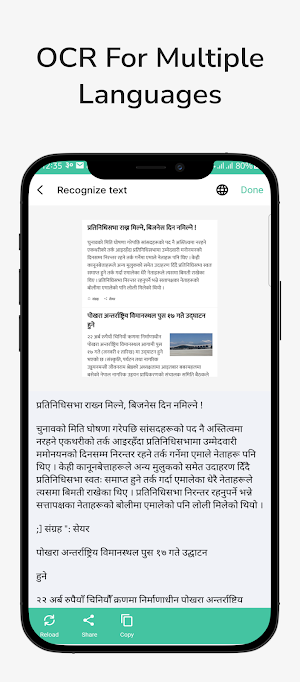


About Pocket Scanner
*Ad free app*
The Pocket Scanner app turns your device into a powerful portable scanner that recognizes text automatically (OCR) and allows you to save to multiple files formats including PDF, JPEG and ZIP.
This app Scan anything — receipts, notes, documents, photos, business cards, books, whiteboards — with text you can reuse from each PDF and photo scan.
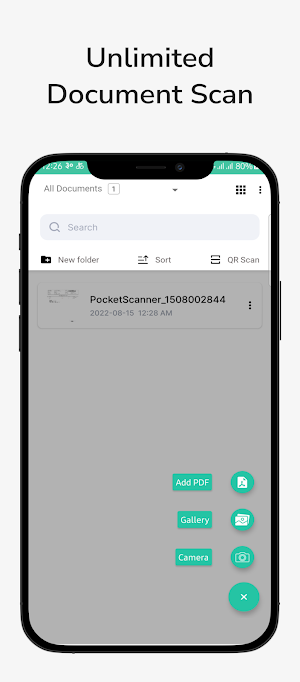
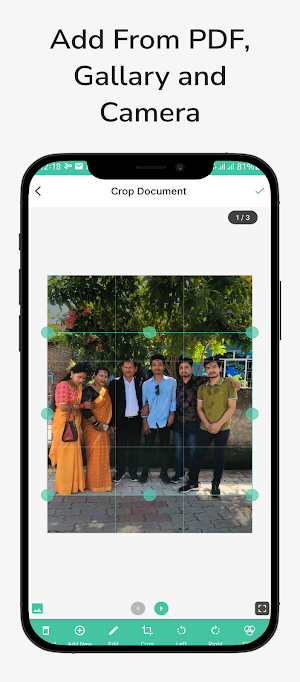
This app allows you to import pdf, import from gallery and capture from camera.
HOW IT WORKS
• With the Pocket scanner app, you can make anything scannable.
• Use the PDF scanner to quickly create a photo scan or PDF scan.
• Scan any document and convert to PDF.
CAPTURE
• Scan anything with precision with this mobile PDF scanner.
• Advanced image technology automatically detects borders, sharpens scanned content, and recognizes text (OCR).
ENHANCE
• Touch up scans or photos from your camera roll.
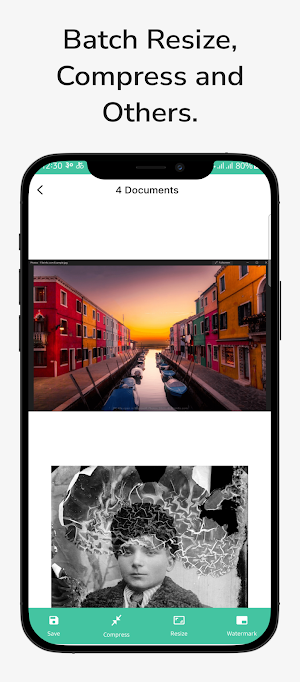
• Whether it’s a PDF or photo scan, you can preview, reorder, crop, rotate, resize, compress, watermark, signature and adjust color.
REUSE
• Turn your photo scan into a high-quality PDF that unlocks text through automated text recognition (OCR).
• Reuse text from each PDF scan thanks to OCR.
SCAN ANYTHING, ANYWHERE, ANYTIME
• Capture forms, receipts, notes, and business cards with this mobile PDF scanner.
• The Pocket scanner app even lets you scan multi-page documents and save with a single tap.
RECYCLE CONTENT
• The Pocket Scanner Scan PDF scanner makes any content scannable and reusable.
• Free, built-in optical character recognition (OCR) lets you reuse scanned text
GET MORE DONE ON THE GO
• Save each scan offline for instant access and sharing.
• Even lengthy legal documents become manageable and scannable with the Pocket Scanner app, which lets you search, select, and copy text.
Download the best free mobile scanner to convert photos and documents into PDF and JPEG files wherever you are. With OCR technology, you can easily digitalize books, business cards, and business receipts and access . Scan photos to high-quality PDFs or JPEGs and share easier than ever before.
The Pocket Scanner app turns your device into a powerful portable scanner that recognizes text automatically (OCR) and allows you to save to multiple files formats including PDF, JPEG and ZIP.
This app Scan anything — receipts, notes, documents, photos, business cards, books, whiteboards — with text you can reuse from each PDF and photo scan.
This app allows you to import pdf, import from gallery and capture from camera.
HOW IT WORKS
• With the Pocket scanner app, you can make anything scannable.
• Use the PDF scanner to quickly create a photo scan or PDF scan.
• Scan any document and convert to PDF.
CAPTURE
• Scan anything with precision with this mobile PDF scanner.
• Advanced image technology automatically detects borders, sharpens scanned content, and recognizes text (OCR).
ENHANCE
• Touch up scans or photos from your camera roll.
• Whether it’s a PDF or photo scan, you can preview, reorder, crop, rotate, resize, compress, watermark, signature and adjust color.
REUSE
• Turn your photo scan into a high-quality PDF that unlocks text through automated text recognition (OCR).
• Reuse text from each PDF scan thanks to OCR.
SCAN ANYTHING, ANYWHERE, ANYTIME
• Capture forms, receipts, notes, and business cards with this mobile PDF scanner.
• The Pocket scanner app even lets you scan multi-page documents and save with a single tap.
RECYCLE CONTENT
• The Pocket Scanner Scan PDF scanner makes any content scannable and reusable.
• Free, built-in optical character recognition (OCR) lets you reuse scanned text
GET MORE DONE ON THE GO
• Save each scan offline for instant access and sharing.
• Even lengthy legal documents become manageable and scannable with the Pocket Scanner app, which lets you search, select, and copy text.
Download the best free mobile scanner to convert photos and documents into PDF and JPEG files wherever you are. With OCR technology, you can easily digitalize books, business cards, and business receipts and access . Scan photos to high-quality PDFs or JPEGs and share easier than ever before.
What’s new
Version 1.1 · Updated November 11, 2022
Multiple Language Added * Hindi * Bengali * Japanese * Nepali * English
User reviews

Nice

awesome
Alternatives to Pocket Scanner
Looking for apps like Pocket Scanner? Here are 6 similar Android apps on Google Play. The highest rated is QuickScan: Document Scanner (4.3/5), and 5 of the 6 are free to download.
-
Camscanner - docs & QR Pro
-
QuickScan: Document Scanner 4.3
-
Scanner APP - Document Scanner
-
Document Scanner - PDF, OCR 4.2
-
PDF Reader - Scan, Edit & Sign 4.3
-
Doc Scanner - Scan PDF, OCR 4.1
| App | Rating | Price | Installs | Last updated | Compare |
|---|---|---|---|---|---|
| Pocket Scanner | – | Free | 100+ | Nov 11, 2022 | |
| Camscanner - docs & QR Pro | – | 1.99 USD | 1+ | Apr 25, 2023 | Compare |
| QuickScan: Document Scanner | 4.3 / 5 | Free | 100,000+ | Jun 12, 2026 | Compare |
| Scanner APP - Document Scanner | – | Free | 50,000+ | Aug 20, 2026 | Compare |
| Document Scanner - PDF, OCR | 4.2 / 5 | Free | 100,000+ | Oct 25, 2026 | Compare |
| PDF Reader - Scan, Edit & Sign | 4.3 / 5 | Free | 1,000,000+ | Oct 19, 2026 | Compare |
| Doc Scanner - Scan PDF, OCR | 4.1 / 5 | Free | 500,000+ | Oct 20, 2026 | Compare |
Compare Pocket Scanner with the top alternatives: ratings, updates, ASO score and keyword gaps →