
Network Calls Viewer - Web
changeblogger.org Tools
Open a web page in the android devices and inspect its network request and logs.
- Downloads
- 125+
- on Google Play
- Price
- Free
- No in-app purchases
- Updated
- Jul 21
- 2026 · v1.0
Screenshots

About Network Calls Viewer - Web
WHAT IT INSPECTS
The app inspects only the web pages you open inside it. It does not monitor, intercept or record traffic from other apps on your device, from your system browser, or from your network. It is not a VPN, a proxy or a packet capture tool, and it does not ask for those permissions.
BROWSE
• Enter any http or https address, or type words to run a web search
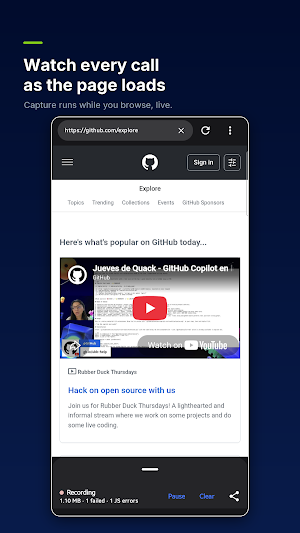
• Navigate with back, forward and reload while the recording continues
• Switch to a desktop user agent to load the desktop version of a site
• Follow and save file downloads, with a list of what has been downloaded
REQUEST LIST
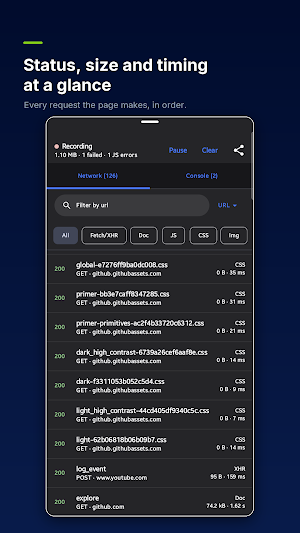
Every request the page makes appears in a live list as it happens:
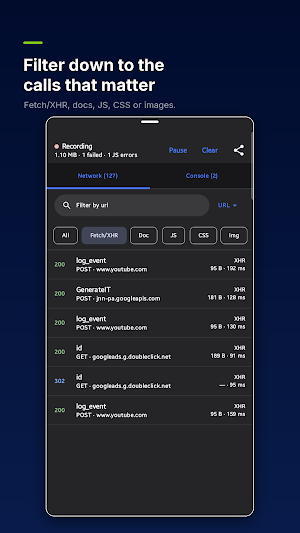
• Request name, HTTP method, status code, resource type, transfer size and duration
• Filter by type: documents, stylesheets, scripts, images, fonts, XHR and fetch, media, WebSockets
• Search the list by URL, and optionally by header or body content
• Highlight failed and error responses
• Pause recording, resume it, or clear the list before a new test run
REQUEST DETAIL
Tap any request to open a detail view with four tabs:
• Headers - general information (full URL, method, status, remote address, protocol) plus all request and response headers, including cookies sent and set
• Payload - query string parameters parsed into name and value pairs, and the request body
• Response - the response body, formatted for JSON and text, and rendered as a picture for image responses. For WebSocket connections this tab lists the messages sent and received.
• Timing - when the request started, how long it took, its size, and whether it was served from the cache
You can copy a single header, all headers, the URL, the request body, the response body, or the whole request as a cURL command to paste into a terminal.
TEST CONDITIONS
• Throttle the connection with preset network speeds to see how the page behaves on a slow link
• Disable the HTTP cache to force fresh requests
• Block a specific request URL and reload to see how the page copes without it, then unblock it again
CONSOLE
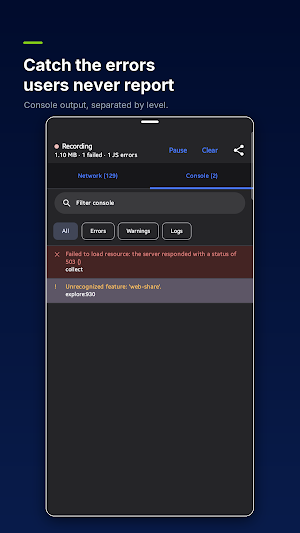
A separate tab collects the JavaScript console output of the page, including uncaught errors, with filters for errors, warnings and logs and a text search.
EXPORT
Export the recorded session as a HAR file. HAR is a standard JSON format for network recordings, so the capture can be saved, shared with a colleague, or reopened later in other tools that read HAR files.
TYPICAL USES
• Check that an API call from your web app sends the right headers and body on a real phone
• Find out why a page is slow: which requests are large, which ones block, which ones fail
• Confirm that analytics, tracking or consent requests fire only when they should
• Reproduce a bug reported on mobile and capture the evidence as a HAR file
• Read the console errors of a page while it runs on the device
PRIVACY
Everything is processed on the device. Captured requests, headers, bodies and console output stay in the app and are only shared if you choose to export or copy them yourself. There is no account, no sign-in, no analytics and no advertising. Captured data is held for the current session and is cleared when you clear the list or close the app.
The app is intended for inspecting websites and web applications you are allowed to test in android devices.
What’s new
Version 1.0 · Updated July 21, 2026
First release. • Load any URL and capture every request the page makes • Method, status, size and timing for each call • Full request and response headers, including cookies • Request and response bodies • JavaScript console output, filtered by level • Throttle the connection and disable the cache • Switch to a desktop user agent • Export the whole session as a HAR file Nothing leaves your device. No account, no analytics, no ads.
Alternatives to Network Calls Viewer - Web
Looking for apps like Network Calls Viewer - Web? Here are 6 similar Android apps on Google Play. The highest rated is Autosync - File Sync & Backup (4.5/5), and all 6 are free to download.
-
Final Surge 4.5
-
Total Drive - Cloud Storage 3.7
-
MYCPE ONE 4.4
-
PDFelement-PDF Editor & Reader 4.1
-
Bitdefender Central 4.5
-
Autosync - File Sync & Backup 4.5
| App | Rating | Price | Installs | Last updated | Compare |
|---|---|---|---|---|---|
| Network Calls Viewer - Web | – | Free | 100+ | Jul 21, 2026 | |
| Final Surge | 4.5 / 5 | Free | 100,000+ | Sep 7, 2026 | Compare |
| Total Drive - Cloud Storage | 3.7 / 5 | Free | 500,000+ | – | Compare |
| MYCPE ONE | 4.4 / 5 | Free | 1,000+ | Oct 28, 2026 | Compare |
| PDFelement-PDF Editor & Reader | 4.1 / 5 | Free | 5,000,000+ | Oct 16, 2026 | Compare |
| Bitdefender Central | 4.5 / 5 | Free | 1,000,000+ | Jul 17, 2026 | Compare |
| Autosync - File Sync & Backup | 4.5 / 5 | Free | 100,000+ | Oct 14, 2026 | Compare |