
AmaDoc PDF Scanner
Travell Productivity Contains ads
Fast PDF Scanner & Document Manager. Scan to PDF with AI OCR. Works offline
- Downloads
- 92+
- on Google Play
- Price
- Free
- No in-app purchases
- Updated
- Apr 7
- 2026 · v1.0
Screenshots
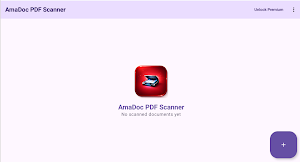
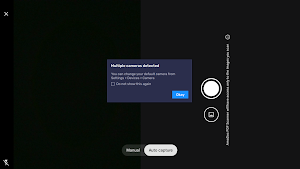
About AmaDoc PDF Scanner
can PDF – Document Manager Pro: Your Professional Mobile Office
Turn your smartphone into a high-performance, pro-grade portable scanner. Scan PDF – Document Manager Pro is the ultimate tool for anyone needing to digitize, manage, and share documents on the go. Powered by advanced machine learning, it delivers crystal-clear scans while keeping your data 100% private and offline.
Whether you’re a student saving lecture notes, a professional scanning receipts for expenses, or a small business owner managing invoices, Scan PDF provides the speed and reliability you need.
🚀 PRO-LEVEL SCANNING FEATURES
•
Intelligent ML Scanning: Automatically detect document edges and perspective with Google’s latest machine learning technology. Get perfectly cropped, high-definition scans every time.
•
Multi-Page PDF Support: Scan one page or a hundred. Create comprehensive PDF documents effortlessly.
•
Import from Gallery: Have existing photos of documents? Import them directly and convert them into professional PDFs in seconds.
•
Offline Privacy: Your documents are your business. All scanning and processing happen locally on your device. No cloud uploads, no account required, and no internet needed for core features.
•
High-Quality Exports: Save your work as professional-grade PDFs or high-resolution JPEGs.
📂 ADVANCED DOCUMENT MANAGEMENT
•
Smart Naming & Organization: Custom-name your files to keep your digital office tidy.
•
Export to Downloads: One-tap export to your device’s Downloads folder for universal access, easy backup, or PC transfer.
•
In-App PDF Viewer: Preview and review your documents instantly within the app.
•
Quick Search & History: Easily find what you need in a clean, modern list displaying dates and page counts.
💎 UNLOCK PRO TOOLS WITH REWARDED ACCESS
Take your productivity to the next level! By watching a quick rewarded ad, you can unlock:
•
AI-Powered OCR (Text Recognition): Automatically extract text from any printed document. Copy, edit, and share digitized text instantly—perfect for digitizing quotes, notes, or data.
•
Premium Tools: Access high-end features for your current session without a monthly subscription.
🛠 WHY CHOOSE SCAN PDF – DOCUMENT MANAGER PRO?
•
Fast & Lightweight: Optimized for speed and low battery consumption.
•
Material 3 Design: A sleek, intuitive, and modern user interface that is easy on the eyes and a joy to use.
•
Seamless Sharing: Share your PDFs via email, WhatsApp, Slack, or any cloud storage with a single tap.
•
Share the Love: Use the built-in "Share App" feature to help your friends and colleagues go paperless!
🔒 PERMISSIONS & PRIVACY
We respect your privacy.
•
Camera: Used strictly to capture document scans.
•
Storage: Required to save and export your professional PDFs to your device.
•
No Data Collection: Your documents are processed only on your phone. We do not store or see your files.
Download Scan PDF – Document Manager Pro today and carry your entire office in your pocket
Turn your smartphone into a high-performance, pro-grade portable scanner. Scan PDF – Document Manager Pro is the ultimate tool for anyone needing to digitize, manage, and share documents on the go. Powered by advanced machine learning, it delivers crystal-clear scans while keeping your data 100% private and offline.
Whether you’re a student saving lecture notes, a professional scanning receipts for expenses, or a small business owner managing invoices, Scan PDF provides the speed and reliability you need.
🚀 PRO-LEVEL SCANNING FEATURES
•
Intelligent ML Scanning: Automatically detect document edges and perspective with Google’s latest machine learning technology. Get perfectly cropped, high-definition scans every time.
•
Multi-Page PDF Support: Scan one page or a hundred. Create comprehensive PDF documents effortlessly.
•
Import from Gallery: Have existing photos of documents? Import them directly and convert them into professional PDFs in seconds.
•
Offline Privacy: Your documents are your business. All scanning and processing happen locally on your device. No cloud uploads, no account required, and no internet needed for core features.
•
High-Quality Exports: Save your work as professional-grade PDFs or high-resolution JPEGs.
📂 ADVANCED DOCUMENT MANAGEMENT
•
Smart Naming & Organization: Custom-name your files to keep your digital office tidy.
•
Export to Downloads: One-tap export to your device’s Downloads folder for universal access, easy backup, or PC transfer.
•
In-App PDF Viewer: Preview and review your documents instantly within the app.
•
Quick Search & History: Easily find what you need in a clean, modern list displaying dates and page counts.
💎 UNLOCK PRO TOOLS WITH REWARDED ACCESS
Take your productivity to the next level! By watching a quick rewarded ad, you can unlock:
•
AI-Powered OCR (Text Recognition): Automatically extract text from any printed document. Copy, edit, and share digitized text instantly—perfect for digitizing quotes, notes, or data.
•
Premium Tools: Access high-end features for your current session without a monthly subscription.
🛠 WHY CHOOSE SCAN PDF – DOCUMENT MANAGER PRO?
•
Fast & Lightweight: Optimized for speed and low battery consumption.
•
Material 3 Design: A sleek, intuitive, and modern user interface that is easy on the eyes and a joy to use.
•
Seamless Sharing: Share your PDFs via email, WhatsApp, Slack, or any cloud storage with a single tap.
•
Share the Love: Use the built-in "Share App" feature to help your friends and colleagues go paperless!
🔒 PERMISSIONS & PRIVACY
We respect your privacy.
•
Camera: Used strictly to capture document scans.
•
Storage: Required to save and export your professional PDFs to your device.
•
No Data Collection: Your documents are processed only on your phone. We do not store or see your files.
Download Scan PDF – Document Manager Pro today and carry your entire office in your pocket
User reviews

Thanks Amadoc Scanner is amazing
Alternatives to AmaDoc PDF Scanner
Looking for apps like AmaDoc PDF Scanner? Here are 6 similar Android apps on Google Play. The highest rated is Mobile Scanner App - Scan PDF (4.6/5), and all 6 are free to download.
-
ConstructionOnline 3.9
-
PDF Merge: Scan, Sign & Edit 3.8
-
pdfFiller Edit, fill, sign PDF 3.9
-
Mobi PDF・Editor・Scanner・Reader 4.4
-
Mobile Scanner App - Scan PDF 4.6
-
PDF Scanner Plus - Doc Scanner 4.6
| App | Rating | Price | Installs | Last updated | Compare |
|---|---|---|---|---|---|
| AmaDoc PDF Scanner | – | Free | 50+ | Apr 7, 2026 | |
| ConstructionOnline | 3.9 / 5 | Free | 10,000+ | Oct 23, 2026 | Compare |
| PDF Merge: Scan, Sign & Edit | 3.8 / 5 | Free | 5,000,000+ | Feb 2, 2026 | Compare |
| pdfFiller Edit, fill, sign PDF | 3.9 / 5 | Free | 5,000,000+ | Oct 22, 2026 | Compare |
| Mobi PDF・Editor・Scanner・Reader | 4.4 / 5 | Free | 10,000,000+ | Oct 19, 2026 | Compare |
| Mobile Scanner App - Scan PDF | 4.6 / 5 | Free | 10,000,000+ | Sep 16, 2026 | Compare |
| PDF Scanner Plus - Doc Scanner | 4.6 / 5 | Free | 1,000,000+ | Oct 12, 2026 | Compare |
Compare AmaDoc PDF Scanner with the top alternatives: ratings, updates, ASO score and keyword gaps →