

InstaOMR – Scan & Evaluate OMR
Edinso Education
Scan OMR sheets with your phone. Get instant results—no machine required
- Downloads
- 986+
- on Google Play
- Price
- Free
- No in-app purchases
- Updated
- Jul 2
- 2026 · v18.0
Screenshots


About InstaOMR – Scan & Evaluate OMR
Scan. Evaluate. Generate Results—All in Seconds.
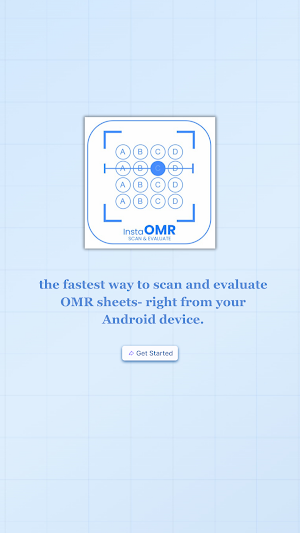
InstaOMR is a powerful mobile OMR scanning app designed for schools, coaching institutes, colleges, and universities. Eliminate the need for expensive OMR machines—your smartphone is all you need.
Simply point your camera at a filled OMR sheet, and InstaOMR instantly reads responses, compares them with the answer key, calculates scores (including negative marking), and generates detailed performance reports—within seconds.
Key Features
• No Hardware Required – Use your smartphone—no OMR scanner or machine needed
• Instant Evaluation – Get results in under 30 seconds per sheet
• Smart Detection – Works seamlessly in normal classroom lighting
• Custom OMR Templates – Supports 20, 60, and 100 question formats
• Negative Marking Support – Fully configurable marking system
• Detailed Analytics – Score, rank, percentage, and question-wise analysis
• Cloud Storage – Access your data anytime, from any device
• Pay-As-You-Go Credits – Only pay for what you scan—no subscriptions
How It Works
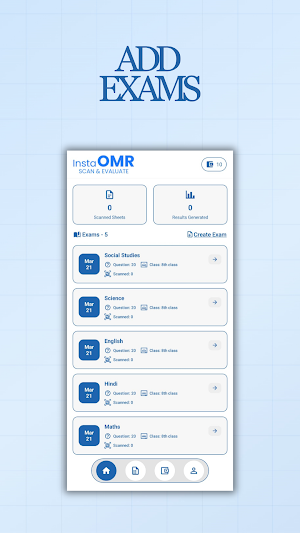
1. Step 1: Create Exam – Add class name, exam details, and choose your OMR template
2. Step 2: Set Answer Key – Define correct answers, marks per question, and negative marking rules
3. Step 3: Scan Sheets – Place the sheet on a flat surface and scan using your phone
4. Step 4: Get Reports – Download detailed performance reports instantly
Who Is It For?
• Schools conducting regular tests and assessments
• Coaching institutes running competitive exam mocks
• Colleges and universities managing large batches
• Exam boards needing fast evaluation turnaround
• Training institutes and certification bodies
Flexible Credit System
1 Scan = 1 Credits
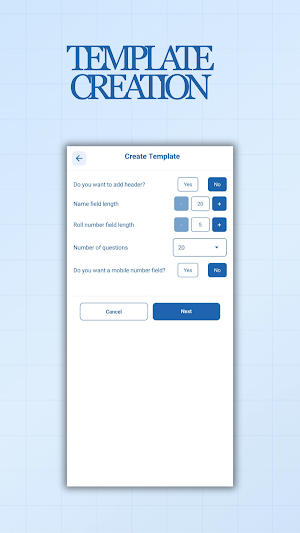
Custom OMR Template Builder
• 20, 60, or 100 questions
• 1 or 2 header rows
• Roll number fields (5–9 digits)
• Optional mobile number field
• Live preview before saving
Security & Reliability
• Secure cloud storage with encryption
• Automatic backups—never lose data
• Built-in validations to minimize errors
InstaOMR is a powerful mobile OMR scanning app designed for schools, coaching institutes, colleges, and universities. Eliminate the need for expensive OMR machines—your smartphone is all you need.
Simply point your camera at a filled OMR sheet, and InstaOMR instantly reads responses, compares them with the answer key, calculates scores (including negative marking), and generates detailed performance reports—within seconds.
Key Features
• No Hardware Required – Use your smartphone—no OMR scanner or machine needed
• Instant Evaluation – Get results in under 30 seconds per sheet
• Smart Detection – Works seamlessly in normal classroom lighting
• Custom OMR Templates – Supports 20, 60, and 100 question formats
• Negative Marking Support – Fully configurable marking system
• Detailed Analytics – Score, rank, percentage, and question-wise analysis
• Cloud Storage – Access your data anytime, from any device
• Pay-As-You-Go Credits – Only pay for what you scan—no subscriptions
How It Works
1. Step 1: Create Exam – Add class name, exam details, and choose your OMR template
2. Step 2: Set Answer Key – Define correct answers, marks per question, and negative marking rules
3. Step 3: Scan Sheets – Place the sheet on a flat surface and scan using your phone
4. Step 4: Get Reports – Download detailed performance reports instantly
Who Is It For?
• Schools conducting regular tests and assessments
• Coaching institutes running competitive exam mocks
• Colleges and universities managing large batches
• Exam boards needing fast evaluation turnaround
• Training institutes and certification bodies
Flexible Credit System
1 Scan = 1 Credits
Custom OMR Template Builder
• 20, 60, or 100 questions
• 1 or 2 header rows
• Roll number fields (5–9 digits)
• Optional mobile number field
• Live preview before saving
Security & Reliability
• Secure cloud storage with encryption
• Automatic backups—never lose data
• Built-in validations to minimize errors
User reviews

Best application 👍

We use InstaOMR at our coaching center and it has made exam work very easy. Creating OMR sheets, scanning them, and getting instant results saves a lot of time. The bulk export feature is very helpful for managing many students. Simple and efficient app.

Genuinely good app

revolutionary step.

very excellent app👍👍

the app is great!
Alternatives to InstaOMR – Scan & Evaluate OMR
Looking for apps like InstaOMR – Scan & Evaluate OMR? Here are 5 similar Android apps on Google Play. All of them are free to download.





| App | Rating | Price | Installs | Last updated | Compare |
|---|---|---|---|---|---|
| InstaOMR – Scan & Evaluate OMR | – | Free | 500+ | Jul 2, 2026 | |
| Online Test | – | Free | 500+ | – | Compare |
| Swami Narayana | – | Free | 5+ | – | Compare |
| JRS Tutorials | – | Free | 10,000+ | Jul 11, 2026 | Compare |
| GenSupport | – | Free | 1,000+ | Feb 19, 2024 | Compare |
| MG EDINSO | – | Free | 10+ | – | Compare |