
FPS Meter On Screen Real-Time
Black Marvels Club Productivity Contains ads
Get real time fps rate and temperature details on screen with customization.
- Rating
- 1.8
- 32 ratings
- Downloads
- 5K+
- on Google Play
- Price
- Free
- No in-app purchases
- Updated
- Jan 19
- 2024 · v1.0
Screenshots
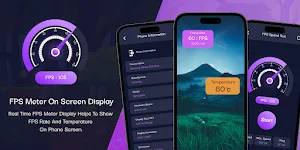
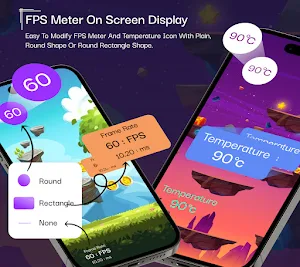
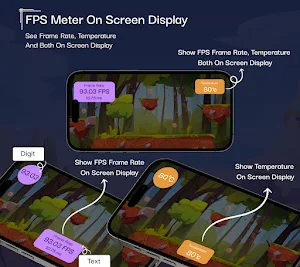
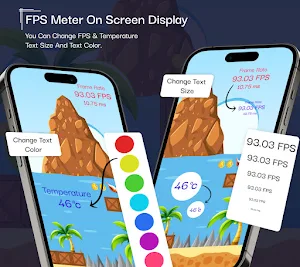


About FPS Meter On Screen Real-Time
Real Time FPS Meter And Display, Show FPS Meter On Screen App, Display Real Time FPS Meter.
FPS Meter On Screen Real-Time helps to show real time FPS rate on screen.
Now you can customize frames per rate (FPS rate) as you want with appearance on phone screen.
Show amazing looking appearance of FPS rate with update interval rate.
Get real time performance information and customization for your device.
You can show FPS rate, screen refresh rate, CPU information, temprature information, display details, phone information, frames rate graph.
View the screen refresh rate on your device's screen.
Customize the appearance of the refresh rate display️, including overlay and status bar options.
Show temperature details on screen with easy customization.
You can customize with text, background color, gradient background color, text background, background shape.
Show temperature in celsius, farenhit and kelvin.
Set temperature text position as you want at top, center or bottom in phone view.
FPS Meter On Screen with easy customization and on screen preview to change as you want.
Speedtest explore mobile network coverage with speedtest maps based on real world data.
Show performance by provider to find out where you’re likely to experience strong connectivity.
Easily switch between providers and regions to compare coverage in the locations you frequent.
Check speed for wifi and mobile network.
Features :-
- A complete customizable FPS rate to show appearance as you want.
- FPS meter display frames per second rate on your screen.
- Show FPS rate in screen overlay and status bar as you want to show.
- FPS rate graph show current update of FPS rate with live graph.
- Temperature on screen with screen overlay and status bar.
- CPU information and specifications about your device's CPU hardware and processor.
- Phone information shows your device configuration in detailed.
- Speed test to test actual speed from your wifi and mobile data speed from network provider.
- Easily toggle the display of FPS rate and temperature on or off from the screen.
- Customize FPS rate and temperature view with text and digit and text with digit details.
- Customize FPS rate and temperature view with portrait mode and horizontal mode.
- Customize FPS rate and temperature view with text size, color, font size and position.
- You can customize FPS rate and temperature view with background shape, background color, background animation, gradient background.
- Customize FPS rate and temperature view with top center, center center and bottom center as you want to show on screen.
- Customize view with color setting as solid color, gradient color, animation GIFs for text and background shape.
- Show on screen preview before finalize.
Shows a customizable real time display frames per second (FPS) and real time temperature view anywhere on screen.
You can choose to show it as overlay or in status bar for both view.
Permission :-
- This app needs to access overlay permission to display FPS and Refresh Rate view over other apps.
FPS Meter On Screen Real-Time helps to show real time FPS rate on screen.
Now you can customize frames per rate (FPS rate) as you want with appearance on phone screen.
Show amazing looking appearance of FPS rate with update interval rate.
Get real time performance information and customization for your device.
You can show FPS rate, screen refresh rate, CPU information, temprature information, display details, phone information, frames rate graph.
View the screen refresh rate on your device's screen.
Customize the appearance of the refresh rate display️, including overlay and status bar options.
Show temperature details on screen with easy customization.
You can customize with text, background color, gradient background color, text background, background shape.
Show temperature in celsius, farenhit and kelvin.
Set temperature text position as you want at top, center or bottom in phone view.
FPS Meter On Screen with easy customization and on screen preview to change as you want.
Speedtest explore mobile network coverage with speedtest maps based on real world data.
Show performance by provider to find out where you’re likely to experience strong connectivity.
Easily switch between providers and regions to compare coverage in the locations you frequent.
Check speed for wifi and mobile network.
Features :-
- A complete customizable FPS rate to show appearance as you want.
- FPS meter display frames per second rate on your screen.
- Show FPS rate in screen overlay and status bar as you want to show.
- FPS rate graph show current update of FPS rate with live graph.
- Temperature on screen with screen overlay and status bar.
- CPU information and specifications about your device's CPU hardware and processor.
- Phone information shows your device configuration in detailed.
- Speed test to test actual speed from your wifi and mobile data speed from network provider.
- Easily toggle the display of FPS rate and temperature on or off from the screen.
- Customize FPS rate and temperature view with text and digit and text with digit details.
- Customize FPS rate and temperature view with portrait mode and horizontal mode.
- Customize FPS rate and temperature view with text size, color, font size and position.
- You can customize FPS rate and temperature view with background shape, background color, background animation, gradient background.
- Customize FPS rate and temperature view with top center, center center and bottom center as you want to show on screen.
- Customize view with color setting as solid color, gradient color, animation GIFs for text and background shape.
- Show on screen preview before finalize.
Shows a customizable real time display frames per second (FPS) and real time temperature view anywhere on screen.
You can choose to show it as overlay or in status bar for both view.
Permission :-
- This app needs to access overlay permission to display FPS and Refresh Rate view over other apps.
Alternatives to FPS Meter On Screen Real-Time
Looking for apps like FPS Meter On Screen Real-Time? Here are 6 similar Android apps on Google Play. The highest rated is Auto Clicker - Tapping Click (1.7/5), and all 6 are free to download.
-
Auto Clicker - Tapping Click 1.7
-
Shake To Lock Unlock Screen
-
App Lock With Face Lock
-
Big Font Size Keyboard
-
SMS & Call Logs Backup Restore
-
App Data Monitor - Data Usage
| App | Rating | Price | Installs | Last updated | Compare |
|---|---|---|---|---|---|
| FPS Meter On Screen Real-Time | 1.8 / 5 | Free | 5,000+ | Jan 19, 2024 | |
| Auto Clicker - Tapping Click | 1.7 / 5 | Free | 10,000+ | Jul 3, 2023 | Compare |
| Shake To Lock Unlock Screen | – | Free | 10,000+ | May 17, 2023 | Compare |
| App Lock With Face Lock | – | Free | 1,000+ | Mar 19, 2024 | Compare |
| Big Font Size Keyboard | – | Free | 50+ | Jan 25, 2024 | Compare |
| SMS & Call Logs Backup Restore | – | Free | 50+ | Nov 10, 2023 | Compare |
| App Data Monitor - Data Usage | – | Free | 50+ | Oct 17, 2023 | Compare |
Similar apps on Google Play
- Auto Clicker - Tapping Click
- Shake To Lock Unlock Screen
- App Lock With Face Lock
- Big Font Size Keyboard
- SMS & Call Logs Backup Restore
- App Data Monitor - Data Usage
- Text Note To PDF Converter
- Hide Contact Hide Phone Number
- Notification LED : Edge Light
- PDF Viewer And Reader Lite
- Quick Phone Setting Access
- Phone Mic To Bluetooth Speaker
- Battery Indicator Energy Ring
- Touch Lock Screen Photo Video
- Speaker Cleaner & Dust Remover
- Full Battery Charge Alarm App
- Countdown Widget - Days & Time
- MHTML/MHT Viewer & PDF Convert
- Magnifier Glass And Flashlight
- Mouse Touchpad for Big Phones
- Color Notepad - Notes & Lists
- Bluetooth Volume Manager
- Big Fonts - Font Size Changer
- NFC Tool - NFC Reader & Writer