
Photo, Voice & OCR Translator
AP Tech Studio Tools Contains ads
Scan Photos and Text into All Languages with Camera Translator & OCR Text Reader
- Downloads
- 1K+
- on Google Play
- Price
- Free
- No in-app purchases
- Updated
- Oct 7
- 2022 · v1.2
Screenshots
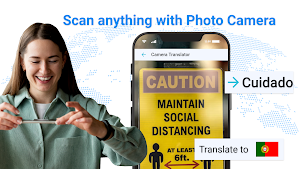


About Photo, Voice & OCR Translator
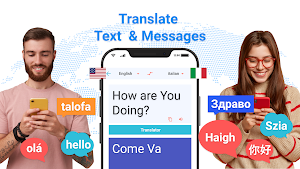
Smart OCR is a useful tool to convert your image to text and translate your all text into your desired language. This language translator helps the user to convert text to their desired language.
OCR scanner is an essential tool to capture your document and convert it into text and use text for your future use. In other serval OCRs, only text is captured not the objects.
This OCR can capture objects and convert’s it into text. This app is very fast and accurate to capture and translate.
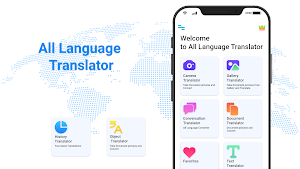
All languages translator and OCR camera has been launched with advanced features;
Accuracy for all languages
Offline translation
Document to a text capture
OCR camera
Object capture
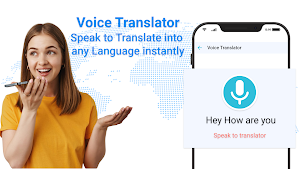
Conversation between multi-languages
Paragraph translation
Camera translation
Image from gallery translate
Image to text
Object translator
Users need translation whenever they travel, study, have conversations, or have foreign business deals. Now the user is not needed anything else aspect this smart translator app is a cross translator application that has multiple languages for the facility of the user.
Now users can converse in all languages by using this remarkable translator app.
Conversation in this app is very easy. Feature of conversation has been given separately. This language translator is a facility for those people who had to converse with people who speak different languages.
Sometimes the user just wants to read-only text that he had been given in another language like signboards, directions on the road, cautions, or instructions.
OCR provided features translate instantly by the device's camera. User has to just turn on the camera, and point the camera to the desired text that the user wants to translate, it will bring the user the translation automatically. Then if the user needs to copy translated text can capture and copy text to the clipboard.
Text scanners provide a favorite feature to the user because sometimes users have to save their important text to early access. With this feature, users can save and easily find important text and use it for their further use.
History feature is given so now user can find out easily their last conversation and text translate. This is ease to the user that where the user has to leave progress from.
Photo translator app can translate your page into text. Users have to only turn on this OCR camera and point to the document or text that the user wants to translate, it will translate your document and bring you the results.
OCR scanner is an essential tool to capture your document and convert it into text and use text for your future use. In other serval OCRs, only text is captured not the objects.
This OCR can capture objects and convert’s it into text. This app is very fast and accurate to capture and translate.
All languages translator and OCR camera has been launched with advanced features;
Accuracy for all languages
Offline translation
Document to a text capture
OCR camera
Object capture
Conversation between multi-languages
Paragraph translation
Camera translation
Image from gallery translate
Image to text
Object translator
Users need translation whenever they travel, study, have conversations, or have foreign business deals. Now the user is not needed anything else aspect this smart translator app is a cross translator application that has multiple languages for the facility of the user.
Now users can converse in all languages by using this remarkable translator app.
Conversation in this app is very easy. Feature of conversation has been given separately. This language translator is a facility for those people who had to converse with people who speak different languages.
Sometimes the user just wants to read-only text that he had been given in another language like signboards, directions on the road, cautions, or instructions.
OCR provided features translate instantly by the device's camera. User has to just turn on the camera, and point the camera to the desired text that the user wants to translate, it will bring the user the translation automatically. Then if the user needs to copy translated text can capture and copy text to the clipboard.
Text scanners provide a favorite feature to the user because sometimes users have to save their important text to early access. With this feature, users can save and easily find important text and use it for their further use.
History feature is given so now user can find out easily their last conversation and text translate. This is ease to the user that where the user has to leave progress from.
Photo translator app can translate your page into text. Users have to only turn on this OCR camera and point to the document or text that the user wants to translate, it will translate your document and bring you the results.
Alternatives to Photo, Voice & OCR Translator
Looking for apps like Photo, Voice & OCR Translator? Here are 4 similar Android apps on Google Play. The highest rated is Image scanner text translator (3.7/5), and all 4 are free to download.
-
Image scanner text translator 3.7
-
Translate 3.0
-
Camera Translator 3.4
-
Luxembourgish-EnglishTranslate
| App | Rating | Price | Installs | Last updated | Compare |
|---|---|---|---|---|---|
| Photo, Voice & OCR Translator | – | Free | 1,000+ | Oct 7, 2022 | |
| Image scanner text translator | 3.7 / 5 | Free | 1,000,000+ | – | Compare |
| Translate | 3.0 / 5 | Free | 1,000,000+ | May 15, 2020 | Compare |
| Camera Translator | 3.4 / 5 | Free | 1,000,000+ | Apr 16, 2020 | Compare |
| Luxembourgish-EnglishTranslate | – | Free | 10+ | Nov 26, 2022 | Compare |