

비츠온 Smart Link - 비츠온 , Vitson
IoDevice Lifestyle
Bitson is a smart home system that provides remote control, monitoring, brightness and color temperature control, timer function anytime and anywhere.
- Downloads
- 1.3K+
- on Google Play
- Price
- Free
- No in-app purchases
- Updated
- Apr 29
- 2019 · v1.1.9
Screenshots


About 비츠온 Smart Link - 비츠온 , Vitson
[Features of the product]
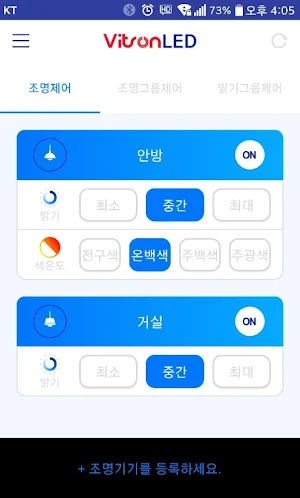
Lighting control: You can use the app to control On / Off, brightness, color temperature, and control status of the lighting device from outside / inside.
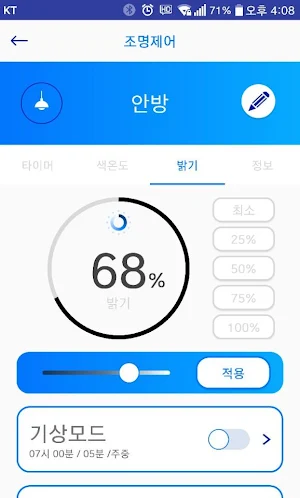
Brightness control: You can use the app to control the brightness of the lighting device
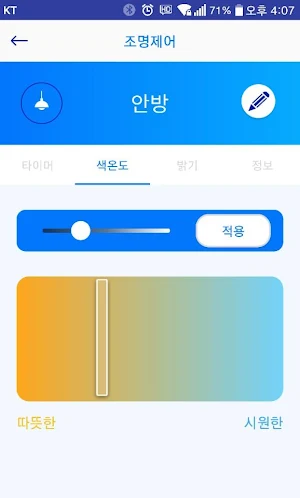
Color temperature control: You can use the app to control the color temperature of the lighting device (support model: ISV002).
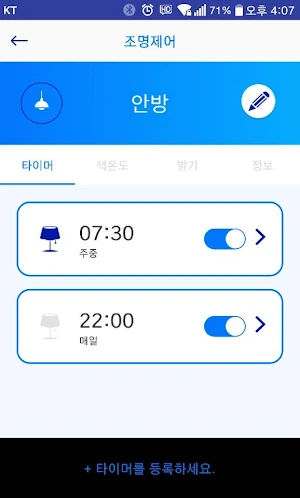
Timer: You can use the app to control the lighting device on / off according to the schedule / time scheduled.
Weather mode: You can use the weather mode feature of your app to enable the lighting device to gradually light up during "Custom" time for a scheduled time (scheduled).
Sleep mode: You can use the sleep mode feature of the app to allow the lighting device to gradually dim for a "Custom" time at a scheduled sleep (scheduled) time.
Easy sleep mode: You can use the "OFF" function of the lighting device immediately after "10 minutes / 20 minutes / user setting" when you click "10 minutes / 20 minutes / user setting" .
Brightness Group Control: You can use the brightness group control of your app to adjust the brightness of many lighting fixtures simultaneously in groups.
Lighting group control: You can use the lighting group control function of the app to turn On / Off control of multiple luminaires on / off simultaneously in groups.
Widget function allows easy on / off control of smart LED lighting device, brightness control, color temperature control.
[Notice]
1. The place where the smart lighting device is installed should be within the WIFI signal distance of the wired / wireless router in the house. (If the WiFi signal is weak or unstable, it may not be controlled smoothly.)
2. The wired / wireless router in the house must support WIFI 2.4Ghz (802.11b / g / n 2.4Ghz).
3. Gigabit WiFi A wireless router that supports dual band (5Ghz / 2.4Ghz) supports only 2.4Ghz WIFI name (SSID). The 5Ghz WIFI name (SSID) is not supported.
4. If your wired / wireless router is WEP encryption, please change to WPA2 and register.
5. Android OS 4.4 or later It is optimized for smartphone, and depending on the resolution of some terminals, the screen may be broken or the app may not be usable.
Lighting control: You can use the app to control On / Off, brightness, color temperature, and control status of the lighting device from outside / inside.
Brightness control: You can use the app to control the brightness of the lighting device
Color temperature control: You can use the app to control the color temperature of the lighting device (support model: ISV002).
Timer: You can use the app to control the lighting device on / off according to the schedule / time scheduled.
Weather mode: You can use the weather mode feature of your app to enable the lighting device to gradually light up during "Custom" time for a scheduled time (scheduled).
Sleep mode: You can use the sleep mode feature of the app to allow the lighting device to gradually dim for a "Custom" time at a scheduled sleep (scheduled) time.
Easy sleep mode: You can use the "OFF" function of the lighting device immediately after "10 minutes / 20 minutes / user setting" when you click "10 minutes / 20 minutes / user setting" .
Brightness Group Control: You can use the brightness group control of your app to adjust the brightness of many lighting fixtures simultaneously in groups.
Lighting group control: You can use the lighting group control function of the app to turn On / Off control of multiple luminaires on / off simultaneously in groups.
Widget function allows easy on / off control of smart LED lighting device, brightness control, color temperature control.
[Notice]
1. The place where the smart lighting device is installed should be within the WIFI signal distance of the wired / wireless router in the house. (If the WiFi signal is weak or unstable, it may not be controlled smoothly.)
2. The wired / wireless router in the house must support WIFI 2.4Ghz (802.11b / g / n 2.4Ghz).
3. Gigabit WiFi A wireless router that supports dual band (5Ghz / 2.4Ghz) supports only 2.4Ghz WIFI name (SSID). The 5Ghz WIFI name (SSID) is not supported.
4. If your wired / wireless router is WEP encryption, please change to WPA2 and register.
5. Android OS 4.4 or later It is optimized for smartphone, and depending on the resolution of some terminals, the screen may be broken or the app may not be usable.
What’s new
Version 1.1.9 · Updated April 29, 2019
안드로이드 OS 9(파이) 지원.
Alternatives to 비츠온 Smart Link - 비츠온 , Vitson
Looking for apps like 비츠온 Smart Link - 비츠온 , Vitson? Here are 6 similar Android apps on Google Play. The highest rated is TP-Link Deco (4.7/5), and all 6 are free to download.



| App | Rating | Price | Installs | Last updated | Compare |
|---|---|---|---|---|---|
| 비츠온 Smart Link - 비츠온 , Vitson | – | Free | 1,000+ | Apr 29, 2019 | |
| TP-Link VIGI | 4.6 / 5 | Free | 500,000+ | Oct 12, 2026 | Compare |
| Home V | 3.5 / 5 | Free | 100,000+ | Jun 26, 2026 | Compare |
| TP-Link Deco | 4.7 / 5 | Free | 10,000,000+ | Oct 23, 2026 | Compare |
| Linksys | 3.4 / 5 | Free | 5,000,000+ | Nov 13, 2025 | Compare |
| Keyguard | 4.7 / 5 | Free | 10,000+ | Sep 16, 2026 | Compare |
| SmartHome (MSmartHome) | 4.6 / 5 | Free | 5,000,000+ | Oct 30, 2026 | Compare |