

STEX Sync
TAEHA MECHATRONICS CO., LTD Health & Fitness
STEX Sync is a pairing app that manages and records personal workout info.
- Downloads
- 1K+
- on Google Play
- Price
- Free
- No in-app purchases
- Updated
- Aug 24
- 2025 · v2.4
Screenshots


About STEX Sync
1. STEX Machine & Smartphone Paring
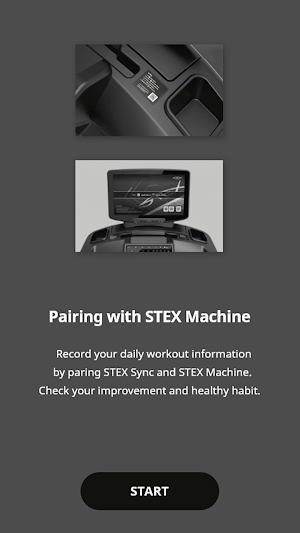
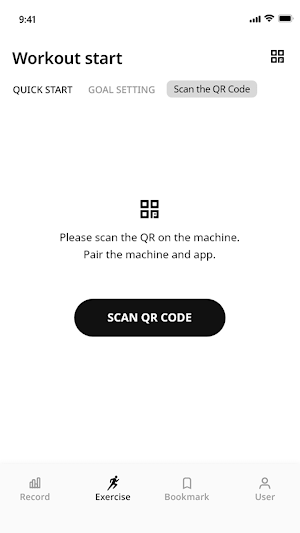
* Record personal workout information in STEX Sync by pairing a smartphone with STEX machine.
- Enjoy an easy pairing system through the QR code scan.
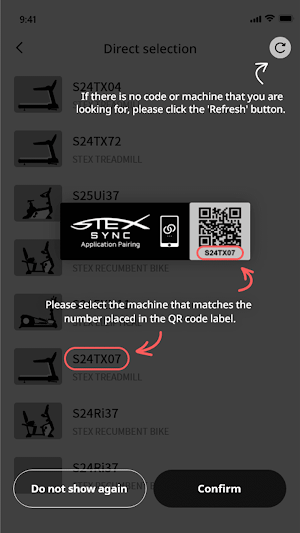
- User can be pairing STEX Sync by selecting STEX machine directly from the list.
▷ After pairing with the STEX machine, set up your workout plan.
2. Workout Setting Menu
* Set up and start a workout plan that suits the user’s workout ability and taste.
- Select the ‘Quick start’ when the user wants a ‘Free workout’ (non-target setting)
- Select the ‘Goal setting’ when the user wants a target setting workout.
- Enjoy an exercise program suitable for today's feeling through 'Recommendation'.
▷ Practice your exercise plan consistently through the free workout and goal setting workout.
3. Synchronizing of Set Values and STEX Machine
* Set workout goals remotely onto the STEX machine.
- Synchronize the workout goal type and 'set value' onto the STEX machine.
- Synchronize the 'Cooldown‘ (on/off) setting onto the STEX machine.
▷ After synchronizing the STEX Sync and STEX machine, press the ‘Start button’ to start the workout.
4. Workout Info Indicator
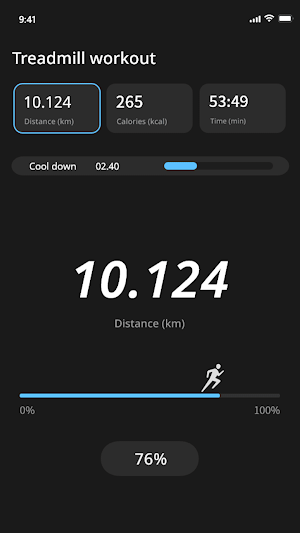
* Motivate user by providing workout performance and goal achievement rate.
- Check the workout performance(Km/mile, Kcal, min) in real-time.
- Check the goal achievement rate in real-time.
- Check the cooldown progress in real-time.
▷ Record the workout information performed and achieved.
5. Workout History
* Analyze workout performed history to manage correct workout habits.
- Visualize(graph) workout history.
- Check the records(all, yearly, monthly, weekly) from the start date of workout to the present.
- Check the user's preferred (treadmill/bike/elliptical) workout.
- Check the workout name and workout location registered in the record. (Modification & change available)
- Share the user’s workout history (image or Excel document) with friends.
▷ Establish and practice a more beneficial workout plan by examining the workout history.
6. Bookmark
* User can reuse the workout settings satisfied with through the bookmark function.
- The user can save the goal types, set values, and cooldown settings in the goal setting workout.
- User can save up to 50 settings as bookmarks.
▷ Take advantage of the workout settings bookmark function.
7. Personal information & Setting.
* Manage the workout records, bookmark data, Etc, and receive customer support services.
- If there are any questions while using STEX Sync, please use the Help & feedback tab.
- User can back up and restore workout history and bookmark data to the smartphone's internal storage.
- User can reset STEX Sync. (workout history, bookmarks, user information)
▷ If there are any questions, please contact us through the ‘Help & feedback’ menu.
We will do our best to provide a better user environment and experience.
[Permission required]
- Location access permission
→ required to scan a pairable STEX machine while using the app.
- Camera access permission
→ required to scan the QR code affixed to the STEX machine.
- Storage access permission (Android 10 Ver or below)
→ required to back up workout data to the device’s storage.
* Record personal workout information in STEX Sync by pairing a smartphone with STEX machine.
- Enjoy an easy pairing system through the QR code scan.
- User can be pairing STEX Sync by selecting STEX machine directly from the list.
▷ After pairing with the STEX machine, set up your workout plan.
2. Workout Setting Menu
* Set up and start a workout plan that suits the user’s workout ability and taste.
- Select the ‘Quick start’ when the user wants a ‘Free workout’ (non-target setting)
- Select the ‘Goal setting’ when the user wants a target setting workout.
- Enjoy an exercise program suitable for today's feeling through 'Recommendation'.
▷ Practice your exercise plan consistently through the free workout and goal setting workout.
3. Synchronizing of Set Values and STEX Machine
* Set workout goals remotely onto the STEX machine.
- Synchronize the workout goal type and 'set value' onto the STEX machine.
- Synchronize the 'Cooldown‘ (on/off) setting onto the STEX machine.
▷ After synchronizing the STEX Sync and STEX machine, press the ‘Start button’ to start the workout.
4. Workout Info Indicator
* Motivate user by providing workout performance and goal achievement rate.
- Check the workout performance(Km/mile, Kcal, min) in real-time.
- Check the goal achievement rate in real-time.
- Check the cooldown progress in real-time.
▷ Record the workout information performed and achieved.
5. Workout History
* Analyze workout performed history to manage correct workout habits.
- Visualize(graph) workout history.
- Check the records(all, yearly, monthly, weekly) from the start date of workout to the present.
- Check the user's preferred (treadmill/bike/elliptical) workout.
- Check the workout name and workout location registered in the record. (Modification & change available)
- Share the user’s workout history (image or Excel document) with friends.
▷ Establish and practice a more beneficial workout plan by examining the workout history.
6. Bookmark
* User can reuse the workout settings satisfied with through the bookmark function.
- The user can save the goal types, set values, and cooldown settings in the goal setting workout.
- User can save up to 50 settings as bookmarks.
▷ Take advantage of the workout settings bookmark function.
7. Personal information & Setting.
* Manage the workout records, bookmark data, Etc, and receive customer support services.
- If there are any questions while using STEX Sync, please use the Help & feedback tab.
- User can back up and restore workout history and bookmark data to the smartphone's internal storage.
- User can reset STEX Sync. (workout history, bookmarks, user information)
▷ If there are any questions, please contact us through the ‘Help & feedback’ menu.
We will do our best to provide a better user environment and experience.
[Permission required]
- Location access permission
→ required to scan a pairable STEX machine while using the app.
- Camera access permission
→ required to scan the QR code affixed to the STEX machine.
- Storage access permission (Android 10 Ver or below)
→ required to back up workout data to the device’s storage.
Alternatives to STEX Sync
Looking for apps like STEX Sync? Here are 6 similar Android apps on Google Play. 5 of the 6 are free to download.
-
Pet Oracle - AI Vet 24/7 Care
-
The Class Plan
-
Arbo Crossfit
-
Progreza
-
Water Reminder & Daily Tracker
-
CoachLogik
| App | Rating | Price | Installs | Last updated | Compare |
|---|---|---|---|---|---|
| STEX Sync | – | Free | 1,000+ | Aug 24, 2025 | |
| Pet Oracle - AI Vet 24/7 Care | – | Free | 500+ | May 22, 2025 | Compare |
| The Class Plan | – | Free | 500+ | – | Compare |
| Arbo Crossfit | – | Free | 500+ | Jul 31, 2026 | Compare |
| Progreza | – | Free | 5,000+ | Jul 26, 2026 | Compare |
| Water Reminder & Daily Tracker | – | 2.49 USD | 0+ | Jun 29, 2025 | Compare |
| CoachLogik | – | Free | 1,000+ | – | Compare |
Compare STEX Sync with the top alternatives: ratings, updates, ASO score and keyword gaps →
Similar apps on Google Play
- Pet Oracle - AI Vet 24/7 Care
- The Class Plan
- Arbo Crossfit
- Progreza
- Water Reminder & Daily Tracker
- CoachLogik
- Hard Zone
- Studio Fusion
- Wholesum Clinic
- Diabetes Bhawan
- ÖBSV
- SOUL SENSE
- Barbell Beauty Fitness
- Pure Energy Music
- Pleasant Prairie RecPlex
- HERBODY - Frauenfitness
- Blood Pressure & Sugar Monitor
- Студия «Танцы Йога МультКино»
- Six Harmonies
- Palazzo Fiuggi
- LiveAltlife
- Nutri-Q Practitioner
- ProТебя студия танца и фитнеса
- The Peak FItness App
- Descend MTB