

Selfit Golf - Swing & Tracer
%ED%8C%94%EB%B0%A9%ED%95%B4%EC%A0%80%EB%93%9C Sports
Diagnose your golf swing from one recording, and draw the ball flight on video.
- Downloads
- 17+
- on Google Play
- Price
- Free
- No in-app purchases
- Updated
- Sep 11
- 2026 · v1.3.0
Screenshots

About Selfit Golf - Swing & Tracer
One video from the practice range is all it takes.
Selfit Golf reads your posture, scores it, tells you what to fix first — and draws the ball flight right on your video.
■ Swing Coach — what's wrong, in numbers
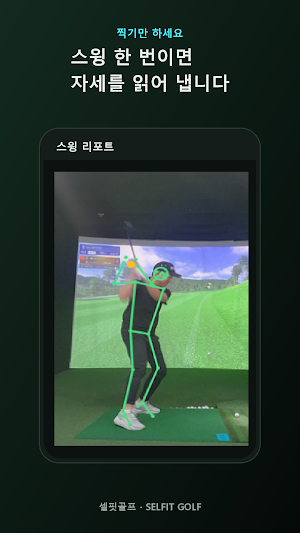
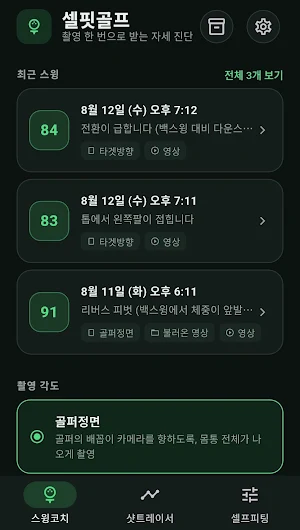
Record a swing or load one from your gallery. The app detects your body and splits the swing into five phases: address, halfway back, top, impact, finish.
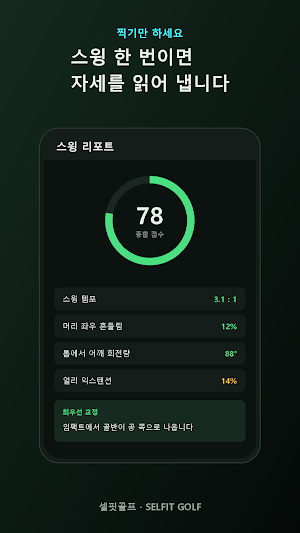
· 18 measurements and an overall score
tempo, head sway, spine angle retention, shoulder and hip turn, X-factor,
weight shift, hip opening at impact, early extension, swing path and more
· Every measurement shown next to its recommended range
· Fixes ranked by priority, each with the likely cause and drills to work on
· Skeleton overlay on the still frame of every phase
· A trimmed clip of just the swing is saved so you can compare over time
· Share sends the skeleton-overlaid clip together with an HTML report
■ Shot Tracer — see where the ball went
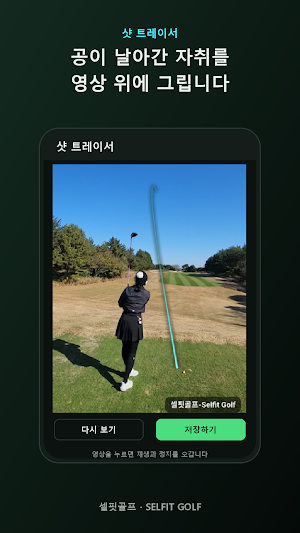
Load a shot you recorded. The app finds impact, you tap the ball eight times, and it draws the rest.
· The app locates impact; you confirm it or move it yourself
· Eight taps and you are done. Pinch to zoom for an accurate tap
· Not a flat parabola drawn on the screen — a real 3D ballistic solution
gravity, air drag, backspin and side spin, so the line thins as it recedes
and a fade or draw keeps curving the way it should
· The line continues past the edge of the frame all the way to where the ball lands
· Save the traced video to your gallery or share it straight away
■ Who it's for
· Golfers who can't take lessons but want to know what to fix
· Anyone checking their own form at the range
· Players who want to keep a video of a good shot
· Anyone comparing this month's swing to last month's
■ How to record
· Face-on — belt buckle toward the camera, whole body in frame
· Down the line — aim where the ball will fly, whole body in frame
· A tripod or a wall to lean the phone on makes a big difference
· Shot Tracer works best against plain backgrounds such as sky or grass
■ Good to know
· Pose detection and analysis run entirely on your device. Recordings and joint
coordinates stay in local storage and are never uploaded.
· The distance and speed figures Shot Tracer recovers are not a substitute for
launch monitor hardware. What this feature delivers is the visible trace,
not a measurement.
· A busy background, or a ball that leaves the frame within a few frames, can
defeat it. When that happens the app says so rather than drawing a wrong line.
· Saved videos carry a "셀핏골프-Selfit Golf" watermark.
· Available in Korean and English.
Selfit Golf reads your posture, scores it, tells you what to fix first — and draws the ball flight right on your video.
■ Swing Coach — what's wrong, in numbers
Record a swing or load one from your gallery. The app detects your body and splits the swing into five phases: address, halfway back, top, impact, finish.
· 18 measurements and an overall score
tempo, head sway, spine angle retention, shoulder and hip turn, X-factor,
weight shift, hip opening at impact, early extension, swing path and more
· Every measurement shown next to its recommended range
· Fixes ranked by priority, each with the likely cause and drills to work on
· Skeleton overlay on the still frame of every phase
· A trimmed clip of just the swing is saved so you can compare over time
· Share sends the skeleton-overlaid clip together with an HTML report
■ Shot Tracer — see where the ball went
Load a shot you recorded. The app finds impact, you tap the ball eight times, and it draws the rest.
· The app locates impact; you confirm it or move it yourself
· Eight taps and you are done. Pinch to zoom for an accurate tap
· Not a flat parabola drawn on the screen — a real 3D ballistic solution
gravity, air drag, backspin and side spin, so the line thins as it recedes
and a fade or draw keeps curving the way it should
· The line continues past the edge of the frame all the way to where the ball lands
· Save the traced video to your gallery or share it straight away
■ Who it's for
· Golfers who can't take lessons but want to know what to fix
· Anyone checking their own form at the range
· Players who want to keep a video of a good shot
· Anyone comparing this month's swing to last month's
■ How to record
· Face-on — belt buckle toward the camera, whole body in frame
· Down the line — aim where the ball will fly, whole body in frame
· A tripod or a wall to lean the phone on makes a big difference
· Shot Tracer works best against plain backgrounds such as sky or grass
■ Good to know
· Pose detection and analysis run entirely on your device. Recordings and joint
coordinates stay in local storage and are never uploaded.
· The distance and speed figures Shot Tracer recovers are not a substitute for
launch monitor hardware. What this feature delivers is the visible trace,
not a measurement.
· A busy background, or a ball that leaves the frame within a few frames, can
defeat it. When that happens the app says so rather than drawing a wrong line.
· Saved videos carry a "셀핏골프-Selfit Golf" watermark.
· Available in Korean and English.
What’s new
Version 1.3.0 · Updated September 11, 2026
New: Putt distance Stand at your ball on the green, open the camera and tap the hole. AR detects the green and shows how far away the hole is, in meters and feet. • Find it in the new "Putting" tab • Tapped the wrong spot? Tap again to move the hole • Works on devices that support Google Play Services for AR (ARCore)
Alternatives to Selfit Golf - Swing & Tracer
Looking for apps like Selfit Golf - Swing & Tracer? Here are 4 similar Android apps on Google Play. All of them are free to download.




| App | Rating | Price | Installs | Last updated | Compare |
|---|---|---|---|---|---|
| Selfit Golf - Swing & Tracer | – | Free | 10+ | Sep 11, 2026 | |
| 스마트폰CCTV - 안쓰는 내 폰을 CCTV로 | – | Free | 100+ | Sep 29, 2026 | Compare |
| 뉴스레이더 - 최신 언론사 뉴스를 한곳에서 | – | Free | 50+ | Apr 30, 2026 | Compare |
| 초간단모자이크 | – | Free | 10+ | – | Compare |
| 보안갤러리 | – | Free | 10+ | Apr 5, 2026 | Compare |