
Junishi: Animal Watch Face
wabiface Personalization
Twelve animal hours on an ink-style dial — a watch face for Wear OS
- Downloads
- 43+
- on Google Play
- Price
- $0.99
- No in-app purchases
- Updated
- Jul 8
- 2026
Screenshots


About Junishi: Animal Watch Face
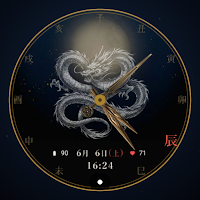
Junishi: Animal Watch Face is an ink-style watch face for Wear OS, built around an old idea: that each hour of the day has its own animal.
🐉 AN ANIMAL FOR EVERY HOUR
The dial is ruled by twelve animal signs — rat, ox, tiger, rabbit, dragon, snake, horse, goat, monkey, rooster, dog, and boar. As the clock turns, the ink-style animal painted at the center changes with the hour. It follows the time of day — not your birth year — so the animal you see is simply the animal of the current hour.
🧭 THE TWELVE-BRANCH DIAL
Instead of numerals, the twelve kanji of the Earthly Branches (十二支) ring the dial, and the current hour's kanji glows vermillion. These signs came to Japan from China long ago and were once used to name the hours of the day — an echo you can still hear in the Japanese words gozen (午前, "before the horse hour") and gogo (午後, "after the horse hour") for a.m. and p.m.
🕰️ ANALOG & DIGITAL
Gold hour, minute, and second hands sweep over the face, with a small digital time and a Japanese-style date — month, day, and weekday — beneath.
🎨 THREE ACCENT COLORS
Choose Ink White, Vermillion, or Gold from the watch face settings to retint the clock and details.
⌚ COMPLICATIONS
Two small complications sit beside the date — battery and heart rate by default. Swap them for other information from your watch's complication picker.
🌙 AMBIENT MODE
Optimized for always-on display. In ambient mode the face simplifies to a fine white outline of the hour's animal, the dimmed hands, and the glowing hour kanji on a pure black background — gentle on the battery.
🖌️ ARTWORK
The twelve animals are original ink-style artwork — human-directed and created with the help of AI tools, then reviewed by the developer.
🌸 ABOUT WABIFACE
WabiFace is a collection of watch faces inspired by Japanese aesthetics — wabi-sabi, mono no aware, and the dignified passage of time.
Requires Wear OS 5 or later. Compatible with Pixel Watch, Galaxy Watch, and other Wear OS 5+ smartwatches.
Please check your watch OS version before purchasing.
For support: [email protected]
Website: https://wabiface.jp
🐉 AN ANIMAL FOR EVERY HOUR
The dial is ruled by twelve animal signs — rat, ox, tiger, rabbit, dragon, snake, horse, goat, monkey, rooster, dog, and boar. As the clock turns, the ink-style animal painted at the center changes with the hour. It follows the time of day — not your birth year — so the animal you see is simply the animal of the current hour.
🧭 THE TWELVE-BRANCH DIAL
Instead of numerals, the twelve kanji of the Earthly Branches (十二支) ring the dial, and the current hour's kanji glows vermillion. These signs came to Japan from China long ago and were once used to name the hours of the day — an echo you can still hear in the Japanese words gozen (午前, "before the horse hour") and gogo (午後, "after the horse hour") for a.m. and p.m.
🕰️ ANALOG & DIGITAL
Gold hour, minute, and second hands sweep over the face, with a small digital time and a Japanese-style date — month, day, and weekday — beneath.
🎨 THREE ACCENT COLORS
Choose Ink White, Vermillion, or Gold from the watch face settings to retint the clock and details.
⌚ COMPLICATIONS
Two small complications sit beside the date — battery and heart rate by default. Swap them for other information from your watch's complication picker.
🌙 AMBIENT MODE
Optimized for always-on display. In ambient mode the face simplifies to a fine white outline of the hour's animal, the dimmed hands, and the glowing hour kanji on a pure black background — gentle on the battery.
🖌️ ARTWORK
The twelve animals are original ink-style artwork — human-directed and created with the help of AI tools, then reviewed by the developer.
🌸 ABOUT WABIFACE
WabiFace is a collection of watch faces inspired by Japanese aesthetics — wabi-sabi, mono no aware, and the dignified passage of time.
Requires Wear OS 5 or later. Compatible with Pixel Watch, Galaxy Watch, and other Wear OS 5+ smartwatches.
Please check your watch OS version before purchasing.
For support: [email protected]
Website: https://wabiface.jp
What’s new
Updated July 8, 2026
First phone release: a setup guide that helps you install this watch face on your Wear OS 5+ watch (Galaxy Watch, Pixel Watch).
User reviews

I love the thought that went into this design and it's easy to read and just nice to look at

Beautiful and unique watch face! The artwork is elegant, the animations are smooth, and it looks amazing on my Wear OS watch. Highly recommended!
Alternatives to Junishi: Animal Watch Face
Looking for apps like Junishi: Animal Watch Face? Here are 6 similar Android apps on Google Play.
-
BFF16- Blackboard Art Dragon
-
BFF1- Animation Thunder Dragon
-
GoodLuck Relay ZKin Watch
-
CELEST5629 Artistic Watch
-
BFF66- Neon Art Dragon
-
Dragon Book Animated WatchFace
| App | Rating | Price | Installs | Last updated | Compare |
|---|---|---|---|---|---|
| Junishi: Animal Watch Face | – | $0.99 | 10+ | Jul 8, 2026 | |
| BFF16- Blackboard Art Dragon | – | 1.39 USD | 5+ | Aug 19, 2025 | Compare |
| BFF1- Animation Thunder Dragon | – | 1.39 USD | 1+ | – | Compare |
| GoodLuck Relay ZKin Watch | – | 2.99 USD | 10+ | – | Compare |
| CELEST5629 Artistic Watch | – | 1.99 USD | 100+ | Aug 5, 2026 | Compare |
| BFF66- Neon Art Dragon | – | 1.39 USD | 1+ | Oct 7, 2026 | Compare |
| Dragon Book Animated WatchFace | – | 1.99 USD | 10+ | Aug 5, 2026 | Compare |
Similar apps on Google Play
- BFF16- Blackboard Art Dragon
- BFF1- Animation Thunder Dragon
- GoodLuck Relay ZKin Watch
- CELEST5629 Artistic Watch
- BFF66- Neon Art Dragon
- Dragon Book Animated WatchFace
- ALL Prospers For Wear OS
- GS034 - Dragon Watch Face
- Draco Elegance Watch Face
- BFF1- Animation Fire Dragon
- AZ272 New Year Dragon Watch
- Dragones Esfera
- CELEST5502 Artistic Watch
- Red Dragon Watch 100
- Dragon Watch Face 101
- AE DRAGON
- BFF42 - Neon Art Dragon Flower
- ACD116 History Ancient China
- ZKin Watch Face Golden Dragon
- AZ277 NewYear Dragon Watch
- Dragon Watch Faces ULTRA SGW7
- Dragon Fire Watch Face 007
- Dragon Roots Watch