
Simple Flyer & Poster Maker
Art & Design In-app purchases
Create Flyers Quickly & Easily
- Downloads
- 242+
- on Google Play
- Price
- Free
- In-app purchases
- Updated
- Sep 22
- 2026 · v1.1.3
Screenshots


About Simple Flyer & Poster Maker
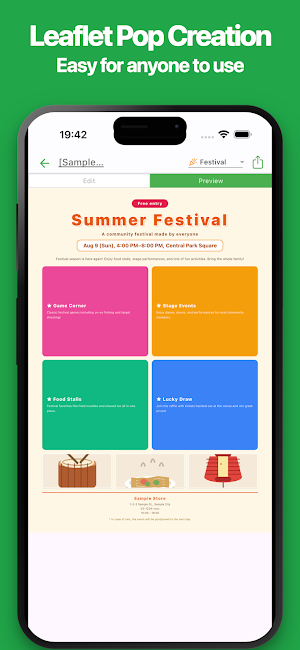
Create flyers, in-store signs, and posters easily on your smartphone or tablet.
Simply add titles, descriptions, photos, prices, dates, locations, and other information to create clear promotional designs for your store, service, or event.
No computer or specialized design software is required. With a simple and intuitive interface, even first-time users can create, edit, save, share, and print designs directly from a smartphone or tablet.
The app is suitable for restaurants, cafés, retail stores, salons, schools, event organizers, freelancers, and self-employed professionals.
Use it for product promotions, sale announcements, event notices, price displays, business information, and many other purposes. Choose a layout that matches your content, add your text and images, and create a design suited to your business.
Created designs can be saved as images or PDF files for printing and sharing. You can also reuse previous designs when changing products, prices, dates, or campaign details.
This app can be used for:
・Store and service flyers
・In-store product signs
・Sale and discount announcements
・New product and service promotions
・Event and campaign notices
・Business hours and holiday information
・Featured product displays
・Price and fee signs
・Recruitment flyers
・Class and seminar announcements
・Takeout and delivery promotions
・Posters for stores and events
・Promotional images for social media
■ Features
・Easy flyer and sign creation
Create designs by entering titles, descriptions, prices, and other information.
No professional design knowledge is required.
・Smartphone and tablet support
Create and update promotional materials without using a computer.
Edit your designs in your store or while away from your desk.
・Simple interface
The app has a clean and easy-to-understand interface.
Even first-time users can create and edit designs without difficulty.
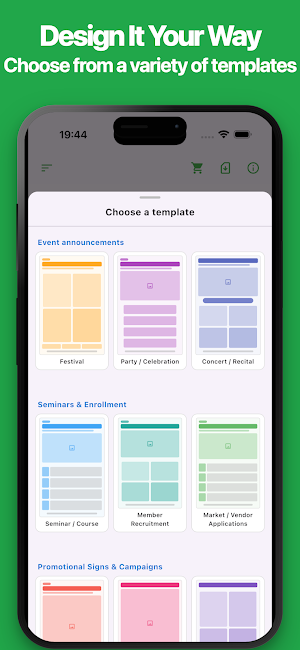
・Multiple layouts
Choose from different layouts based on your purpose and content.
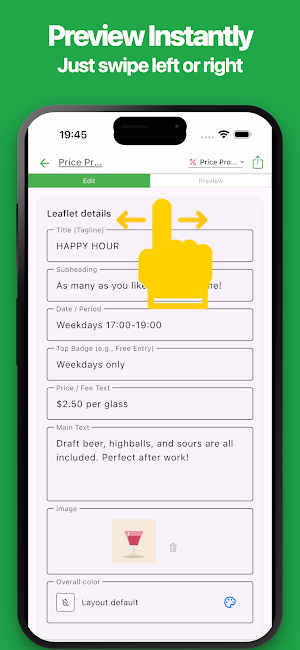
Check the preview while selecting a suitable design.
・Titles and descriptions
Add product names, service names, event titles, descriptions, notices, and other details.
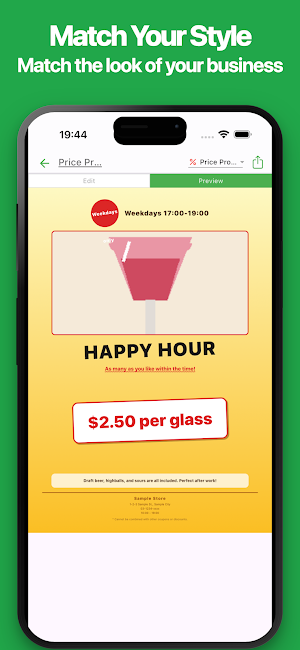
・Price displays
Add regular prices, sale prices, discounts, and other pricing information.
Create signs and flyers that make prices easy to see.
・Dates and locations
Add event dates, business hours, venues, store addresses, and contact information.
・Photos and images
Add photos of products, food, stores, services, and events.
Use images to make your designs more attractive and informative.
・Text customization
Adjust text size, placement, and displayed content.
Highlight important titles, prices, and messages.
・Color customization
Change background and text colors to match your store, brand, season, or campaign.
・Manage multiple designs
Create separate designs for products, sales, events, business hours, and other purposes.
・Preview
Review your design while editing and adjust the content and layout before saving.
・Save as an image
Save your flyer, sign, or poster as an image for digital display or online sharing.
・PDF export
Export your design as a PDF file for saving, sharing, and printing.
・Easy printing
Print directly from your smartphone or tablet for use in stores or at events.
・Sharing
Share your designs by email, messaging apps, and other services.
・Import
Import saved data and continue editing at any time.
Reuse an existing design and update only the necessary information.
・No account required
No account creation or login is required.
Start creating flyers and signs immediately after installing the app.
Create promotional flyers, in-store signs, and posters with simple controls.
Use the app for products, sales, campaigns, events, price displays, and other business promotions.
Simply add titles, descriptions, photos, prices, dates, locations, and other information to create clear promotional designs for your store, service, or event.
No computer or specialized design software is required. With a simple and intuitive interface, even first-time users can create, edit, save, share, and print designs directly from a smartphone or tablet.
The app is suitable for restaurants, cafés, retail stores, salons, schools, event organizers, freelancers, and self-employed professionals.
Use it for product promotions, sale announcements, event notices, price displays, business information, and many other purposes. Choose a layout that matches your content, add your text and images, and create a design suited to your business.
Created designs can be saved as images or PDF files for printing and sharing. You can also reuse previous designs when changing products, prices, dates, or campaign details.
This app can be used for:
・Store and service flyers
・In-store product signs
・Sale and discount announcements
・New product and service promotions
・Event and campaign notices
・Business hours and holiday information
・Featured product displays
・Price and fee signs
・Recruitment flyers
・Class and seminar announcements
・Takeout and delivery promotions
・Posters for stores and events
・Promotional images for social media
■ Features
・Easy flyer and sign creation
Create designs by entering titles, descriptions, prices, and other information.
No professional design knowledge is required.
・Smartphone and tablet support
Create and update promotional materials without using a computer.
Edit your designs in your store or while away from your desk.
・Simple interface
The app has a clean and easy-to-understand interface.
Even first-time users can create and edit designs without difficulty.
・Multiple layouts
Choose from different layouts based on your purpose and content.
Check the preview while selecting a suitable design.
・Titles and descriptions
Add product names, service names, event titles, descriptions, notices, and other details.
・Price displays
Add regular prices, sale prices, discounts, and other pricing information.
Create signs and flyers that make prices easy to see.
・Dates and locations
Add event dates, business hours, venues, store addresses, and contact information.
・Photos and images
Add photos of products, food, stores, services, and events.
Use images to make your designs more attractive and informative.
・Text customization
Adjust text size, placement, and displayed content.
Highlight important titles, prices, and messages.
・Color customization
Change background and text colors to match your store, brand, season, or campaign.
・Manage multiple designs
Create separate designs for products, sales, events, business hours, and other purposes.
・Preview
Review your design while editing and adjust the content and layout before saving.
・Save as an image
Save your flyer, sign, or poster as an image for digital display or online sharing.
・PDF export
Export your design as a PDF file for saving, sharing, and printing.
・Easy printing
Print directly from your smartphone or tablet for use in stores or at events.
・Sharing
Share your designs by email, messaging apps, and other services.
・Import
Import saved data and continue editing at any time.
Reuse an existing design and update only the necessary information.
・No account required
No account creation or login is required.
Start creating flyers and signs immediately after installing the app.
Create promotional flyers, in-store signs, and posters with simple controls.
Use the app for products, sales, campaigns, events, price displays, and other business promotions.
Alternatives to Simple Flyer & Poster Maker
Looking for apps like Simple Flyer & Poster Maker? Here are 6 similar Android apps on Google Play. The highest rated is Tenada: Graphic Design & Logo (4.6/5), and all 6 are free to download.
-
Poster Maker AI Flyer maker 4.5
-
Logo maker Design Logo creator 4.5
-
Greeting & Birthday Card Maker 4.3
-
Logo Maker : Logo Creator 4.3
-
Poster Maker - AI Flyer Design 4.5
-
Tenada: Graphic Design & Logo 4.6
| App | Rating | Price | Installs | Last updated | Compare |
|---|---|---|---|---|---|
| Simple Flyer & Poster Maker | – | Free | 100+ | Sep 22, 2026 | |
| Poster Maker AI Flyer maker | 4.5 / 5 | Free | 1,000,000+ | Oct 14, 2026 | Compare |
| Logo maker Design Logo creator | 4.5 / 5 | Free | 10,000,000+ | Aug 30, 2026 | Compare |
| Greeting & Birthday Card Maker | 4.3 / 5 | Free | 100,000+ | Oct 1, 2026 | Compare |
| Logo Maker : Logo Creator | 4.3 / 5 | Free | 100,000+ | Nov 21, 2025 | Compare |
| Poster Maker - AI Flyer Design | 4.5 / 5 | Free | 100,000+ | Oct 21, 2026 | Compare |
| Tenada: Graphic Design & Logo | 4.6 / 5 | Free | 1,000,000+ | Oct 3, 2026 | Compare |
Similar apps on Google Play
- Poster Maker AI Flyer maker
- Logo maker Design Logo creator
- Greeting & Birthday Card Maker
- Logo Maker : Logo Creator
- Poster Maker - AI Flyer Design
- Tenada: Graphic Design & Logo
- AI Logo Generator, Logo Maker
- VistaCreate: AI Graphic Design
- Logo Maker Shop - AI Generator
- Invoice Maker - Simple Invoice
- Quincy - Quinceanera Planner
- Photobook: Photo Books & Gifts
- DesignEvo - Logo Maker
- Invitation Maker & Card Design
- pdfFiller Edit, fill, sign PDF
- Blend: AI Videos Logos Try On
- Desygner: Graphic Design Maker
- PosterMyWall: Design & Promote
- Geulgram - Text on Photo
- Likcut
- Posters: Flyer Template maker
- Evite: Email & SMS Invitations
- Zoho Show: Presentation Maker
- Personal Creations
- SignNow: Sign & Fill PDF Docs
- Invitd Invitation Maker & RSVP