
RISO PRINT-S
RISO KAGAKU CORPORATION Tools
RISO PRINT-S is an application to print PDF documents.
- Rating
- 3.9
- 28 ratings
- Downloads
- 5K+
- on Google Play
- Price
- Free
- No in-app purchases
- Updated
- Dec 21
- 2020 · vv5.1.0.0
Screenshots



About RISO PRINT-S
RISO PRINT-S is an application to print PDF documents directory from the tablets or the smartphones.
You can print PDF documents saved in your devices. You can also configure several print settings like duplex print, imposition, punch and staple by using RISO PRINT-S.
[Features]
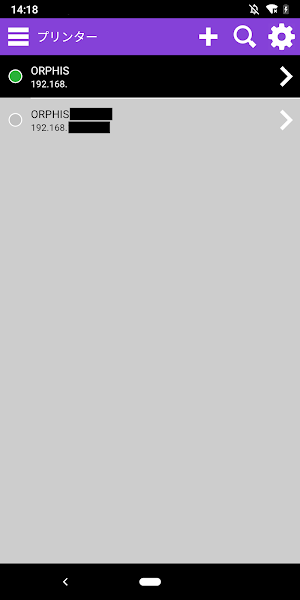
・Registering/Managing Printers
Up to 10 printers can be registered.
・Previewing a PDF document
The document is displayed on the preview area of RISO PRINT-S.
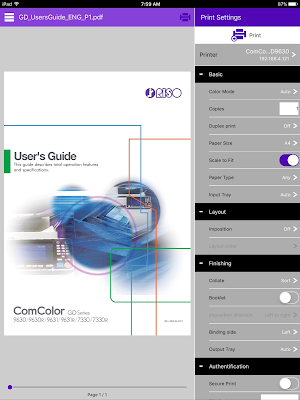
・Configuring the Print Settings on RISO PRINT-S
You can configure the print settings on RISO PRINT-S by a PDF document or a printer.
[Basic]
Color Mode
Copies
Duplex print
Paper Size
Scale to Fit
Paper Type
Input Tray
[Layout]
Imposition
Layout order
[Finishing]
Collate
Booklet
Booklet binding
Layout order
Binding side
Staple
Punch
Output Tray
[Authentication]
Secure Print
PIN Code
・Printable Data
PDF*1 versions 1.3, 1.4, 1.5, 1.6, 1.7*2
*1: Encrypted PDF documents are not supported.
*2: Extended features are not supported.
[Supported printers]
ComColor Series *1
SHAN CAI YIN WANG Series *1
ComColor FW Series *2*3
SHAN CAI YIN WANG FW Series *2*3
ComColor GD Series *2*4
SHAN CAI YIN WANG GD Series *2*4
*1:Optional External controller (ComColorExpress IS1000C or IS950C) is required.
*2:Optional PS kit is required.
*3:The printer firmware version must be Ver.2.0 or higher.
*4:The printer firmware version must be Ver.1.3 or higher.
[Tested OS]
Android 4.4, 6.0, 7.0, 8.0, 9.0, 10.0
[Supported languages]
Japanese, English, French
[Precautions for use]
・The available features vary depending on your printer and optional devices.
・PDF documents cannot be displayed directly on RISO PRINT-S. Please open a PDF document with other viewer application beforehand. For details, see [HELP] screen.
・When RISO PRINT-S is started after opening a PDF document, the document is displayed on the preview area of the [Home] screen.
・Wireless LAN (Wi-Fi) connection environment is required beforehand.
Please refer to the instructions prepared for your wireless LAN (Wi-Fi) environment to connect and configure it.
・The screens displayed vary depending on the device.
You can print PDF documents saved in your devices. You can also configure several print settings like duplex print, imposition, punch and staple by using RISO PRINT-S.
[Features]
・Registering/Managing Printers
Up to 10 printers can be registered.
・Previewing a PDF document
The document is displayed on the preview area of RISO PRINT-S.
・Configuring the Print Settings on RISO PRINT-S
You can configure the print settings on RISO PRINT-S by a PDF document or a printer.
[Basic]
Color Mode
Copies
Duplex print
Paper Size
Scale to Fit
Paper Type
Input Tray
[Layout]
Imposition
Layout order
[Finishing]
Collate
Booklet
Booklet binding
Layout order
Binding side
Staple
Punch
Output Tray
[Authentication]
Secure Print
PIN Code
・Printable Data
PDF*1 versions 1.3, 1.4, 1.5, 1.6, 1.7*2
*1: Encrypted PDF documents are not supported.
*2: Extended features are not supported.
[Supported printers]
ComColor Series *1
SHAN CAI YIN WANG Series *1
ComColor FW Series *2*3
SHAN CAI YIN WANG FW Series *2*3
ComColor GD Series *2*4
SHAN CAI YIN WANG GD Series *2*4
*1:Optional External controller (ComColorExpress IS1000C or IS950C) is required.
*2:Optional PS kit is required.
*3:The printer firmware version must be Ver.2.0 or higher.
*4:The printer firmware version must be Ver.1.3 or higher.
[Tested OS]
Android 4.4, 6.0, 7.0, 8.0, 9.0, 10.0
[Supported languages]
Japanese, English, French
[Precautions for use]
・The available features vary depending on your printer and optional devices.
・PDF documents cannot be displayed directly on RISO PRINT-S. Please open a PDF document with other viewer application beforehand. For details, see [HELP] screen.
・When RISO PRINT-S is started after opening a PDF document, the document is displayed on the preview area of the [Home] screen.
・Wireless LAN (Wi-Fi) connection environment is required beforehand.
Please refer to the instructions prepared for your wireless LAN (Wi-Fi) environment to connect and configure it.
・The screens displayed vary depending on the device.
What’s new
Version v5.1.0.0 · Updated December 21, 2020
Fixed a minor bug.
Alternatives to RISO PRINT-S
Looking for apps like RISO PRINT-S? Here are 6 similar Android apps on Google Play. 3 of the 6 are free to download.
-
FMA Worldwide Job Vacancy
-
HD Material Interior
-
Bubble Level PRO
-
Text and Emoji Repeater
-
Ultra QR Scanner - Bar Code
-
BT RemotePro Arduino Bluetooth
| App | Rating | Price | Installs | Last updated | Compare |
|---|---|---|---|---|---|
| RISO PRINT-S | 3.9 / 5 | Free | 5,000+ | Dec 21, 2020 | |
| FMA Worldwide Job Vacancy | – | Free | 1,000+ | Nov 2, 2023 | Compare |
| HD Material Interior | – | 0.99 USD | 0+ | Mar 22, 2020 | Compare |
| Bubble Level PRO | – | 2.99 USD | 100,000+ | Sep 9, 2026 | Compare |
| Text and Emoji Repeater | – | Free | 100+ | – | Compare |
| Ultra QR Scanner - Bar Code | – | Free | 1,000,000+ | Oct 31, 2026 | Compare |
| BT RemotePro Arduino Bluetooth | – | 0.49 USD | 10+ | Jul 20, 2023 | Compare |
Compare RISO PRINT-S with the top alternatives: ratings, updates, ASO score and keyword gaps →
Similar apps on Google Play
- FMA Worldwide Job Vacancy
- HD Material Interior
- Bubble Level PRO
- Text and Emoji Repeater
- Ultra QR Scanner - Bar Code
- BT RemotePro Arduino Bluetooth
- Beagleprint
- Powerful BMS-Personal
- AutoTrickler
- Metric Threads Pro
- AR Draw : Trace to Sketch
- FaceDaily
- Encrypt Text to Arrows
- Analog Night Clock Wallpaper
- PinoyGPT
- BACKFIRE Skateboards
- ShoppingList
- calculadora para todos
- Cloudike
- Movistar Mobility
- SE Training
- Video Downloader: Downloader
- Easy Memo
- USB OTG File Manager
- ISIS Steam Tools