
RISO PRINT-D
RISO KAGAKU CORPORATION Tools
RISO PRINT-D allows you to print from your device with RISO digital duplicators.
- Downloads
- 100+
- on Google Play
- Price
- Free
- No in-app purchases
- Updated
- Nov 24
- 2022 · v3.0.05
Screenshots


About RISO PRINT-D
[Features]
RISO PRINT-D allows you to print in the following ways.
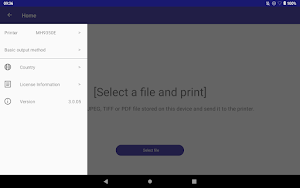
・Select a file and print
Tap "Select File" on the RISO PRINT-D home screen to select a file (image or document) on the tablet to print.
・Print from other apps by sharing files
Open a file (image or document) in any app (e.g. web browser or image viewing app). Select RISO PRINT-D in the app's share function to print the file.
[Print settings]
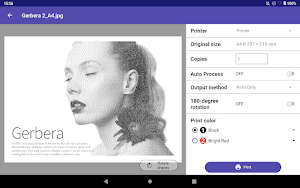
The following settings are available.
・Copies
・Auto process
・Output method (Print Only, Print & Storage, Storage Only)
・Rotation
・Pages to print (for multi-page documents)
・Print color (for two drum machine only. Two color printing is not possible but single color printing is available with either drum 1 or 2.)
[Printable file format]
JPEG、TIFF*1、PDF
*1: Multi-page TIFF is not supported.
[Required items to use RISO PRINT-D]
・Tablet device
OS: Android 6.0 or higher, Chrome OS
Screen size: 8.4 inches or larger is recommended
Screen resolution: 1600x2560 or higher is recommended.
(If the screen size and resolution are not enough, it may not be displayed properly.)
Free internal storage space: 200MB or more is recommended.
(If there is not enough free space in the internal storage, it may not work properly.)
・Supported duplicator
RISO SF series
RISO SF EⅡ series
RISO MH series
[Supported languages]
English, French, Simplified Chinese, Traditional Chinese (Taiwan), Traditional Chinese (Hong Kong)*1, Japanese
When the OS language is other than the above languages, it will be displayed in English.
*1: Depending on the OS languages of your device, it is not possible to select.
[Before Use]
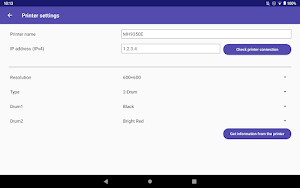
・It is necessary to set an IP address on your digital duplicator so that it can communicate wirelessly.
・Prepare a wireless LAN (Wi-Fi) connection environment in advance. For details on wireless LAN (Wi-Fi) connection and settings, refer to the user's manual of your wireless LAN.
RISO PRINT-D allows you to print in the following ways.
・Select a file and print
Tap "Select File" on the RISO PRINT-D home screen to select a file (image or document) on the tablet to print.
・Print from other apps by sharing files
Open a file (image or document) in any app (e.g. web browser or image viewing app). Select RISO PRINT-D in the app's share function to print the file.
[Print settings]
The following settings are available.
・Copies
・Auto process
・Output method (Print Only, Print & Storage, Storage Only)
・Rotation
・Pages to print (for multi-page documents)
・Print color (for two drum machine only. Two color printing is not possible but single color printing is available with either drum 1 or 2.)
[Printable file format]
JPEG、TIFF*1、PDF
*1: Multi-page TIFF is not supported.
[Required items to use RISO PRINT-D]
・Tablet device
OS: Android 6.0 or higher, Chrome OS
Screen size: 8.4 inches or larger is recommended
Screen resolution: 1600x2560 or higher is recommended.
(If the screen size and resolution are not enough, it may not be displayed properly.)
Free internal storage space: 200MB or more is recommended.
(If there is not enough free space in the internal storage, it may not work properly.)
・Supported duplicator
RISO SF series
RISO SF EⅡ series
RISO MH series
[Supported languages]
English, French, Simplified Chinese, Traditional Chinese (Taiwan), Traditional Chinese (Hong Kong)*1, Japanese
When the OS language is other than the above languages, it will be displayed in English.
*1: Depending on the OS languages of your device, it is not possible to select.
[Before Use]
・It is necessary to set an IP address on your digital duplicator so that it can communicate wirelessly.
・Prepare a wireless LAN (Wi-Fi) connection environment in advance. For details on wireless LAN (Wi-Fi) connection and settings, refer to the user's manual of your wireless LAN.
Alternatives to RISO PRINT-D
Looking for apps like RISO PRINT-D? Here are 3 similar Android apps on Google Play. The highest rated is Gesso - Audio Tours (4.9/5), and all 3 are free to download.


| App | Rating | Price | Installs | Last updated | Compare |
|---|---|---|---|---|---|
| RISO PRINT-D | – | Free | 100+ | Nov 24, 2022 | |
| Gesso - Audio Tours | 4.9 / 5 | Free | 10,000+ | – | Compare |
| Spot2Nite | 3.1 / 5 | Free | 10,000+ | Jun 4, 2026 | Compare |
| Truzi: Music's Better Shared | – | Free | 10+ | May 31, 2023 | Compare |
Compare RISO PRINT-D with the top alternatives: ratings, updates, ASO score and keyword gaps →