

Video Compress - Shrink Vids
Brachmann Online Marketing GmbH & Co. KG Photo & Video iPhoneiPadiPod touch
Video Compress - Shrink Vids is a free Photo & Video app for iPhone and iPad by Brachmann Online Marketing GmbH & Co. KG. Rated 4.7/5 from 3,699 ratings.
- Rating
- 4.7
- 3.6K ratings
- Price
- Free
- on the App Store
- Size
- 12 MB
- Age 4+
- Updated
- Oct 23
- 2026 · v3.1.1
Screenshots


About Video Compress - Shrink Vids
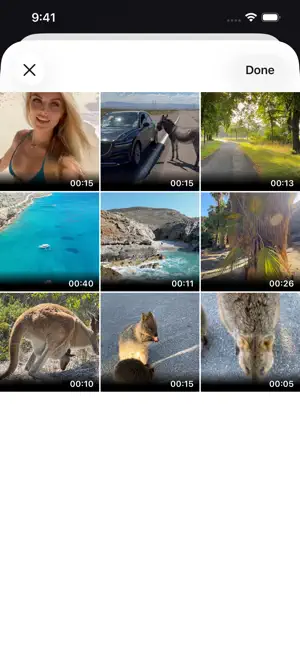
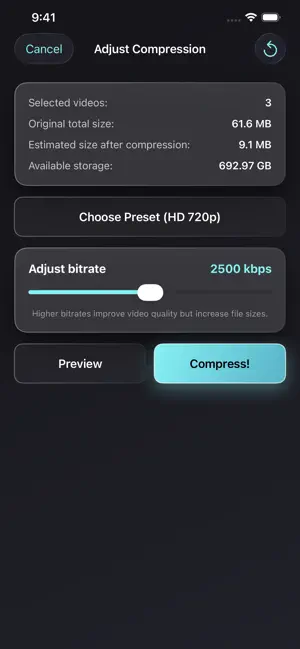
Simply compress and shrink videos to save storage. Download now for free! Is your iPhone/iPad storage almost full — or do you want to reduce a video’s file size to send it faster via messengers like WhatsApp, iMessage, Telegram, Signal, Facebook Messenger, Snapchat, etc., or upload it to social media like Instagram, TikTok, Facebook, YouTube, and more? This app solves the problem. You can also use this app when your cloud storage (iCloud, Google Photos, Dropbox, OneDrive, Google Drive, etc.) is running out of space. Compress videos before uploading to fit many more — with little to no noticeable loss of quality. Everything happens on your device (on-device processing): no cloud, no server upload. Works offline, without an account or registration. How it works: 1) Choose a video (or select multiple videos) 2) Pick a preset resolution and set the compression strength with the bitrate slider 3) Preview the result: compare the compressed video with the original before you save 4) Save the compressed video to your iOS Photos/Videos library Great for: - Saving iPhone storage and freeing up space on iOS and iPadOS - Sending videos faster in chats (WhatsApp, iMessage, Telegram, Signal, Messenger, Snapchat, etc.) - Uploading to social apps when your video is too large (Instagram, TikTok, Facebook, YouTube, etc.) - Backing up more videos to cloud storage (iCloud, Google Photos, Dropbox, OneDrive, Google Drive, etc.) - Keeping quality high while shrinking the video file size Overview: - Compress and shrink a single video or multiple videos to save storage on your iPhone/iPad - Choose presets for video compression (resolution) and adjust compression strength with a bitrate slider - Before/after preview to check the visual quality of the compressed video - Shows available device storage and the estimated new file size (before and after compression) - Simple & intuitive - Optional: delete the original video after compression (it may still appear in the “Recently Deleted” album — delete it there as well to free up storage) - No watermark on compressed videos - Keeps important metadata, including date/time and location (GPS), after compression - Compatible with iPhone and iPad - Works with 4K videos recorded on iPhone/iPad Presets available for video compression: - Full HD 1080p (1920×1080 pixels) - HD 720p (1280×720 pixels) - HD 540p (960×540 pixels) - 480p (640×480 pixels) - 360p (480×360 pixels) In addition, you can set the bitrate with a slider. The app shows the estimated new file size and provides a before/after video preview so you can check the image quality. Download now for free and save storage on your device! PLEASE NOTE: The app was made to compress original videos that had been recorded with the original camera app of your iPhone/iPad and may not always be able to compress videos from other sources or videos that had previously been edited, although it was successfully tested with drone videos, GoPro action cam videos, DSLR camera videos etc. in MOV, HEVC (H.265), MP4, H.264 in different fps (frames per second). Please also don't select too many videos at once. Please always try to compress a short video from the same source and see if it works before you make a purchase within the app. Standard Apple Terms of Use (EULA): https://www.apple.com/legal/internet-services/itunes/dev/stdeula/
Ratings & reviews
4.7
3.6K ratings
What’s new
Version 3.1.1 · Updated October 23, 2026
Minor improvements and bug fixes.
App privacy
The developer, Brachmann Online Marketing GmbH & Co. KG, reported these privacy practices to Apple.
Data Used to Track You
The following data may be used to track you across apps and websites owned by other companies:
- Location: Coarse Location
- Identifiers: Device ID
- Usage Data: Product Interaction, Advertising Data
- Diagnostics: Crash Data, Performance Data
Data Linked to You
The following data, which may be collected and linked to your identity, may be used for the following purposes:
- Location: Coarse Location
- Identifiers: Device ID
- Usage Data: Product Interaction, Advertising Data
- Diagnostics: Performance Data
Used for: Third-Party Advertising, Analytics
Data Not Linked to You
The following data, which may be collected but is not linked to your identity, may be used for the following purposes:
- Diagnostics: Crash Data
Used for: Third-Party Advertising, Analytics
Alternatives to Video Compress - Shrink Vids
Looking for apps like Video Compress - Shrink Vids? Here are 6 similar apps on the App Store. The highest rated is Easy Video Compressor - Resize (4.8/5), and all 6 are free to download.
-
 Video compressor - save space
4.7
Video compressor - save space
4.7
-
 Video Compress - Shrink Videos
4.5
Video Compress - Shrink Videos
4.5
-
 Compress Videos & Resize Video
4.7
Compress Videos & Resize Video
4.7
-
 Video Compressor-Shrink videos
4.7
Video Compressor-Shrink videos
4.7
-
 Easy Video Compressor - Resize
4.8
Easy Video Compressor - Resize
4.8
-
 Video Compressor : Save Space
4.7
Video Compressor : Save Space
4.7
| App | Rating | Price | Last updated | Compare |
|---|---|---|---|---|
| Video Compress - Shrink Vids | 4.7 / 5 (3,699 ratings) | Free | October 23, 2026 | |
| Video compressor - save space | 4.7 / 5 (4,561) | Free | Jul 14, 2026 | Compare |
| Video Compress - Shrink Videos | 4.5 / 5 (11,493) | Free | Aug 23, 2026 | Compare |
| Compress Videos & Resize Video | 4.7 / 5 (17,515) | Free | Apr 28, 2026 | Compare |
| Video Compressor-Shrink videos | 4.7 / 5 (9,684) | Free | Aug 18, 2026 | Compare |
| Easy Video Compressor - Resize | 4.8 / 5 (822) | Free | Sep 24, 2026 | Compare |
| Video Compressor : Save Space | 4.7 / 5 (477) | Free | Sep 2, 2026 | Compare |