

RepixPro
INSPIRING-LIFE TECHNOLOGIES PRIVATE LIMITED Photo & Video iPhoneiPadiPod touchMac
RepixPro is a paid Photo & Video app for iPhone and iPad by INSPIRING-LIFE TECHNOLOGIES PRIVATE LIMITED. Rated 1.0/5 from 1 ratings. Requires iOS 12.0.
- Rating
- 1.0
- 1 ratings
- Price
- 4.99 USD
- on the App Store
- Size
- 45 MB
- Age 4+
- Updated
- Sep 3
- 2024 · v1.1
Screenshots



About RepixPro
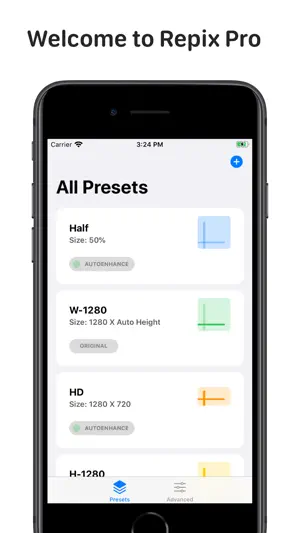
Powerful Image Processing App now for your iPhones and iPads. RePix PRO is an all in one solution for all your tasks related to Applying Filters, Resizing, Cropping, and renaming all of your images at once. Batch Processing of images on your iOS Device was never this easy. whether it be one image or hundreds of them. whether you have strict size criteria for web/graphics design projects. or just wish to make it smaller for social media. We took care of every user from Novice to Advance. If you have no clue about those figures written in the Width and Height Boxes, No worries, Just Tap on any of the preset and Choose your images and you're Done. If you need advance controls, we prepared a separate Advance section for you. Liked what you just performed on an image? Well, Your tweaks and settings are always yours with the functionality of making it your favorite presets. Save it and use it anytime you want. RePix PRO delivers you the finest possible output on your iOS devices, And it's blazing fast. So, What makes RePix PRO Unique ? ● SMART RESIZING - Resizing is hassle-free in RePix PRO. Resize it from the whole bunch of Size Presets. Just Select the Resize Preset and select the images you want to work on . and Voila. You're done. Not sure about the dimensions.? No issues, RePix PRO now lets you resize in Percentage of the size you want. ● MAGIC CROP - A super-smart Magic Crop functionality crops your images with precise control and also takes care of the person in the photo. Now you need not worry about chopping off someone's head or Toe in the image. The magic crop has held your back. ● AUTO IMAGE ENHANCER - Collection of hand-picked filters and corrections which enhances your image ● BATCH RENAMER - Batch renaming is easy and fun. Make it truly yours with added custom suffix and prefix of your choice. Find any word in the Image name and replace it with your favorite word to make it memorable. ● EXPORT - It offers greater control on your exported images. Choose from a bunch of formats like .JPG / .JPEG / .PNG / .BMP / .TIFF / .HEIC / .HEIF. Oh Yeah. You can see your favorite photos being worked on in preview while Exporting. ● DARK MODE - Soothing Dark Mode makes your experience seamless. ● UPDATES - Regular Free Updates & Support. Repix Pro has been Featured in Mac App Store
What’s new
Version 1.1 · Updated September 3, 2024
Some Ui improvements. Minor issues fixed.
App privacy
The developer, INSPIRING-LIFE TECHNOLOGIES PRIVATE LIMITED, reported these privacy practices to Apple.
Data Not Collected
The developer does not collect any data from this app.
Alternatives to RepixPro
Looking for apps like RepixPro? Here are 6 similar apps on the App Store. The highest rated is SuperViewFinder (5.0/5), and 2 of the 6 are free to download.
-
 Repix - AI Fan Avatar
-
 SuperViewFinder
5.0
SuperViewFinder
5.0
-
 12px Photo Challenge
-
 Simply Watercolor
4.8
Simply Watercolor
4.8
-
 Circular Tiny Planet Editor
4.7
Circular Tiny Planet Editor
4.7
-
 Provoke Camera
4.8
Provoke Camera
4.8
| App | Rating | Price | Last updated | Compare |
|---|---|---|---|---|
| RepixPro | 1.0 / 5 (1 rating) | 4.99 USD | September 3, 2024 | |
| Repix - AI Fan Avatar | – | Free | Jul 30, 2024 | Compare |
| SuperViewFinder | 5.0 / 5 (1) | 9.99 USD | Oct 23, 2026 | Compare |
| 12px Photo Challenge | – | Free | Dec 18, 2024 | Compare |
| Simply Watercolor | 4.8 / 5 (198) | 4.99 USD | Dec 18, 2025 | Compare |
| Circular Tiny Planet Editor | 4.7 / 5 (660) | 4.99 USD | Jan 20, 2024 | Compare |
| Provoke Camera | 4.8 / 5 (6) | 1.99 USD | Aug 18, 2026 | Compare |
Compare RepixPro with the top alternatives: ratings, updates, ASO score and keyword gaps →