

Speaking Email - voice reader
BEWEB LTD Productivity iPhoneiPadiPod touch
Speaking Email - voice reader is a free Productivity app for iPhone and iPad by BEWEB LTD. Rated 4.5/5 from 206 ratings. Requires iOS 16.0.
- Rating
- 4.5
- 206 ratings
- Price
- Free
- on the App Store
- Size
- 33 MB
- Age 4+
- Updated
- Sep 2
- 2026 · v4.0.3
Screenshots

About Speaking Email - voice reader
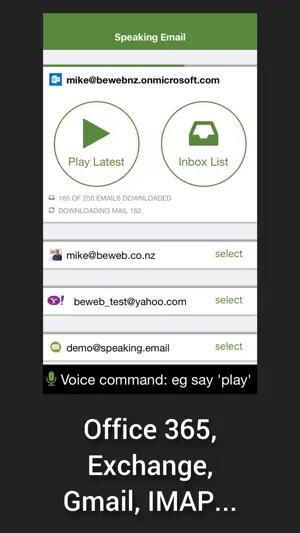
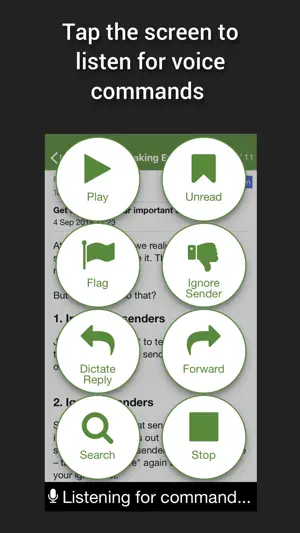
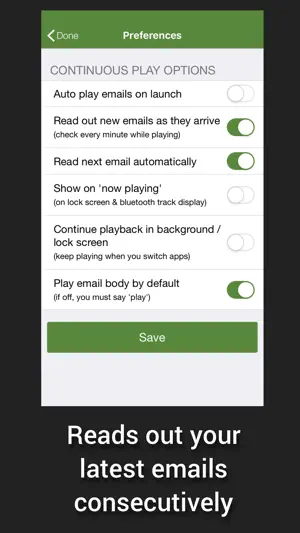
Reads your email out loud, lets you reply and manage mail by voice commands. Ideal for visually impaired users, driving, or anytime you'd like to check email hands free & eyes free. Premium Edition is free for 7 days. Then you are automatically switched to Basic Edition. (Note for CarPlay users: see our other app 'Speaking Email CP') — WHY DO I WANT IT? — FOR DRIVERS Get more time in your day when you check your email on the move. Most people spend 1-2 hours in their inbox. With the help of Speaking Email during your daily drive to work, you can easily cut this time in half. Get more done, stay on top and keep a clean inbox. Voice commands and simple gestures designed to be safe to use while driving give you the ability to archive, flag or even reply on the move. (Note for CarPlay users: see also our other app "Speaking Email CP") FOR ACCESSIBILITY Makes email easy to use for those with visual impairment, blindness, dyslexia, stroke, motor dysfunction. Designed to be used without needing to see or touch the screen, Speaking Email works as a fully voice operated email app. Note: a sighted assistant or VoiceOver is required to sign into your email account and configure the many preferences to your liking. The rest is all voice controlled! — HOW DOES IT WORK? — Speaking Email reads your latest emails out loud from your inbox, one by one. Swipe left and right to play your inbox like a jukebox. Whip through your inbox, clear clutter, flag important items and make inbox zero a reality - all while on the go. You can interact with your email using full screen taps, swipes and voice commands. Voice recognition needs a trigger. You choose when to pause for a command - on full screen tap, every 30 seconds, at the start/end of emails. — FEATURES — - Smart content detection skips over disclaimers, reply headers, and email signatures to speak only the content without the clutter - Multilingual mode automatically detects the email language and switches voices to match, using Apple text-to-speech voices - Makes use of the latest Apple speech recognition technology lets you dictate your reply, which is read back to you before sending - Our simple Ignore Sender command puts you in control, allowing you to avoid hearing emails from the sender in future - Connects securely to all email servers, including Gmail (using Google Sign In), Microsoft 365 (aka Office 365 - using Microsoft Sign In supporting Intune, MFA and OAUTH), Exchange (via ActiveSync), IMAP, POP, iCloud (using app password), Outlook/Hotmail (using Microsoft Sign In), Yahoo (using Yahoo Sign In), AOL (using AOL Sign In) - Voice commands and buttons include: Next Back Archive/Done Flag Trash Reply Forward Ignore (thumbs down) Important (thumbs up) Block Sender Rewind Fast Forward Compose Search Voice Slower Faster People When - Many preferences to set up your experience how you like — QUESTIONS — Reach us at [email protected] See our FAQ: http://www.speaking.email/faq Feature tour: http://www.speaking.email — RECOGNITION — - Gizmodo - "Highly Recommended" by Marc Saltzman in USA Today - TV3 News (NZ), Sky News - The Australian, Herald Sun, Daily Telegraph - NZ Herald, National Business Review - Featured by Apple in Best New Apps - Voted Most Fundable App by Context.IO - Finalist in NZ Hi Tech Awards — QUOTES — “This is a nifty app, and one that will make driving a little safer for inbox addicts”—NBR “My eyesight isn’t as it was years ago, and your Speaking Email makes it so much easier for me to keep in touch with folks” — Willis Hargrave “I absolutely love the app and being an outside sales rep in the car 4-6 hours a day find it incredibly helpful. It is literally freeing up and hour or 2 of time for me every day I am on the road by having a lot less time at the desk doing email. THANKS!!!” — Scott Middleton https://speaking.email/page/privacy https://speaking.email/page/terms-of-use
Ratings & reviews
4.5
206 ratings
What’s new
Version 4.0.3 · Updated September 2, 2026
NEW! Listen while talking - continuous listening for commands option - you can now interject and say a command even while emails are being read out to you See under Preferences > Voice Commands
App privacy
The developer, BEWEB LTD, reported these privacy practices to Apple.
Data Linked to You
The following data, which may be collected and linked to your identity, may be used for the following purposes:
- Contact Info: Email Address, Name
- Purchases: Purchase History
- Location: Coarse Location
- Identifiers: User ID
- Usage Data: Product Interaction
- Diagnostics: Crash Data, Other Diagnostic Data
- User Content: Emails or Text Messages, Customer Support
Used for: Developer’s Advertising or Marketing, Analytics, Product Personalization, App Functionality
Data Not Linked to You
The following data, which may be collected but is not linked to your identity, may be used for the following purposes:
- Identifiers: Device ID
Used for: Analytics, App Functionality
Alternatives to Speaking Email - voice reader
Looking for apps like Speaking Email - voice reader? Here are 6 similar apps on the App Store. The highest rated is Lumin - Talk to your email (4.9/5), and all 6 are free to download.
-
 OneMail - Email by Nouvelware
4.4
OneMail - Email by Nouvelware
4.4
-
 Preside email
4.8
Preside email
4.8
-
 MailBuzzr for Outlook
4.1
MailBuzzr for Outlook
4.1
-
 Lumin - Talk to your email
4.9
Lumin - Talk to your email
4.9
-
 Shortwave - AI Email
4.7
Shortwave - AI Email
4.7
-
 Polymail: Email Inbox
3.9
Polymail: Email Inbox
3.9
| App | Rating | Price | Last updated | Compare |
|---|---|---|---|---|
| Speaking Email - voice reader | 4.5 / 5 (206 ratings) | Free | September 2, 2026 | |
| OneMail - Email by Nouvelware | 4.4 / 5 (297) | Free | Jul 14, 2024 | Compare |
| Preside email | 4.8 / 5 (184) | Free | Jan 12, 2026 | Compare |
| MailBuzzr for Outlook | 4.1 / 5 (518) | Free | Mar 1, 2026 | Compare |
| Lumin - Talk to your email | 4.9 / 5 (66) | Free | Oct 19, 2026 | Compare |
| Shortwave - AI Email | 4.7 / 5 (751) | Free | Jul 2, 2026 | Compare |
| Polymail: Email Inbox | 3.9 / 5 (86) | Free | Oct 9, 2026 | Compare |