

blueCompact
Aug. Winkhaus SE Productivity iPhoneiPadiPod touch
blueCompact is a free Productivity app for iPhone and iPad by Aug. Winkhaus SE. Requires iOS 14.0. Updated September 13, 2024.
- Price
- Free
- on the App Store
- Size
- 61 MB
- Age 4+
- Updated
- Sep 13
- 2024 · v2.7.2
Screenshots
About blueCompact
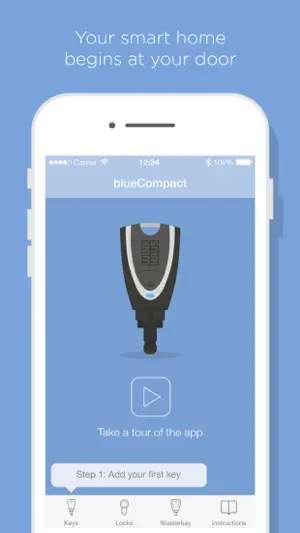
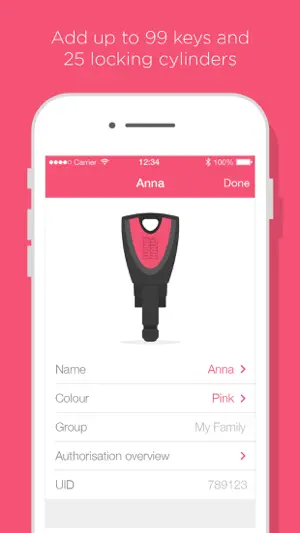
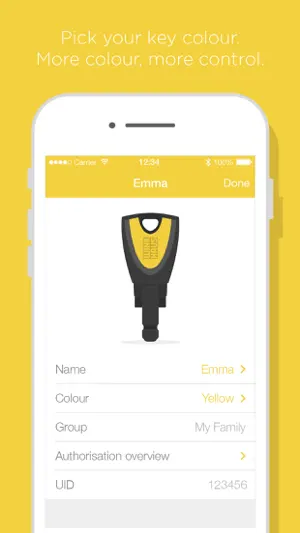
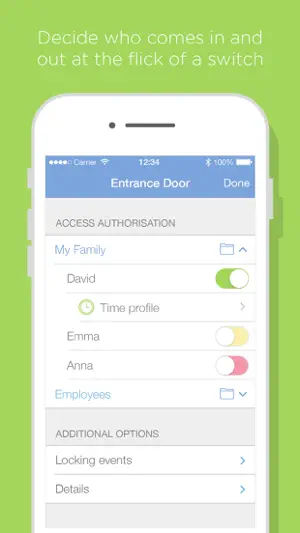
The blueCompact app enables easy control of the new Winkhaus blueCompact locking system. This innovative technology makes access control management for your building more convenient, more flexible, clearer and more secure. blueCompact is ideal for smart homes and for small businesses such as medical practices, lawyers' offices and agencies. The app is available free of charge after purchasing a blueCompact locking system. It is innovative to use and offers a wide range of options for programming and managing keys, cylinders and wall readers. Start living smarter today and discover the versatility of this unique locking system. The blueCompact app offers you: EASY OPERATION Control the entire locking system comfortably and conveniently from your smart phone or tablet. MANAGEMENT OF EVERYTHING Organise up to 99 keys, up to 25 cylinders or wall readers and all access authorisations with just one app. BLOCKING KEYS Lost keys can be deactivated immediately. This eliminates the expense of replacing cylinders. PRECISE MONITORING View a list of all locking events. Keep an overview of the times when your family members or employees come and go. CREATING AND MANAGING TIME PROFILES React flexibly: Who can open which door and when? You can configure the locking authorisations with individual times for each individual key depending on the requirements. This enables you to configure the days and times at which people can access selected rooms. CONTACTLESS DETECTION OF WALL READERS Open motorised locks, roller doors, car park barriers etc. with the blueCompact wall reader. You decide which keys have an authorisation for temporary opening or for a permanent release. It is also possible to set a day-specific time at which the permanent release is deactivated automatically. REMOTE AUTHORISATION Issue locking authorisations remotely when you cannot open the door in person. EASY TO LEARN Familiarise yourself easily with the system controls. Learn intuitively with the user-friendly video instructions for every menu item. SYSTEM REQUIREMENTS Unfortunately, we must exclude the use of devices afflicted with malware in order to guarantee our high security standards for the blueCompact app. LICENSING CONDITIONS By downloading the software and/or installing the software, you agree to the validity of these licensing conditions. The licensing conditions are available to view at https://www.bluecompact.com/en/lizenzbedingungen.html.
What’s new
Version 2.7.2 · Updated September 13, 2024
- Message for missing e-mail account - Minimum iOS version changed
App privacy
The developer, Aug. Winkhaus SE, reported these privacy practices to Apple.
Data Linked to You
The following data, which may be collected and linked to your identity, may be used for the following purposes:
- User Content: Customer Support
- Diagnostics: Other Diagnostic Data
Used for: App Functionality
Alternatives to blueCompact
Looking for apps like blueCompact? Here are 6 similar apps on the App Store. The highest rated is Aufmaster (4.3/5), and all 6 are free to download.


| App | Rating | Price | Last updated | Compare |
|---|---|---|---|---|
| blueCompact | – | Free | September 13, 2024 | |
| NSC SmartRevision | – | Free | Aug 29, 2026 | Compare |
| BMAcloud | – | Free | Oct 16, 2026 | Compare |
| ÜControl | – | Free | Jul 27, 2026 | Compare |
| Izypeo | – | Free | Aug 20, 2026 | Compare |
| Matrix NEO! | – | Free | Jul 9, 2024 | Compare |
| Aufmaster | 4.3 / 5 (4) | Free | Oct 7, 2026 | Compare |
Compare blueCompact with the top alternatives: ratings, updates, ASO score and keyword gaps →