
Manual for Microsoft Excel with Secrets and Tricks
Howtech Finance Limited Book iPhoneiPadiPod touch
Manual for Microsoft Excel with Secrets and Tricks is a free Book app for iPhone and iPad by Howtech Finance Limited. Rated 3.8/5 from 93 ratings.
- Rating
- 3.8
- 93 ratings
- Price
- Free
- on the App Store
- Size
- 15 MB
- Age 4+
- Updated
- May 4
- 2017 · v2.0
Screenshots
Save to Pinterest


About Manual for Microsoft Excel with Secrets and Tricks
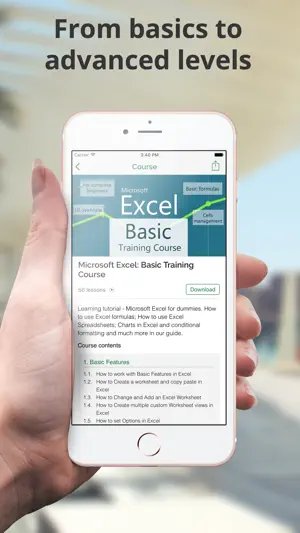
If you're looking for a convenient way to learn all the ways to use Microsoft Excel, this guide is for you! • Over 500 most useful tips from professional tutors • Each tutorial can be viewed as text or video - choice is yours • Our app is making your learning easy and convenient Microsoft Excel is a powerful office calculation program which thousands use on a daily basis. Are you a beginner or do you use it frequently but still have questions regarding a specific move/essential trick? As a matter of fact, the very best selection of tutorials are provided here. After using our guide there won’t be left much you won’t be able to do self-confidently in Excel, since it’s been under research and development by an expert dev team. Key features of this manual: • How to Create multiple custom Worksheet views in Excel • How to Customize the ribbon bar in Excel • How to Customize your display of Status Bar totals in Excel • How to work with data using shortcuts in Excel • How to Understand formulas and functions in Excel • How to work with times and dates in Excel • How to Format numbers and dates in Excel • How to apply fonts, background colors, and borders in Excel • How to add Background Color automatically in Excel • How to adjust columns, rows and text in Excel • How to use custom conditional formatting in Excel • How to split screen and Freeze Cells in Excel • How to insert headers and footers in Excel • How to Add pictures and shapes in Excel • How to Use tables to sort and filter data in Excel • How to know Basic and multi-field sorting in Excel • How to control cell cursor in Excel • How to Select Multiple Cells in Excel • How to Target large data groups in Excel • How to Name and use cell ranges in Excel • How to Convert Excel vertical cells to horizontal • How to Record and using a simple macro in Excel • How to Create a basic Pivot Table in Excel • How to Use templates in Excel • How to Create Templates in Excel • How to Hide or group rows and columns in Excel • How to Write subscript in Excel • How to Create a Drop Down Menu in Excel • How to Insert Check Mark Symbol in Excel • How to Use Symbols and Special Characters in Excel • How to Insert and edit comments in Excel • How to Save Excel as read only • How to Convert an Excel spreadsheet to a word document • How to Convert Excel to a jpeg format • How to Export Excel data to a text file • How to Copy Excel sheet into email • How to Open an Excel Spreadsheet Online • How to Share a workbook and track changes in Excel Privacy policy & Terms of use You can find our Privacy Policy and Terms of Use following links: • Privacy Policy: http://howtech.tv/privacy-policy/ • Terms of Use: http://howtech.tv/terms-and-conditions/ Auto-Renewable Subscription To gain full access to “Manual for Microsoft Excel with Secrets and Tricks”'s catalog, you will need to activate your subscription. • You can choose between the following subscription periods: 1 week, 1 month or 1 year. • The prices for the subscription plans are the following: $2.49 for weekly subscription, $5.99 for monthly plan and $25.49 for yearly subscription. * • All plans have a 7-day trial period • Your subscription automatically renews unless auto-renew is turned off at least 24-hours before the end of the current period. • Your iTunes account will automatically be charged at the same price for renewal, as stated above, within 24-hours prior to the end of the current period. • Payment will be charged to your iTunes account at confirmation of purchase. • You can manage your subscription and/or turn off auto-renewal by visiting your iTunes Account Settings after purchase. Note: You cannot cancel a subscription during the active period. Any unused portion of a free-trial period, will be forfeited when the user purchases a subscription. * Actual prices may differ depending on your location and currency settings. © 2015 – 2017 HowTech
Ratings & reviews
3.8
93 ratings
What’s new
Version 2.0 · Updated May 4, 2017
• Complete redesign of the app • Video and Text Excel tutorials • More than 700 new tips and tricks
Alternatives to Manual for Microsoft Excel with Secrets and Tricks
Looking for apps like Manual for Microsoft Excel with Secrets and Tricks? Here are 6 similar apps on the App Store. The highest rated is Biblia Lenguaje Actual TLA (4.8/5), and all 6 are free to download.
-
 Tips, Tricks, Guide for excel
3.7
-
 ShweNote: 30 min book summary
4.3
-
 Biblia Lenguaje Actual TLA
4.8
-
 Audiobooks HQ - audio books
4.6
-
 eBook Search - download books
4.5
-
 TaqReader
4.4
| App | Rating | Price | Last updated | Compare |
|---|---|---|---|---|
| Manual for Microsoft Excel with Secrets and Tricks | 3.8 / 5 (93 ratings) | Free | May 4, 2017 | |
| Tips, Tricks, Guide for excel | 3.7 / 5 (3) | Free | Aug 27, 2025 | Compare |
| ShweNote: 30 min book summary | 4.3 / 5 (280) | Free | Oct 5, 2026 | Compare |
| Biblia Lenguaje Actual TLA | 4.8 / 5 (1,657) | Free | Nov 13, 2026 | Compare |
| Audiobooks HQ - audio books | 4.6 / 5 (6,809) | Free | Jan 19, 2024 | Compare |
| eBook Search - download books | 4.5 / 5 (3,452) | Free | Feb 13, 2024 | Compare |
| TaqReader | 4.4 / 5 (1,069) | Free | Nov 11, 2026 | Compare |