

MovieSlate® 8
PureBlend Software Photo & Video iPhoneiPadiPod touch
MovieSlate® 8 is a paid Photo & Video app for iPhone and iPad by PureBlend Software. Rated 4.6/5 from 547 ratings. Requires iOS 17.0.
- Rating
- 4.6
- 547 ratings
- Price
- 29.99 USD
- on the App Store
- Size
- 261 MB
- Age 4+
- Updated
- Oct 21
- 2026 · v27.0
Screenshots

About MovieSlate® 8
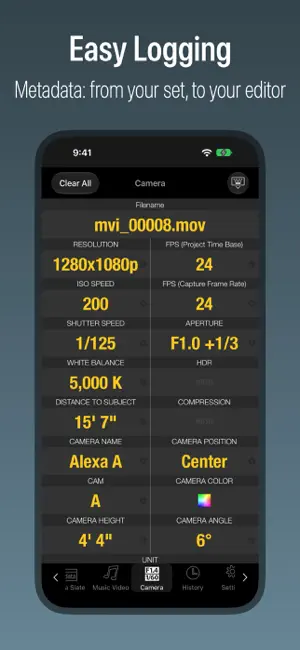
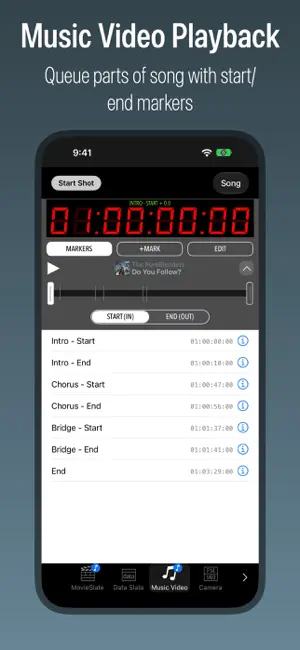
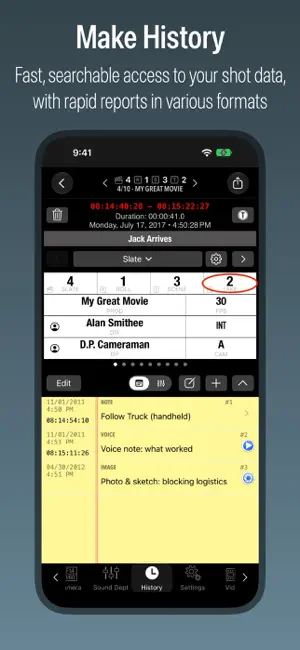
SEE IT Videos/Details at movie-slate.com. AS SEEN IN APPLE’S iPAD TV ADS “MovieSlate® is the the Rolls-Royce of slates” says HandHeldHollywood.com. A convenient, all-in-one digital slate, clapper board, shot log, and notepad is used for film, TV, documentaries, music videos, and interviews, this professional production tool is the easy way to log footage and take notes as you shoot— saving you valuable time later when capturing/editing footage, and creating reports. All at a mere fraction of a bulky digital clapperboard’s cost. SLATE Tap a field to edit production info. Choose info from default/custom snippets, contacts, or saved history. Enter new info with the keyboard. Use the optimized keypad to quickly enter numeric info like: roll, scene, take, timecode. Or swipe up/down on fields to increment/decrement numbers. TIMECODE Entering timecode is easy with our optimized keypad. Sync to clock time, or an iTunes song (Music Video mode). With optional PRO Features in-app purchase: LTC/WiFi sync with: compatible cameras, recorders, generators, Timecode Systems Hubs, wireless timecode slates; and other MovieSlate apps. CLAPPER To begin a shot: photograph the slate’s production info, then tap the clapper sticks. Sticks open & clap closed, creating an audible/visible marker. All slate data is logged to history. Optional credits animations briefly display each production field, full screen. NOTES For each shot, you can: circle a take; rate sound/picture quality; write multiple shot notes; record voice notes; take picture notes. Example: when shooting interviews, create notes to timecode-mark when a particular question was asked, or something remarkable was said. Enter notes using the microphone, camera, keyboard— or insert snippet phrases (such as “Interview”, “Question”, or “Tail Sticks”). LOG HISTORY Get fast, searchable access to shot info, without wading through hours of footage. For each shot: all production, GPS location, and timecode data is stored to the app’s Shot Log History, where you can view, edit, or rate shots. History/Notes can be exported/emailed as: HTML, XML, CSV formats. Supports multiple projects. CUSTOMIZE Choose behaviors, layouts, sounds, themes (clapper/hinge designs, backgrounds, fonts, colors)— even your production logo on the slate and in reports. ALWAYS READY With MovieSlate: lost clapper boards are a thing of the past. Your shot history is always ready to view, review, edit, or send. SLATE FEATURES • Landscape/Portrait; lockable • Standard FPS rates • Customize behavior, appearance, sounds • Detects external claps (using compatible cases) • Color/Gray/Focus charts • Credits animations PRO FEATURES in-app purchase: $9.99/month (auto-renewable) or $299.99 one-time • Timecode Sync - with compatible gear via WiFi/headphone jack. • Denecke TS-TCB - sync claps/timecode/data. • Sound Dept - data/notes logging/reports for up to 32 tracks. • Sound Recorder Sync - with Sound Devices 6-Series. • Reality MultiCam - data/notes logging/reports for up to 26 cameras. • Camera Sync - with some RED cameras. • KeyClips - keyword-based logging for FCPX. • MovieSlate Cloud Pro - advanced backup/restore/sharing. • App-to-App - sync and remote control. SCRIPT DEPT SUBSCRIPTION in-app purchase: $24.99/month (auto-renewable) • Includes Script Dept features and all Pro Features. SUBSCRIPTIONS Listed prices are $USD. At purchase confirmation: payment is charged to your iTunes Account; any unused portion of free trial period is forfeited. Auto-renewable subscriptions are billed monthly through the App Store. Subscriptions automatically renew unless auto-renew feature is turned off at least 24-hours before end of current subscription/trial period. Your iTunes Account is charged for renewal within 24-hours prior to end of current period. To manage subscription auto-renewal see http://support.apple.com/kb/HT4098 PRIVACY http://movie-slate.com/privacy TERMS OF USE http://movie-slate.com/tou REQUIRES iOS 17-27
Ratings & reviews
4.6
547 ratings
What’s new
Version 27.0 · Updated October 21, 2026
• OS 27 support. • iPhone Duo support. • Most screens have been redesigned to work better on devices of all sizes. • Settings, History, Chat, and Sound Dept now use split views on every device. On narrow screens the list slides in as a drawer. • Keypads are popovers on larger windows. • Snippets/Menus screens have been redesigned: + Now support layouts: List, Buttons, and new "Keyboard + Suggestions". + Are popovers on larger windows. • Tabbar changes: + Tabbar can be hidden on every device; tap a tab then "Hide Tabbar" menu item. + When tabbar is hidden a TABS button appears in the bottom right corner. + Tabbar can be shown by tapping TABS button, then "Show Tabbar" menu item. + Tabbar gets shorter and loses icons when screen is short. + On iPhone Duo, a round tab button sometimes appears on the right. + Tab badges (such as REC and SONG) are now icons instead of words. • Help: + Updated User Guide. + User Guide - chapters now appear in collapsible sections. + User Guide - added "Export PDF" button (download icon). + What's New screen has been simplified. + Added some icons to buttons, and fixed layouts for some devices. • Sound Dept - removed superfluous alternate layout. • Slate > Listen for Claps - fixed crash bug. • LTC Timecode - fixed issue confusing 24fps with 23.97fps. • History > Reports - fixed issue when reports include images or audio. • MSCloud > Receive Shared Data - fixed confusion about imported PDFs. • Chat: + Can now send messages to offline recipients. + Unsent messages will send once recipients are online again. • Script Dept: + Added option for DAY numbers with decimals in Project settings. + Page Numbers, Arrows, Layers, Video buttons are a unified Pages Toolbar. + Long-tap Page arrows to scroll continuously through pages. + Script Page Numbers appear above thumbnail bars (when enabled in Settings).. + Script Page Numbers now appear on thumbnail grid screens. + Markup - fixed issue with partially-off-page lines jumping. + Markup - better placement of tramline headers. + Breakdown Reports - added sorting options. + Breakdowns > Sort - added "By Set" and "By Day/Night". + Breakdowns - added support for "Vertical" scripts (short-form series with many episodes in one Script PDF). + Importing a PDF now suggests the PDF's own name. + Fixed duplicate episode numbers in suggested report names. + Fixed issues with deleting some annotations like Ruler Lines. + Updated PDF Library (fixes several crashes).
App privacy
The developer, PureBlend Software, reported these privacy practices to Apple.
Data Not Collected
The developer does not collect any data from this app.
Alternatives to MovieSlate® 8
Looking for apps like MovieSlate® 8? Here are 6 similar apps on the App Store. The highest rated is pCAM Pro - Camera Tools (4.9/5), and 4 of the 6 are free to download.
-
 Bluetooth+ for Blackmagic
4.7
Bluetooth+ for Blackmagic
4.7
-
 pCAM Pro - Camera Tools
4.9
pCAM Pro - Camera Tools
4.9
-
 Tentacle Timebar
4.2
Tentacle Timebar
4.2
-
 Shot Designer
3.8
Shot Designer
3.8
-
 DSLR Clapperboard
3.4
DSLR Clapperboard
3.4
-
 Camera Report
3.0
Camera Report
3.0
| App | Rating | Price | Last updated | Compare |
|---|---|---|---|---|
| MovieSlate® 8 | 4.6 / 5 (547 ratings) | 29.99 USD | October 21, 2026 | |
| Bluetooth+ for Blackmagic | 4.7 / 5 (1,165) | 5.99 USD | Jun 13, 2024 | Compare |
| pCAM Pro - Camera Tools | 4.9 / 5 (222) | 34.99 USD | Oct 24, 2026 | Compare |
| Tentacle Timebar | 4.3 / 5 (4) | Free | Sep 15, 2026 | Compare |
| Shot Designer | 3.8 / 5 (10) | Free | Oct 1, 2024 | Compare |
| DSLR Clapperboard | 3.4 / 5 (24) | Free | Feb 22, 2024 | Compare |
| Camera Report | 3.0 / 5 (1) | Free | Dec 2, 2024 | Compare |
Compare MovieSlate® 8 with the top alternatives: ratings, updates, ASO score and keyword gaps →