

Par Timer
Motus Apps LLC Utilities iPhoneiPadiPod touch
Par Timer is a paid Utilities app for iPhone and iPad by Motus Apps LLC. Requires iOS 16.6. Updated August 25, 2025.
- Price
- 0.99 USD
- on the App Store
- Size
- 4 MB
- Age 4+
- Updated
- Aug 25
- 2025 · v2.1
Screenshots
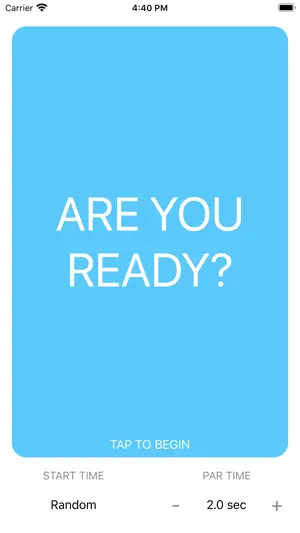


About Par Timer
Par can be used to practice par times for USPSA or IDPA. You set a par time and try to beat the clock, simple as that. Features: - Random, Instant, or 3 Second start delay. - Adjustable par time, to tenths of a second. - Very easy to use. - Large button to start/stop timer. To change the start time, simply tap it to toggle between 3 seconds, random, and instant. To change the par time, simply tap it to type in a new par time, or use the plus and minus buttons to adjust tenths. Make sure your phone is not muted and the sound is up to hear sounds. Note: Does NOT detect audible gunshots, this app is for timing purposes only.
What’s new
Version 2.1 · Updated August 25, 2025
We added instant start as a delay option.
App privacy
The developer, Motus Apps LLC, reported these privacy practices to Apple.
Data Not Linked to You
The following data, which may be collected but is not linked to your identity, may be used for the following purposes:
- Usage Data: Product Interaction
- Diagnostics: Crash Data, Performance Data, Other Diagnostic Data
Used for: Analytics
Alternatives to Par Timer
Looking for apps like Par Timer? Here are 6 similar apps on the App Store. The highest rated is Media Renamer Pro: Batch File (5.0/5), and 3 of the 6 are free to download.
-
 Shooting Range Shot Timer
1.7
Shooting Range Shot Timer
1.7
-
 DryFire Pro: Par Timer
-
 Dry Fire - Shot Timer
2.3
Dry Fire - Shot Timer
2.3
-
 Media Renamer Pro: Batch File
5.0
Media Renamer Pro: Batch File
5.0
-
 Simple OneTap Timer
-
 WiggleWormAlert
| App | Rating | Price | Last updated | Compare |
|---|---|---|---|---|
| Par Timer | – | 0.99 USD | August 25, 2025 | |
| Shooting Range Shot Timer | 1.7 / 5 (7) | 6.99 USD | Dec 14, 2023 | Compare |
| DryFire Pro: Par Timer | – | 1.99 USD | Feb 5, 2026 | Compare |
| Dry Fire - Shot Timer | 2.3 / 5 (33) | Free | Dec 15, 2023 | Compare |
| Media Renamer Pro: Batch File | 5.0 / 5 (1) | 4.99 USD | Oct 27, 2026 | Compare |
| Simple OneTap Timer | – | Free | Jan 27, 2026 | Compare |
| WiggleWormAlert | – | Free | Jul 8, 2026 | Compare |
Compare Par Timer with the top alternatives: ratings, updates, ASO score and keyword gaps →