

AsKey - Keyboard for AsReader
Asterisk Corporation Business iPhoneiPadiPod touch
AsKey - Keyboard for AsReader is a free Business app for iPhone and iPad by Asterisk Corporation. Rated 5.0/5 from 1 ratings. Requires iOS 12.0.
- Rating
- 5.0
- 1 ratings
- Price
- Free
- on the App Store
- Size
- 3 MB
- Age 4+
- Updated
- Sep 10
- 2025 · v2.5.1
Screenshots
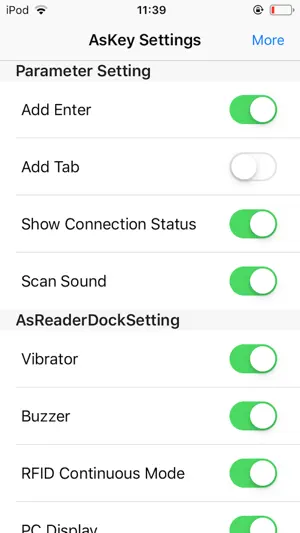
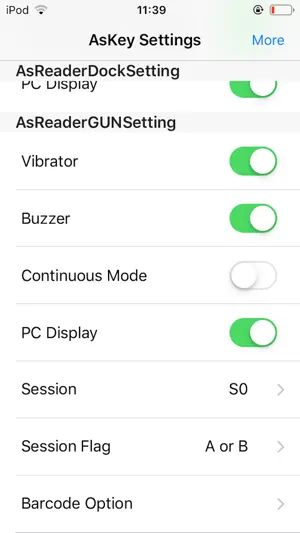
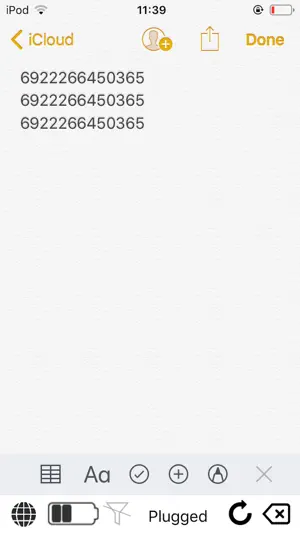
About AsKey - Keyboard for AsReader
This app is a custom software keyboard to input the data AsReader scan. How to use 1. Enable the custom keyboard after installing the app. Go to Setting > General > Keyboard > Keyboards > Add New Keyboard... and select "AsReader" Go back to Setting > General > Keyboard > Keyboards select "AsKey - AsReader", set "Allow Full Access" to ON. 2. Connect AsReader to iPhone/iPod touch 3. Open an app (e.g. memo, safari or web form) 4. Switch keyboard to Askey. AsKey will connect with AsReader. 5. Press the trigger buttons of the AsReader to scan a barcode. The scanned data will be inputted by the keyboard.
What’s new
Version 2.5.1 · Updated September 10, 2025
The issue where automatic connection to AsReader fails after switching apps has been fixed.
App privacy
The developer, Asterisk Corporation, reported these privacy practices to Apple.
Data Not Collected
The developer does not collect any data from this app.
Alternatives to AsKey - Keyboard for AsReader
Looking for apps like AsKey - Keyboard for AsReader? Here are 6 similar apps on the App Store. The highest rated is Xema KE (5.0/5), and all 6 are free to download.
-
 Xema KE
5.0
Xema KE
5.0
-
 CortexWedge
3.5
CortexWedge
3.5
-
 移動管理 Ver.2.18 Assetment Neo
-
 Scanner Keyboard: CameraBoard
4.1
Scanner Keyboard: CameraBoard
4.1
-
 AsReader QC
-
 資産情報 Ver.2.18 Assetment Neo
| App | Rating | Price | Last updated | Compare |
|---|---|---|---|---|
| AsKey - Keyboard for AsReader | 5.0 / 5 (1 rating) | Free | September 10, 2025 | |
| Xema KE | 5.0 / 5 (1) | Free | Jul 30, 2025 | Compare |
| CortexWedge | 3.5 / 5 (4) | Free | Oct 2, 2026 | Compare |
| 移動管理 Ver.2.18 Assetment Neo | – | Free | Jul 8, 2026 | Compare |
| Scanner Keyboard: CameraBoard | 4.1 / 5 (7) | Free | Apr 1, 2026 | Compare |
| AsReader QC | – | Free | Mar 11, 2024 | Compare |
| 資産情報 Ver.2.18 Assetment Neo | – | Free | May 12, 2026 | Compare |