

Typiora Keyboard
Nam Kennic Utilities iPhoneiPadiPod touch
Typiora Keyboard is a free Utilities app for iPhone and iPad by Nam Kennic. Rated 4.4/5 from 468 ratings. Requires iOS 15.6. Updated July 11, 2026.
- Rating
- 4.4
- 468 ratings
- Price
- Free
- on the App Store
- Size
- 89 MB
- Age 4+
- Updated
- Jul 11
- 2026 · v7.0.4
Screenshots


About Typiora Keyboard
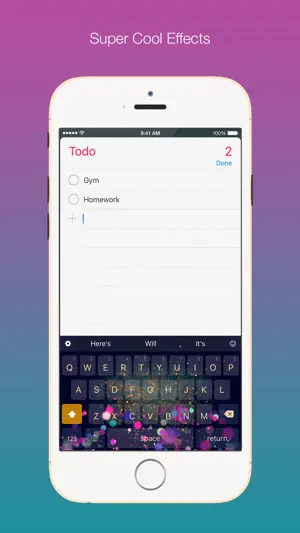
Typiora is an amazing keyboard extension that has a lot of powerful features to help you to type with fun and convenient like Cursor Control, Swipe to Delete, Swipe to Type, Text-Case Control, ForceTouch-Capitalize, Alternate Key, Numbers Row, Shortcuts, or One-Hand Mode. It's also very easy to design your own theme with a powerful Theme Customizer. Choose from mood presets or fine-tune every detail in Advanced mode. Be unique and creative! You can also enjoy beautiful effects inside Typiora keyboard. Create your own effect with the Effect Editor and share it with your friends! Typiora can change your text into hundreds of fonts to impress your friends. Boring of click sound? Typiora brings fun to your typing with different sounds on every touch. Typiora Store allows you to browse and download themes, effects, fonts, sounds, and keyboard layouts from a growing community of creators. Highlight features: • Awesome Themes: Hundreds of cool themes. Create your own Theme and share with your friends • Theme Editor: Design from mood presets or go Advanced for full per-element control • Particle Effects: Your keyboard is more lively with beautiful particle effects • Effect Editor: Create and customize your own particle effects • Fancy Fonts: to make words look exquisite • Sounds: Type with different sounds or even a song, no more boring click sound • AI Grammar Check: Fix grammar, spelling, and punctuation instantly • AI Translate: Translate your text into 30+ languages right from the keyboard • AI Rephrase: Rewrite in Formal, Casual, Concise, Polite, or Funny tone • AI Continue Writing: Let AI complete your sentences and paragraphs • Typing Stats: Track your speed, accuracy, words typed, and daily activity • Typing Personality: Discover if you're a Speed Demon, Night Owl, Emoji Artist, and more • 44+ Achievements: Unlock milestones for typing, gestures, and AI usage • Cursor Control: Drag to move the cursor quickly • Quick Delete: Swipe to delete, repeat deletion and word deletion • Forward Deletion: Delete text on the right • Swipe to Type: Glide across keys to type entire words • One-Handed Mode: Shrink the keyboard to type easily with one hand • Smart Prediction: Next-word guessing and auto correction • Emoji Suggestions: Context-aware emoji with 300+ country flag suggestions • Calculator: Evaluate math expressions in the suggestion bar • Unit Conversion: Convert units instantly as you type • Shortcuts & Text Templates: Type less and faster, shortcuts are used as text templates • Alt-Keys: Fast number input • Number Row: Addition number row on top • Case Sensitive: Keyboard buttons in lowercase or uppercase • Text-Case Control: Fast switching text to uppercase, lowercase or capitalize • Responsive Theme: Theme system supports both Light and Dark mode • Typiora Store: Browse and download community themes, effects, fonts, sounds, and keyboards • Multi-Language: English, Vietnamese (Telex & VNI), Emoji, and more downloadable layouts • New Emoji: Quick access to full new emoji set • Pictographics: Access to hundreds of special symbols and text-arts • Test Lab: Section to test your keyboard to see how it reacts to every type of text fields • iCloud Sync: Your typing stats sync securely across your devices Typiora DOES NOT require Full Access, but still being recommended in order to update/improve database, play sound, or use AI features. Typiora takes your privacy very seriously, it DOES NOT collect anything you type. Your typing stats are stored only on your device and private iCloud. Typiora Premium unlocks all themes, effects, fonts, sounds, and AI features with one subscription. Free users enjoy smart gestures, basic plugins, typing stats, text templates, and multi-language support. Follow Typiora at: facebook.com/Typiora twitter.com/Typiora www.typiora.app Email: [email protected]
Ratings & reviews
4.4
468 ratings
What’s new
Version 7.0.4 · Updated July 11, 2026
Improved word prediction
App privacy
The developer, Nam Kennic, reported these privacy practices to Apple.
Data Used to Track You
The following data may be used to track you across apps and websites owned by other companies:
- Usage Data: Advertising Data
Alternatives to Typiora Keyboard
Looking for apps like Typiora Keyboard? Here are 6 similar apps on the App Store. The highest rated is Cool Symbols Keyboard & Fonts (4.6/5), and all 6 are free to download.
-
 Font Party: New Keyboard Fonts
4.5
Font Party: New Keyboard Fonts
4.5
-
 Slyder
4.5
Slyder
4.5
-
 Fonts Keyboard AI
4.5
Fonts Keyboard AI
4.5
-
 Cool Symbols Keyboard & Fonts
4.6
Cool Symbols Keyboard & Fonts
4.6
-
 better keyboard themes
4.3
better keyboard themes
4.3
-
 Cool Type Keyboard
4.4
Cool Type Keyboard
4.4
| App | Rating | Price | Last updated | Compare |
|---|---|---|---|---|
| Typiora Keyboard | 4.4 / 5 (468 ratings) | Free | July 11, 2026 | |
| Font Party: New Keyboard Fonts | 4.5 / 5 (159) | Free | Oct 16, 2023 | Compare |
| Slyder | 4.5 / 5 (1,649) | Free | Sep 22, 2026 | Compare |
| Fonts Keyboard AI | 4.5 / 5 (7,746) | Free | Sep 22, 2026 | Compare |
| Cool Symbols Keyboard & Fonts | 4.6 / 5 (3,704) | Free | Jul 4, 2026 | Compare |
| better keyboard themes | 4.3 / 5 (194) | Free | May 16, 2024 | Compare |
| Cool Type Keyboard | 4.4 / 5 (42) | Free | Apr 18, 2026 | Compare |
Compare Typiora Keyboard with the top alternatives: ratings, updates, ASO score and keyword gaps →