

Bottles - Wine Cellar Manager
Paul Hangas Food & Drink iPhoneiPadiPod touchMac
Bottles - Wine Cellar Manager is a paid Food & Drink app for iPhone and iPad by Paul Hangas. Requires iOS 26.4. Updated May 24, 2026.
- Price
- 2.99 USD
- on the App Store
- Size
- 8 MB
- Age 17+
- Updated
- May 24
- 2026 · v5.5
Screenshots



About Bottles - Wine Cellar Manager
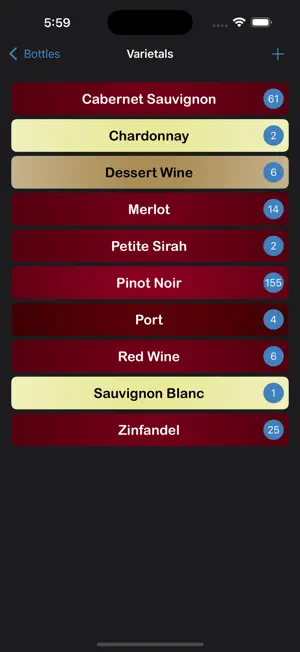
Bottles lets you easily manage your wine collection. Perfect for those of us that have a collection of wine. Allows you to rate the wines you open, so that you know which bottles you liked most when purchasing more wine. There are no additional fees, no ads, and none of your data is shared. Add your wine to the Bottles app, specifying the location you store each bottle. Use the app to view lists of your wine, pick a bottle to enjoy, see where it is located, and mark the bottle as opened. Later Bottles can remind you to rate that wine, helping in the future to pick your favorite wines, and helping you to purchase more of your favorites. Wines can be viewed by varietal, winery, vintage, favorites and more. List can be easily sorted and searched. Since your wine data is stored in iCloud, you can safely access your collection from all your iPhones, iPads and Macs. Bottles may be used when not connected to the internet, and your changes will sync the next time you run Bottles with an internet connection. Bottles supports light and dark mode, and your Text Size setting.
What’s new
Version 5.5 · Updated May 24, 2026
Main Screen - Number of bottles in collection shown at top of screen. Add Bottle Screen - Updated the Cost Discount dialog to handle negative discounts the same as positive discounts. - Updated “Location” label to show “Purchase Location”. - Fixed “Shelf # or x, y” to show a number keyboard. Rating Reminders - Updated to handle multiple opened bottles, increasing the likelihood of rating every opened bottle. - Can now mark a bottle as Corked in the Rate Bottle reminder. Bottles marked as Corked can be shown separately inside the Opened screen. - Can now mark a bottle as Missing when you rate the bottle. A missing bottle is often because it was removed from the collection without tapping the Open Bottle button. Bottles marked as Missing can be shown separately inside the Opened screen. Settings - Added button for Email Support. Opened screen - Can view by Opened, Corked or Missing. - Date headers now show “Yesterday” or “Today” instead of only a date. Date Added screen - Date headers now show “Yesterday” or “Today” instead of only a date.
App privacy
The developer, Paul Hangas, reported these privacy practices to Apple.
Data Not Collected
The developer does not collect any data from this app.
Alternatives to Bottles - Wine Cellar Manager
Looking for apps like Bottles - Wine Cellar Manager? Here are 6 similar apps on the App Store. The highest rated is Wine Cellar (1.0/5), and 3 of the 6 are free to download.
-
 Wine Cellar HD
-
 Wine Cellar
1.0
Wine Cellar
1.0
-
 Wine Cellar Import Pro
-
 100 Cocktails
-
 SteakFlip: Timer
-
 Soups: Prep Healthy Recipes
| App | Rating | Price | Last updated | Compare |
|---|---|---|---|---|
| Bottles - Wine Cellar Manager | – | 2.99 USD | May 24, 2026 | |
| Wine Cellar HD | – | 0.99 USD | Mar 21, 2025 | Compare |
| Wine Cellar | 1.0 / 5 (1) | 0.99 USD | Mar 18, 2025 | Compare |
| Wine Cellar Import Pro | – | 0.99 USD | Mar 21, 2025 | Compare |
| 100 Cocktails | – | Free | Feb 14, 2025 | Compare |
| SteakFlip: Timer | – | Free | Mar 5, 2026 | Compare |
| Soups: Prep Healthy Recipes | – | Free | Sep 3, 2025 | Compare |