

MoonCatcher
HIROFUMI MARUO Photo & Video iPhoneiPadiPod touch
MoonCatcher is a paid Photo & Video app for iPhone and iPad by HIROFUMI MARUO. Requires iOS 12.0. Updated March 21, 2025.
- Price
- 0.99 USD
- on the App Store
- Size
- 23 MB
- Age 4+
- Updated
- Mar 21
- 2025 · v18.1
Screenshots



About MoonCatcher
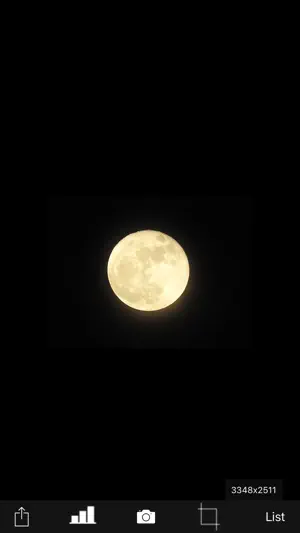
This is an app that allows you to easily photograph the moon at night, including its pattern. You can also zoom easily. Usage is simple. (A) Tap the moon from the menu and tap the closest moon shape among the three. (B) Point the camera at the moon and zoom. (C) Release the shutter without moving the smartphone (tripod recommended). The shutter will fire several times, so don't let it slide until the end. If you cannot take any of the photos with the moon in focus, you can try "changing the center of focus" as many times as you like below. Tap the manual mode button (second button from the bottom right) to enter manual mode, where you can manually set focus, ISO/shutter speed, white balance, and multiple exposure parameters. ------------------------- The features of this app are (1) Fully automatic function - If you select "Moon", the exposure will be automatically darkened in response to the bright moon in the night sky, and the focus will be adjusted to the distance. Since it fires continuously while changing the focus multiple times, you can choose the best result among them. (The number of consecutive shots and the center of focus can be changed with the slider) *"Change the focus center": Tap "Moon" on the shooting screen to display the moon shape selection segment, the number of consecutive shots slider, and the focus center slider. Now you can change each value. Because the moon is far away, it is difficult to focus when zoomed in. Therefore, if you take pictures while changing the focus little by little, you can expect the moon to be in focus at some point. The focus range is from 0 (nearby) to 1 (far), but in reality, the focus is shifted by 1/5 when shooting. For example, 0.7 to 0.9 (0.8 in the center). By changing the center of focus, you can shift the focus within any range and fire continuously. - There are two types of night views. ・"Night Scene 1" brightens a dark night scene by one level. ・“Night Scene 2” brightens the image one step brighter than “Night Scene 1”. It fires continuously while changing the brightness 4 times. - If you select "HDR", multiple consecutive images with different exposures will be combined to create a pseudo-large dynamic range. Multiple exposure 3 times. (2) Full manual function You can take photos by manually setting the focal length, exposure, white balance, photo composition method, and number of photos. ・Tap "Focus", "ISO/SS", and "WB" to select auto or manual. ・Tap "Multiple Exposure" to select the multiple exposure composition method and set the number of composite images (up to 100). The synthesis methods are as following. Bright: Screen composit (Screen Blend) Normal: Comparison(light) composition (Lighten Blend) Dark: Comparison (dark) composition (Darken Blend) HDR: Special composition (Special Blend) (3) Other camera functions ・Zoom function: Achieving a zoom ratio of 40 time ・A camera position: The LCD screen side or the back camera is selectable. ・Focus position specification ・Mesh display ・Aspect selection ・Deviation correction selection (4) Filter function just after the photography To display the photograph just after photography and the following filtering are possible by slider operation. ・Purity (sharpness) ・Comparison degree (contrast) ・Luminosity (exposure) ・Display list function The photos taken in this app is stored in the camera roll and in app itself too and you can see the list of them with the shooting date and time information. ・Image processing function When you tap the image on the list, it displays the list of filters for image processing. It has about 70 filters such as 'Brightness','Contrast','Blur','Sharpening','Sepia','Monochrome','Edge detection','Sketch' and so on. *** This app include the following open sources. - GPUImage (Copyright (c) 2012, Brad Larson, Ben Cochran, Hugues Lismonde, Keitaroh Kobayashi, Alaric Cole, Matthew Clark, Jacob Gundersen, Chris Williams. All rights reserved.)
What’s new
Version 18.1 · Updated March 21, 2025
The following function has been added: When shooting the moon with focus shift, the center of focus is set to the focus point immediately before shooting.
App privacy
The developer, HIROFUMI MARUO, reported these privacy practices to Apple.
Data Not Collected
The developer does not collect any data from this app.
Alternatives to MoonCatcher
Looking for apps like MoonCatcher? Here are 6 similar apps on the App Store. The highest rated is Dr. Seuss Camera (4.7/5), and 3 of the 6 are free to download.
-
 iMoonCamera3
3.2
iMoonCamera3
3.2
-
 Dr. Seuss Camera
4.7
Dr. Seuss Camera
4.7
-
 moontake
4.5
moontake
4.5
-
 StarryLens - Night Sky Camera
4.2
StarryLens - Night Sky Camera
4.2
-
 Night Camera: Low light photos
4.3
Night Camera: Low light photos
4.3
-
 NightCap Camera: Long Exposure
4.3
NightCap Camera: Long Exposure
4.3
| App | Rating | Price | Last updated | Compare |
|---|---|---|---|---|
| MoonCatcher | – | 0.99 USD | March 21, 2025 | |
| iMoonCamera3 | 3.2 / 5 (5) | 4.99 USD | Oct 26, 2026 | Compare |
| Dr. Seuss Camera | 4.7 / 5 (892) | 0.99 USD | Oct 17, 2025 | Compare |
| moontake | 4.5 / 5 (43) | Free | Oct 23, 2026 | Compare |
| StarryLens - Night Sky Camera | 4.2 / 5 (134) | Free | Oct 27, 2024 | Compare |
| Night Camera: Low light photos | 4.3 / 5 (4,217) | Free | Sep 15, 2026 | Compare |
| NightCap Camera: Long Exposure | 4.3 / 5 (2,959) | 2.99 USD | Oct 27, 2026 | Compare |
Compare MoonCatcher with the top alternatives: ratings, updates, ASO score and keyword gaps →