

Web Browser SMS
Raphael Odermatt Productivity iPhoneiPadiPod touch
Web Browser SMS is a free Productivity app for iPhone and iPad by Raphael Odermatt. Rated 3.3/5 from 13 ratings. Requires iOS 15.0. Updated May 3, 2026.
- Rating
- 3.3
- 13 ratings
- Price
- Free
- on the App Store
- Size
- 23 MB
- Age 4+
- Updated
- May 3
- 2026 · v2.6.2
Screenshots

About Web Browser SMS
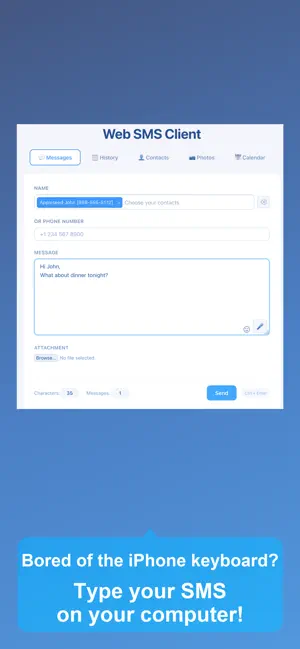
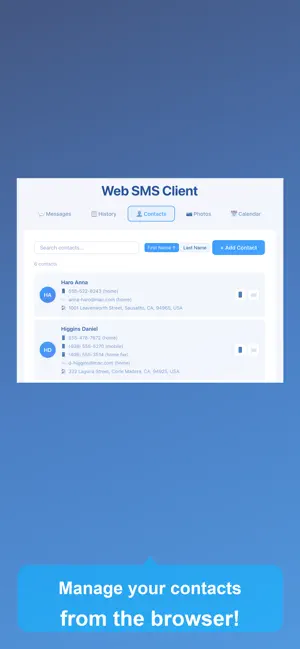
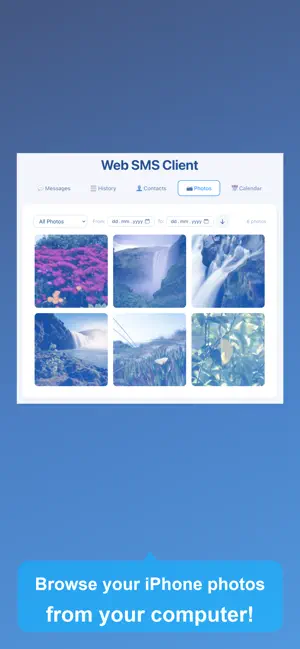
Access your iPhone photos, contacts, messages, and calendar from any web browser. Full control of your iPhone data from your Mac or PC. Tired of being tethered to your iPhone screen? Get complete web-based access to your photos, contacts, text messages, and calendar - all from the comfort of your computer's browser with a real keyboard. SMS & Email from Your Browser --------------------------- ▶ Compose and send text messages and emails using your computer's keyboard through your web browser. Access your full address book - no typing phone numbers or email addresses. Send to multiple recipients. No character limit, with message count display for fee control. Message History --------------------------- ▶ Keep track of every SMS and email you send. The History tab records all your messages with search and filter. View details, resend with one click, and see statistics on your messaging activity. Contact Management --------------------------- ▶ Full web-based access to your iPhone contacts: view, search, add, edit, and delete contacts directly from your browser. Update contact photos with an easy-to-use cropping tool. All changes sync instantly with your iPhone. Export all your contacts to CSV. Photo Library Access --------------------------- ▶ Browse your entire iPhone photo library from any web browser: view albums, thumbnails, and full-resolution images. Download photos and videos with custom size and format options (JPEG/PNG). Filter by album and date. Your photos, accessible anywhere. Calendar & Events --------------------------- ▶ Manage your calendar from your computer: view, create, edit, and delete events in month, week, or day view. Access all your calendars, set event details, locations, and notes. All changes sync instantly with your iPhone calendar. Your iPhone data is just a browser away. Connect via WiFi and manage everything from your computer. Note: WiFi connection required. SMS sent via your iPhone - standard carrier fees apply.
Ratings & reviews
3.3
13 ratings
What’s new
Version 2.6.2 · Updated May 3, 2026
● NEW: Message History - Keep track of all your sent messages The new History tab records every SMS and email you send. Search and filter your messages, view details, and resend with one click. A Statistics panel shows your total message count, SMS/Email breakdown, and your top recipients. Thank you for all your feedback! If you miss something, don't hesitate to contact us. Do you like the app? Please leave a review in the app store.
App privacy
The developer, Raphael Odermatt, reported these privacy practices to Apple.
Data Used to Track You
The following data may be used to track you across apps and websites owned by other companies:
- Identifiers: Device ID
- Usage Data: Advertising Data
Data Not Linked to You
The following data, which may be collected but is not linked to your identity, may be used for the following purposes:
- Identifiers: Device ID
- Usage Data: Product Interaction, Advertising Data, Other Usage Data
- Diagnostics: Crash Data
Used for: Third-Party Advertising, Analytics, App Functionality
Alternatives to Web Browser SMS
Looking for apps like Web Browser SMS? Here are 6 similar apps on the App Store. The highest rated is Group SMS+ (4.7/5), and all 6 are free to download.
-
 SMS from PC
4.2
SMS from PC
4.2
-
 MessageDesk
3.4
MessageDesk
3.4
-
 Forward SMS: SMS Forwarder
3.3
Forward SMS: SMS Forwarder
3.3
-
 Group RCS SMS and Email
4.5
Group RCS SMS and Email
4.5
-
 Second SMS Receive Code
4.0
Second SMS Receive Code
4.0
-
 Group SMS+
4.7
Group SMS+
4.7
| App | Rating | Price | Last updated | Compare |
|---|---|---|---|---|
| Web Browser SMS | 3.3 / 5 (13 ratings) | Free | May 3, 2026 | |
| SMS from PC | 4.2 / 5 (13) | Free | Sep 3, 2026 | Compare |
| MessageDesk | 3.4 / 5 (19) | Free | Dec 17, 2025 | Compare |
| Forward SMS: SMS Forwarder | 3.3 / 5 (22) | Free | Oct 12, 2026 | Compare |
| Group RCS SMS and Email | 4.5 / 5 (1,039) | Free | Sep 17, 2026 | Compare |
| Second SMS Receive Code | 4.0 / 5 (16) | Free | Feb 8, 2025 | Compare |
| Group SMS+ | 4.7 / 5 (4,148) | Free | Sep 11, 2026 | Compare |
Compare Web Browser SMS with the top alternatives: ratings, updates, ASO score and keyword gaps →