

Unibox – Email by sender
eightloops GmbH Productivity iPhoneiPadiPod touch
Unibox – Email by sender is a free Productivity app for iPhone and iPad by eightloops GmbH. Rated 4.1/5 from 238 ratings. Requires iOS 15.6.
- Rating
- 4.1
- 238 ratings
- Price
- Free
- on the App Store
- Size
- 30 MB
- Age 4+
- Updated
- Sep 27
- 2026 · v1.21.0
Screenshots
About Unibox – Email by sender
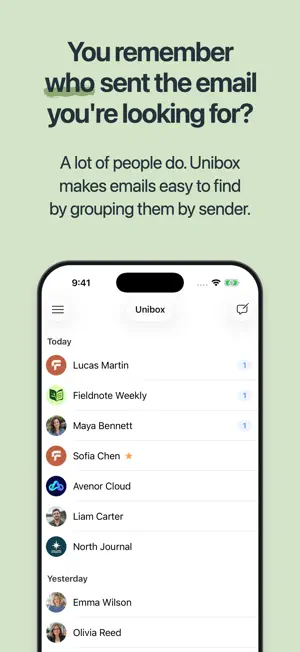
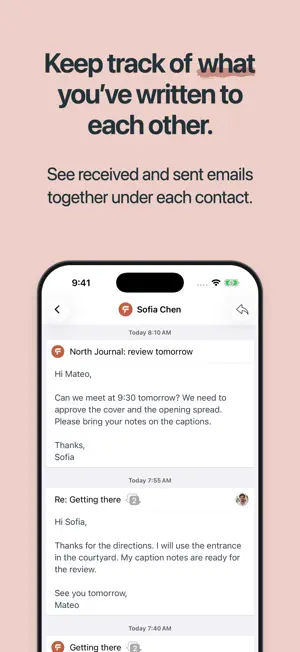
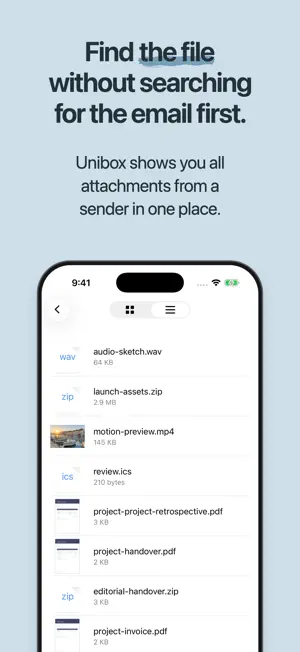
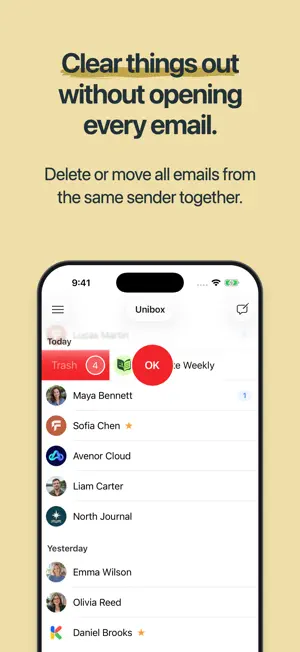
Unibox groups your emails by sender. Find past messages, conversations and attachments under the relevant contact. See what you've written to each other. Under each contact, you'll see both received and sent emails. Whether you're arranging a meeting, following up with a question or sharing new documents, your correspondence stays together even when the subject changes. Find the file without first searching for the email. Unibox shows you all attachments from a sender in one place. Find documents and photos from different messages without first tracking down the email they came with. Clean up without opening every email. Delete or move all emails from the same sender together. This is useful for newsletters, automated confirmations and other regular emails. You can still manage individual emails separately. Reply with your previous emails in view. Read and write in the same window. While composing a reply, you can refer to earlier messages without switching between separate windows. A conversation stays together, even when several people are involved. Open a conversation with multiple participants from your email history. You'll see the messages in that conversation separately from other topics. Keep multiple inboxes in view. Unibox brings emails from all your accounts together in one view. See your personal and work email accounts in the same place. Use your existing email accounts. Unibox supports IMAP accounts, including iCloud, Gmail (with an app password), Outlook.com and Microsoft 365, as well as accounts on your own mail servers. Exchange accounts can be used if IMAP is enabled. Connect directly to your email provider. When sending and receiving email, Unibox connects directly to your email provider. Your emails are not routed through Unibox servers. Login credentials are stored locally on your device. Privacy: https://www.uniboxapp.com/privacy Terms of Use (EULA): https://www.apple.com/legal/internet-services/itunes/dev/stdeula/
Ratings & reviews
4.1
238 ratings
What’s new
Version 1.21.0 · Updated September 27, 2026
• Search now also finds words from their beginning, such as “Inv” for “Invoice”. To match words exactly, you can put them in quotes. Emails also show up in Spotlight more quickly. • Notifications for new emails and background sync now work more reliably. • Spam and Trash folders can now be emptied directly in Unibox. Before deleting permanently, you can choose to delete all messages on the server or only those loaded in Unibox. • Notifications for new emails now show the sender’s contact picture when available. • Account setup has a new, clearer design. • Contact pictures from the Contacts app are shown again, including your own.
App privacy
The developer, eightloops GmbH, reported these privacy practices to Apple.
Data Not Linked to You
The following data, which may be collected but is not linked to your identity, may be used for the following purposes:
- Contact Info: Email Address
- Identifiers: Device ID
- Usage Data: Product Interaction
- Diagnostics: Crash Data, Performance Data
Used for: Developer’s Advertising or Marketing, Analytics, App Functionality
Alternatives to Unibox – Email by sender
Looking for apps like Unibox – Email by sender? Here are 6 similar apps on the App Store. The highest rated is Email Client - Boomerang Mail (4.6/5), and all 6 are free to download.
-
 MailBuzzr for Outlook
4.1
MailBuzzr for Outlook
4.1
-
 Polymail: Email Inbox
3.9
Polymail: Email Inbox
3.9
-
 Airmail for Gmail Outlook Mail
4.3
Airmail for Gmail Outlook Mail
4.3
-
 OneMail - Email by Nouvelware
4.4
OneMail - Email by Nouvelware
4.4
-
 Email Client - Boomerang Mail
4.6
Email Client - Boomerang Mail
4.6
-
 MailTime: AI Email Inbox
3.7
MailTime: AI Email Inbox
3.7
| App | Rating | Price | Last updated | Compare |
|---|---|---|---|---|
| Unibox – Email by sender | 4.1 / 5 (238 ratings) | Free | September 27, 2026 | |
| MailBuzzr for Outlook | 4.1 / 5 (518) | Free | Mar 1, 2026 | Compare |
| Polymail: Email Inbox | 3.9 / 5 (86) | Free | Oct 9, 2026 | Compare |
| Airmail for Gmail Outlook Mail | 4.3 / 5 (4,550) | Free | Oct 20, 2026 | Compare |
| OneMail - Email by Nouvelware | 4.4 / 5 (298) | Free | Jul 14, 2024 | Compare |
| Email Client - Boomerang Mail | 4.6 / 5 (4,662) | Free | Oct 19, 2026 | Compare |
| MailTime: AI Email Inbox | 3.7 / 5 (97) | Free | Oct 25, 2026 | Compare |