

Timeport.
Victor Sidorov Productivity iPhoneiPadiPod touchMac
Timeport. is a free Productivity app for iPhone and iPad by Victor Sidorov. Rated 3.0/5 from 1 ratings. Requires iOS 16.0. Updated September 25, 2026.
- Rating
- 3.0
- 1 ratings
- Price
- Free
- on the App Store
- Size
- 116 MB
- Age 4+
- Updated
- Sep 25
- 2026 · v3.0
Screenshots
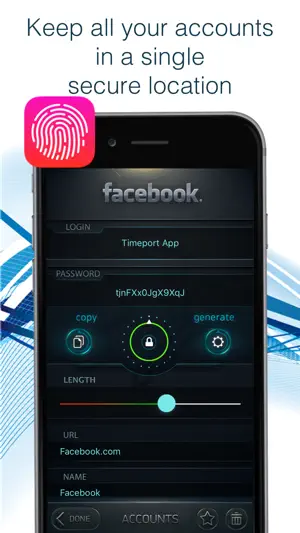


About Timeport.
YOUR DIGITAL LIFE. ONE SECURE SPACE. Passwords. Documents. Bank cards. Photos. Notes. Some information is simply too important to keep just anywhere. Timeport is your private, secure space for the information that matters — available on iPhone, iPad, and now Mac. No more searching for passport details, trying to remember where you saved a card, or wondering which note contains that password. Timeport keeps everything organized, protected, and ready when you need it. EVERYTHING IMPORTANT. ONE APP. Our personal information tends to end up everywhere: passwords in notes, document photos in the camera roll, banking details in messages, and important files scattered across folders. Timeport brings it all together in one organized, protected space. It’s more than a password manager. Timeport is a private vault for your digital life — from online accounts and passwords to IDs, bank cards, personal photos, documents, and notes. KEEP IN TIMEPORT: • Private photos and videos • Folders and media galleries • Passwords, logins, and accounts • Bank cards and account details • Passports, driver’s licenses, and other documents • Notes, ideas, and personal information NOW ON iPHONE, iPAD, AND MAC Timeport 3.0 brings your secure space to Mac. Create your vault on one device and open it on another using the same master password. Your encrypted database syncs through your personal iCloud storage, keeping your information available across your Apple devices. Add a document on Mac and access it on iPhone. Save a card on iPhone and it’s there on your Mac. Write a note on iPad and continue working with it at your desk. One secure space, wherever you need it. MADE FOR MAC Timeport for Mac is a full macOS app designed for a larger screen, keyboard, and desktop workflow. Drag photos and videos directly from Finder into your gallery or documents. Edit notes, attach photos, organize your information, and work with your vault without reaching for your phone. Timeport also supports iPhone Mirroring, macOS appearance settings, widgets, and expiration notifications. STAY AHEAD OF EXPIRATION DATES Add an expiration date to a document or bank card and Timeport will remind you 30 days before it expires, then again 2 days before. Widgets for iPhone, iPad, and Mac keep upcoming expiration dates and section information visible at a glance. PRIVACY ISN’T A FEATURE. IT’S A PRINCIPLE. Timeport does not use its own servers to store your personal data. Your passwords, documents, cards, photos, and other private information are encrypted directly on your device. Only encrypted data is synced to your personal iCloud storage. Without your master password, your vault cannot be accessed. We believe one of the best ways to protect your personal information is simple: we shouldn’t have access to it in the first place. KEY FEATURES • AES-256 encryption • Strong password generator • Secure photo and video storage • Templates for IDs and personal documents • Bank cards and account details • Card scanning with your camera • Photos attached to documents and cards • Notes with photo attachments • Drag & Drop on Mac and iPad • Import from Finder • iPhone Mirroring support • Automatic app lock • Expiration reminders • Widgets for iPhone, iPad, and Mac • Light and Dark Mode • Secure iCloud sync • Available in 13 languages TIMEPORT PRO One purchase unlocks Timeport Pro across your supported Apple devices — iPhone, iPad, and Mac. Notes remain free with no limits. If you previously purchased an unlimited pack for accounts, cards, documents, or media, Timeport Pro is unlocked automatically. MORE THAN 10 YEARS OF TIMEPORT Timeport has been evolving alongside its users for more than a decade. Devices change. Technology changes. But one thing remains the same: important personal information deserves a place you can trust. Your personal data should remain yours. Welcome to Timeport 3.0. Questions, feedback, or suggestions: [email protected]
What’s new
Version 3.0 · Updated September 25, 2026
Time moves fast. Almost without us noticing, Timeport has been with you for more than ten years. Throughout that time, the app has continued to evolve alongside its users. Thank you to everyone who shared ideas, left reviews, and helped us make Timeport better. Now it’s time for the biggest update in Timeport’s history. Welcome to Timeport 3.0. We’ve rebuilt major parts of the app, reworked tens of thousands of lines of code, and redesigned key parts of the experience. And the biggest addition: Timeport is now on Mac. Your iPhone, iPad, and Mac can now share one encrypted database through iCloud. WHAT’S NEW IN TIMEPORT 3.0 1. Timeport for Mac A full macOS app with a shared database across iPhone, iPad, and Mac through iCloud. One purchase gives you Timeport across all supported Apple devices. 2. Timeport Pro Separate feature packs have been replaced by a single one-time Timeport Pro purchase. Notes remain free with no limits. Previous unlimited purchases for media, cards, documents, or accounts automatically unlock Pro. 3. Light Mode A new light appearance is available throughout the app. Choose Light or Dark Mode in Settings, while Mac can also follow your system appearance. 4. Card Scanner Point the camera at a physical card and Timeport can recognize the card number, expiration date, and cardholder name, then fill in the fields automatically. 5. Document & Card Photos Take photos of physical documents and cards and keep them alongside their entries inside your encrypted vault. Photos can also be edited using the system Markup tools. 6. Notes Edit notes on Mac and attach photos. 7. iPhone Mirroring Open and use Timeport from your iPhone directly in an iPhone Mirroring window on Mac. 8. Photos & Videos on Mac Drag photos and videos from Finder directly into a Timeport gallery, document, or card. From iPhone Mirroring, transfer them using copy and paste (⌘C / ⌘V) or the “+” button. 9. Drag & Drop On Mac, drag photos and videos from Finder into galleries and documents. On iPad, drag media into Timeport from other apps, drag photos out, drop items into the Trash to delete them, and rearrange folders and entries. 10. Widgets Widgets for iPhone, iPad, and Mac show upcoming document and card expiration dates and section counts, in your selected app language. 11. Expiration Reminders Timeport reminds you when a document or card is about to expire — 30 days before, then again 2 days before. 12. Document Countries Choose the countries relevant to your documents during initial setup and add more later. 13. Start on Any Device Create your vault on Mac and open it on iPhone with the same master password — or start on iPhone and continue on Mac. 14. Bank Account Details Keep relevant bank account information together with your card, so the details you need stay organized in one place. 15. Updated Navigation Improved transitions between screens, a redesigned Timeport Pro page, and a new country selection experience. 16. More for Mac Expiration notifications and support for the macOS system appearance. 17. 13 Languages Timeport is available in English, Russian, Ukrainian, Belarusian, Kazakh, Azerbaijani, German, Polish, French, Japanese, Spanish, Simplified Chinese, and Traditional Chinese. 18. Encrypted iCloud Sync Your data is encrypted directly on your device. Only encrypted information is sent to iCloud. Timeport 3.0 begins a new chapter. One principle remains unchanged: Timeport does not store your personal data on its own servers. Your encrypted database syncs through your personal iCloud storage. Thank you for being with us all these years. Welcome to Timeport 3.0.
App privacy
The developer, Victor Sidorov, reported these privacy practices to Apple.
Data Not Collected
The developer does not collect any data from this app.
Alternatives to Timeport.
Looking for apps like Timeport.? Here are 6 similar apps on the App Store. The highest rated is Stamp Mail (5.0/5), and all 6 are free to download.
-
 cmeet: calendar & summaries
-
 TaskMe: To-Do List & Planner
-
 Stamp Mail
5.0
Stamp Mail
5.0
-
 Oct8ne Dashboard
-
 Scanning App with Scan to PDF
5.0
Scanning App with Scan to PDF
5.0
-
 PartX: поиск автозапчастей
| App | Rating | Price | Last updated | Compare |
|---|---|---|---|---|
| Timeport. | 3.0 / 5 (1 rating) | Free | September 25, 2026 | |
| cmeet: calendar & summaries | – | Free | Sep 25, 2026 | Compare |
| TaskMe: To-Do List & Planner | – | Free | Oct 21, 2025 | Compare |
| Stamp Mail | 5.0 / 5 (3) | Free | Sep 26, 2026 | Compare |
| Oct8ne Dashboard | – | Free | Oct 21, 2026 | Compare |
| Scanning App with Scan to PDF | 5.0 / 5 (2) | Free | Jul 17, 2025 | Compare |
| PartX: поиск автозапчастей | – | Free | Oct 19, 2026 | Compare |
Compare Timeport. with the top alternatives: ratings, updates, ASO score and keyword gaps →