

AirType - Type, over the air
invivo Utilities iPhoneiPadiPod touch
AirType - Type, over the air is a free Utilities app for iPhone and iPad by invivo. Rated 3.3/5 from 29 ratings. Requires iOS 17.0. Updated October 19, 2026.
- Rating
- 3.3
- 29 ratings
- Price
- Free
- on the App Store
- Size
- 7 MB
- Age 4+
- Updated
- Oct 19
- 2026 · v1.1
Screenshots


About AirType - Type, over the air
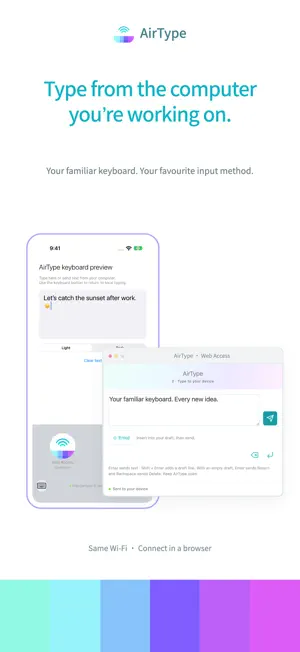
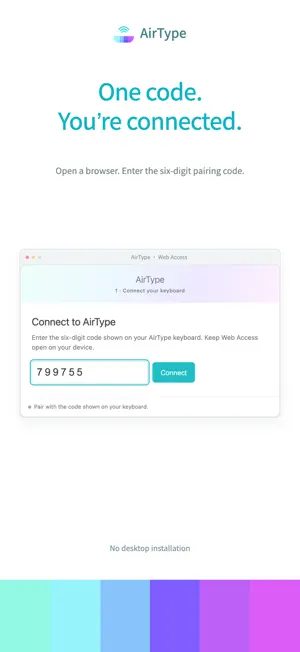
Type on your computer. Receive it on your devices. Keep using the keyboard you know when writing a long message, taking notes, or entering a paragraph on your phone. AirType sends text from your computer browser to the active text field on your devices over the same Wi-Fi network. JUST OPEN A BROWSER No desktop software or account is required. Open the address displayed on the AirType keyboard and enter its six-digit pairing code to connect. USE YOUR FAMILIAR INPUT METHOD Compose text with your computer’s input method, then press Enter or click Send. The browser also offers delete and newline controls, plus a searchable emoji picker for adding emoji to your draft. TYPE LOCALLY, TOO Switch to the built-in English QWERTY keyboard with light and dark appearances, numbers, symbols, and English spelling suggestions. Hold the space bar and drag horizontally to move the cursor. KEEP YOUR UNSENT DRAFT If the connection drops, the browser attempts to reconnect for up to 10 seconds, then offers a manual Reconnect button. Unsent text stays in the current page so you can continue editing. GET STARTED 1. Add AirType in Keyboard settings and enable Allow Full Access. 2. Open AirType and enable its local network connection. Allow Local Network access. 3. Connect your computer and smartphone or tablet to the same Wi-Fi. 4. Open a text field in a supported app, switch to AirType, and keep Web Access visible. 5. Open the keyboard’s address on your computer, enter the pairing code, and type. PLEASE NOTE • Remote typing requires Full Access and Local Network permission. Local typing works without Full Access. • The receiving connection runs only while the Web Access keyboard is visible. • Some apps do not allow third-party keyboards. Secure text fields and certain phone fields use the system keyboard. • Web Access uses unencrypted local HTTP. Use a trusted Wi-Fi network. • No cloud account is needed. AirType does not upload your typing to its own cloud service. Browser drafts remain only in the current page and may be lost if you refresh or close it. Support: [email protected]
Ratings & reviews
3.3
29 ratings
What’s new
Version 1.1 · Updated October 19, 2026
A refreshed Web Access pairing and typing experience. • Connect your browser with a six-digit pairing code. • Browse and search emoji in the browser. • Keep unsent drafts through disconnections and reconnect manually. • Improved local QWERTY typing, spelling suggestions, and cursor control.
App privacy
The developer, invivo, reported these privacy practices to Apple.
Data Not Collected
The developer does not collect any data from this app.
Alternatives to AirType - Type, over the air
Looking for apps like AirType - Type, over the air? Here are 6 similar apps on the App Store. The highest rated is EchoBox Player (5.0/5), and all 6 are free to download.
-
 Air-Keyboard
4.2
Air-Keyboard
4.2
-
 EchoBox Player
5.0
EchoBox Player
5.0
-
 Audio Extractor: VoxCut
4.8
Audio Extractor: VoxCut
4.8
-
 Live Read
4.7
Live Read
4.7
-
 Visionauta
5.0
Visionauta
5.0
-
 OOrion
4.1
OOrion
4.1
| App | Rating | Price | Last updated | Compare |
|---|---|---|---|---|
| AirType - Type, over the air | 3.3 / 5 (29 ratings) | Free | October 19, 2026 | |
| Air-Keyboard | 4.2 / 5 (12) | Free | Mar 7, 2025 | Compare |
| EchoBox Player | 5.0 / 5 (2) | Free | Mar 19, 2026 | Compare |
| Audio Extractor: VoxCut | 4.8 / 5 (23) | Free | Nov 2, 2025 | Compare |
| Live Read | 4.7 / 5 (11) | Free | Nov 4, 2025 | Compare |
| Visionauta | 5.0 / 5 (6) | Free | Oct 6, 2026 | Compare |
| OOrion | 4.1 / 5 (31) | Free | Oct 17, 2026 | Compare |