

PC Remote
Monect (Suzhou) Co., Ltd. Utilities iPhoneiPadiPod touch
PC Remote is a free Utilities app for iPhone and iPad by Monect (Suzhou) Co., Ltd. Rated 3.2/5 from 304 ratings. Requires iOS 17.6. Updated October 27, 2026.
- Rating
- 3.2
- 304 ratings
- Price
- Free
- on the App Store
- Size
- 40 MB
- Age 4+
- Updated
- Oct 27
- 2026 · v9.2
Screenshots


About PC Remote
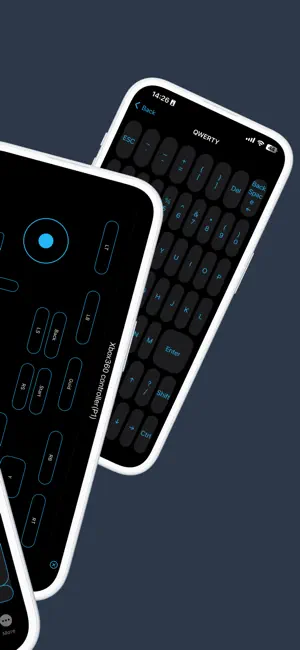
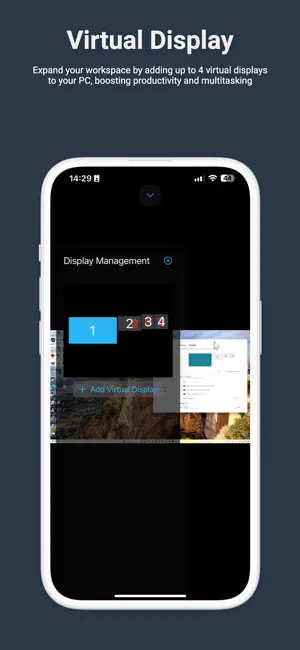
Monect PC Remote — your PC, in your pocket. Turn your iPhone or iPad into a wireless mouse, keyboard, gamepad, and remote desktop for your Windows PC. Control your computer from the same Wi-Fi or from anywhere over the internet — for work, gaming, and everything in between. REMOTE DESKTOP • See and control your PC screen in real time with low-latency H.264 or AV1 video and Opus audio. • Use the screen as a precision touchpad with natural gestures, plus a full mouse, keyboard, scroll, and volume controls. • Switch between monitors and add or remove virtual displays. • Type in any language with 16 desktop keyboard layouts, function and media keys, emoji, and Unicode text. Paste from the iOS clipboard and use hardware-keyboard shortcuts. • Stream in up to 4K with Premium. GAMING • Play PC games anywhere with on-screen layouts tailored to each title: buttons, joysticks, D-pads, sliders, touchpads, background touchpad, motion sensors, macros, and scripts. • Multi-page layouts, custom widgets, and a complete built-in editor. • Supports Xbox 360, DirectInput, and DSU motion controllers, with rumble feedback on your phone. • Browse, install, and publish community layouts in the Layout Store. • Sync layouts with your Monect account, or import .mlo and .mwl packages from other apps. • Launch console games and ROMs stored on your PC from the Games tab. MONI AI ASSISTANT • Ask Moni anything about your PC, or let it look at your screen and help with what's on it. • Create and edit images, attach photos, and talk to Moni with your voice. • Answers appear as they're generated, with a live 3D avatar. Moni runs on your PC and requires Monect AI in PC Remote Receiver. UTILITIES • Virtual Camera: use your iPhone or iPad camera as a high-quality webcam on your PC for calls, meetings, and streaming. Custom names and HD/4K output are available with Premium. • Screen Projector: share your iPhone or iPad screen with your PC, including app audio and your microphone. • Camera: view and control the cameras connected to your PC. • File Explorer: browse your device and PC, and transfer files in either direction. • PC Task Manager: check CPU, memory, disk, GPU, and network usage, inspect processes, and end unresponsive apps on supported PCs. SECURITY AND CONNECTION • Encrypted sessions, password-protected PCs, and sign-in tokens stored securely in the Keychain. • PCs on your local network are discovered automatically. Sign in to reach hosts linked to your Monect account from anywhere. FREE WITH OPTIONAL PREMIUM Monect PC Remote is free to download and supported by ads. Free accounts can transfer files up to 10 MB and connect up to 3 hosts. Premium removes ads and unlocks 4K remote desktop streaming, unlimited file transfer size, up to 10 hosts, unlimited game import size, custom virtual camera names with HD/4K output, and custom touchpad themes. Subscriptions renew automatically until canceled, and purchases can be restored at any time. GET STARTED 1. Download the free PC Remote Receiver from monect.com and install it on your Windows PC. 2. Open Monect PC Remote. Your PC appears automatically on the same Wi-Fi, or sign in to see your linked hosts. 3. Connect and enter your PC password if required. Requires a Windows PC running PC Remote Receiver. Some features depend on your receiver version and PC hardware. Terms of Use (EULA): https://www.apple.com/legal/internet-services/itunes/dev/stdeula/ Privacy Policy: https://www.monect.com/privacy-policy
Ratings & reviews
3.2
304 ratings
What’s new
Version 9.2 · Updated October 27, 2026
Moni, your new AI assistant, is here. • Ask Moni anything, or let it look at your PC screen and help with what's on it. • Generate and edit images, attach photos, and talk to Moni with your voice. • Watch answers stream in with a live 3D avatar. Moni runs on your PC and requires the Monect AI runtime in PC Remote Receiver. PC Task Manager • Check CPU, memory, disk, GPU, and network usage at a glance. • Search and sort processes, inspect details, and end unresponsive apps from your iPhone. Available on supported PCs. Better typing and sound • Type in any language with 16 desktop keyboard layouts, emoji, and Unicode text. • Paste text to your PC, use hardware-keyboard shortcuts, and keep modifier keys in sync. • Hear PC audio while projecting your screen, and enjoy clearer Remote Desktop sound with Opus. Remote Desktop • Added AV1 video decoding, including hybrid Intel/NVIDIA PCs. • Fixed black screens and incorrect video resolution on some PCs. • More reliable audio after interruptions, route changes, and reconnections. Sign-in and subscriptions • Sign-in and session restore are more reliable, with tokens protected in the Keychain. • Durable App Store purchase verification, working Restore Purchases, and clearer subscription error messages. Layouts and stability • Sensor layouts no longer crash on their first motion sample. • Inputs are now released when a layout is closed or the connection drops. • The layout canvas fills the available screen on foldables and compact windows. • Open Source Licenses are now available in About.
App privacy
The developer, Monect (Suzhou) Co., Ltd., reported these privacy practices to Apple.
Data Used to Track You
The following data may be used to track you across apps and websites owned by other companies:
- Usage Data: Advertising Data
Data Not Linked to You
The following data, which may be collected but is not linked to your identity, may be used for the following purposes:
- Usage Data: Product Interaction, Advertising Data
- Diagnostics: Crash Data
- User Content: Photos or Videos
Used for: Third-Party Advertising, Analytics, App Functionality
Alternatives to PC Remote
Looking for apps like PC Remote? Here are 6 similar apps on the App Store. The highest rated is Remote Mouse (4.6/5), and all 6 are free to download.
-
 VGamepad Lite
3.2
VGamepad Lite
3.2
-
 Unified Remote
3.8
Unified Remote
3.8
-
 Remote Mouse
4.6
Remote Mouse
4.6
-
 DSUController
3.8
DSUController
3.8
-
 Remote, Mouse and Keyboard
4.5
Remote, Mouse and Keyboard
4.5
-
 reWASD Mobile
3.8
reWASD Mobile
3.8
| App | Rating | Price | Last updated | Compare |
|---|---|---|---|---|
| PC Remote | 3.2 / 5 (304 ratings) | Free | October 27, 2026 | |
| VGamepad Lite | 3.2 / 5 (106) | Free | Oct 1, 2026 | Compare |
| Unified Remote | 3.8 / 5 (296) | Free | Oct 20, 2026 | Compare |
| Remote Mouse | 4.6 / 5 (18,806) | Free | Nov 3, 2026 | Compare |
| DSUController | 3.8 / 5 (24) | Free | Apr 4, 2026 | Compare |
| Remote, Mouse and Keyboard | 4.5 / 5 (14,478) | Free | Nov 3, 2026 | Compare |
| reWASD Mobile | 3.8 / 5 (14) | Free | Aug 18, 2026 | Compare |
Compare PC Remote with the top alternatives: ratings, updates, ASO score and keyword gaps →