

Zoho Analytics - Mobile BI App
Zoho Corporation Business iPhoneiPadiPod touch
Zoho Analytics - Mobile BI App is a free Business app for iPhone and iPad by Zoho Corporation. Rated 3.8/5 from 28 ratings. Requires iOS 17.6.
- Rating
- 3.8
- 28 ratings
- Price
- Free
- on the App Store
- Size
- 287 MB
- Age 4+
- Updated
- Oct 6
- 2026 · v6.0.0
Screenshots


About Zoho Analytics - Mobile BI App
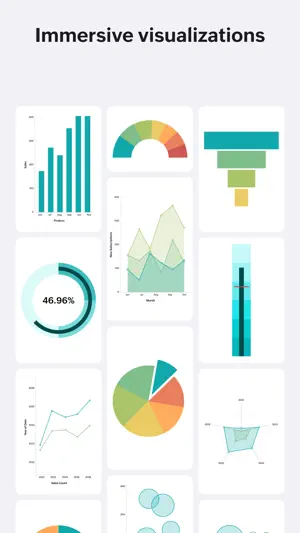
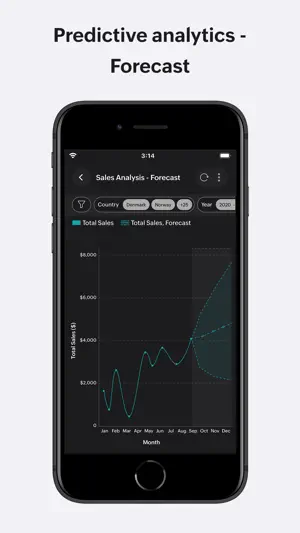
View insightful visualizations on-the-go, enabled by this data visualization software. This mobile business intelligence (BI) app complements the larger web browser-based view offered by Zoho Analytics, the self-service BI and analytics software on the cloud. The mobile BI Analytics app enables you to keep track of your key business metrics, spot trends early, collaborate with your colleagues, and arrive at informed business decisions, all on the go. With this app, you can view all the data, reports and dashboards that you created and have in your Zoho Analytics account. You can interact with the reports, favorite those that you like or view very often, share them with your colleagues, clients and friends with fine-grained access control, and do much more. The app allows you to analyze data and perform business data analytics, from a wide range of sources easily. It scales well and can crunch hundreds of millions of rows of data creating mobile analytics dashboards. The below features make the Zoho Analytics app an indispensable mobile BI analytics and reporting tool, for any business user. Key Features - Wide range of visualization options - geo-map, pie, donut, bar, stacked bar, line, bar-line combo, funnel, heat-map, web and a lot more chart types; Pivot tables, summary and tabular views. - View single page, at-a-glance dashboards. - Dashboards like KPI dashboards, business dashboards, marketing analytics dashboards, sales analytics dashboards, and much more can be created with ease - Apply filters and see filtered data. - See the underlying data, or drill-down any point in the report. - Segregate reports based on type, folders and related views. - Quickly access select reports using Favorites and Recent Items. - Export and share your reports with your colleagues and clients, with fine-grained access control. You control what the shared user can or can't do, like create reports, view/drill-down the underlying data, export the data/reports, etc.
Ratings & reviews
3.8
28 ratings
What’s new
Version 6.0.0 · Updated October 6, 2026
A fresh new look We’ve refreshed the app with a cleaner, more intuitive UI for a smoother analytics experience. Ask Zia - Descriptive Analytics Get descriptive insights from your data simply by asking Zia a question. Folder Hierarchy Organize your analytics with a flexible folder hierarchy and quickly find the reports and dashboards you need.
App privacy
The developer, Zoho Corporation, reported these privacy practices to Apple.
Data Linked to You
The following data, which may be collected and linked to your identity, may be used for the following purposes:
- Identifiers: User ID, Device ID
- Usage Data: Product Interaction, Other Usage Data
- Diagnostics: Crash Data, Performance Data, Other Diagnostic Data
- Contact Info: Email Address, Name, Phone Number
- User Content: Photos or Videos, Customer Support, Other User Content
Used for: Analytics, App Functionality
Alternatives to Zoho Analytics - Mobile BI App
Looking for apps like Zoho Analytics - Mobile BI App? Here are 6 similar apps on the App Store. The highest rated is SAS Visual Analytics (5.0/5), and all 6 are free to download.
-
 Databox: Modern BI
4.0
Databox: Modern BI
4.0
-
 CRM Analytics
4.8
CRM Analytics
4.8
-
 Numerics - Track Your Metrics
3.3
Numerics - Track Your Metrics
3.3
-
 SAS Visual Analytics
5.0
SAS Visual Analytics
5.0
-
 Bigtincan Hub
4.0
Bigtincan Hub
4.0
-
 SMS-Magic
4.3
SMS-Magic
4.3
| App | Rating | Price | Last updated | Compare |
|---|---|---|---|---|
| Zoho Analytics - Mobile BI App | 3.8 / 5 (28 ratings) | Free | October 6, 2026 | |
| Databox: Modern BI | 4.0 / 5 (12) | Free | Sep 30, 2026 | Compare |
| CRM Analytics | 4.8 / 5 (1,294) | Free | Oct 21, 2026 | Compare |
| Numerics - Track Your Metrics | 3.3 / 5 (18) | Free | Mar 26, 2025 | Compare |
| SAS Visual Analytics | 5.0 / 5 (3) | Free | Oct 15, 2026 | Compare |
| Bigtincan Hub | 4.0 / 5 (30) | Free | Oct 13, 2026 | Compare |
| SMS-Magic | 4.3 / 5 (43) | Free | Aug 27, 2026 | Compare |