

MealCam
Kevin Healy Health & Fitness iPhoneiPadiPod touch
MealCam is a free Health & Fitness app for iPhone and iPad by Kevin Healy. Rated 4.7/5 from 234 ratings. Requires iOS 18.0. Updated August 21, 2025.
- Rating
- 4.7
- 234 ratings
- Price
- Free
- on the App Store
- Size
- 28 MB
- Age 4+
- Updated
- Aug 21
- 2025 · v2.2
Screenshots

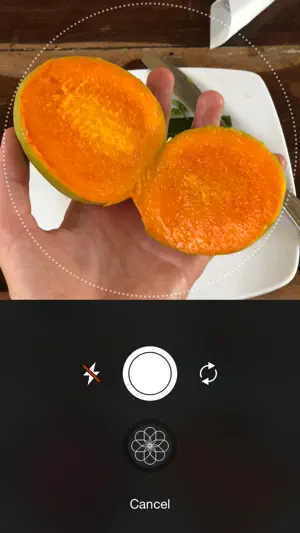
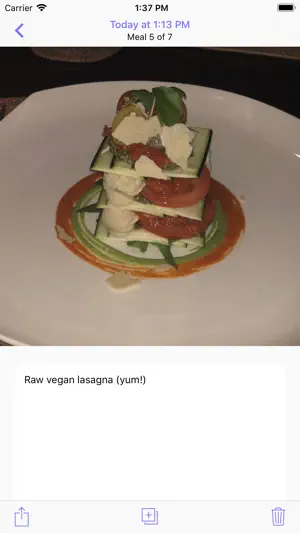
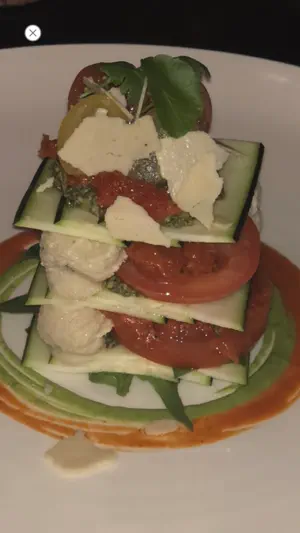
About MealCam
MealCam is where you save pictures of everything that you eat. It is great for intermittent fasters to observe their feeding window lengths without starting timers. You can shortcut from the Lock Screen or Control Center to capture Meals very conveniently. The UI is focused on images instead of calories. Instead of obsessing over numbers, you can look more holistically at what and when you eat to measure things like: -How many colors did I eat? -How many ingredients did I eat that had water in them? (i.e. fruit/veg vs processed food) -How much time did I give my body to digest before I ate again? While it may seem simple. When you use it consistently it becomes immensely powerful. It may be the catalyst to a skinnier, healthier you because of the insights you gain... ...or simply because of the improved accountability you gain by simply taking a picture of every meal! (You might ask yourself, "should I really be eating this?" as you reach for MealCam) ...it could also uncover a food allergy you never knew you had but was responsible for your bloating and discomfort. --- Focusing on calorie counting can often be misleading because to meet a goal you may eat processed food that has an artificially-engineered low/no calorie number... ...when what your body really wanted was a hydrating piece of fresh fruit! (Colorful fresh produce isn't usually sold with nutrition labels... and yet isn't it the healthiest food for us?) So by focusing instead on things like colors and water content you'll get a more holistic view of what you eat. ...and it's easier! (It only takes seconds to take a picture of a meal) --- With photos of your meals you'll have a broader perspective of what you eat where you can observe patterns you would otherwise be unaware of. You can ask questions that get to the root of problems: - What made my digestion like this? - Why am I bloated? - Did I eat something yesterday that caused me to break out? - Why did I gain weight this month? MealCam allows you to recall what you were eating days, weeks, or months ago. (Unlike our memory which often can only recall the past few meals) ...and the very act of taking a picture of every meal makes you more conscious of what you eat. You can also create a 1 day or 7 day summary of your meals to share with your doctor, personal trainer, or nutrition coach. --- MealCam uses of all the greatest new features in iOS: -It uses iCloud to privately sync your meals between devices. -It has a useful Widget. -It supports multitasking on iPad and works in all orientations. ~Private iCloud Syncing~ Meals can be stored in your private iCloud database where they sync with all your devices. Since MealCam uses iCloud's private database, I as the developer do not have access to them. They're for your eyes only. You also have the choice to store them locally on your device without syncing. ~Widget~ A common thing you may ask yourself is, especially if you are intermittent fasting is: what time was my last meal? The widget is the perfect place to quickly answer this question. It shows a timeline of today's meals. Or if you haven't eaten today, how long it's been since your last meal. You can quickly reference what time your last meal was without opening the app and decide if you're ready to eat again. You can also put an accessory widget with this info on the Lock Screen. ~Multitasking~ MealCam works in all sizes and orientations so you can use it for multitasking on the iPad. You can use MealCam side by side with other apps. For example, when you are looking for recipes online you can use MealCam to see what you've eaten the past couple nights. --- I hope you enjoy MealCam as much as I do! - Kevin (the developer)
Ratings & reviews
4.7
234 ratings
What’s new
Version 2.2 · Updated August 21, 2025
Version 2 added great new features for intermittent fasters: you can see time elapsed since last meal, each day's feeding window length, and a timeline of your meals. This 2.2 update fixed bugs related the home screen widget when in tinted mode.
App privacy
The developer, Kevin Healy, reported these privacy practices to Apple.
Data Not Collected
The developer does not collect any data from this app.
Alternatives to MealCam
Looking for apps like MealCam? Here are 6 similar apps on the App Store. The highest rated is Shutterbite: Food Journal (4.8/5), and all 6 are free to download.
-
 Shutterbite: Food Journal
4.8
Shutterbite: Food Journal
4.8
-
 MealSnap: Photo Food Diary
4.4
MealSnap: Photo Food Diary
4.4
-
 Food Journal: AI Food Tracker
4.7
Food Journal: AI Food Tracker
4.7
-
 AnyMeal - Food Diary
4.6
AnyMeal - Food Diary
4.6
-
 Mealligram - My Diet Journal
4.8
Mealligram - My Diet Journal
4.8
-
 MyTummy: Intuitive Eating
4.4
MyTummy: Intuitive Eating
4.4
| App | Rating | Price | Last updated | Compare |
|---|---|---|---|---|
| MealCam | 4.7 / 5 (234 ratings) | Free | August 21, 2025 | |
| Shutterbite: Food Journal | 4.8 / 5 (26) | Free | Aug 18, 2026 | Compare |
| MealSnap: Photo Food Diary | 4.4 / 5 (108) | Free | Sep 11, 2026 | Compare |
| Food Journal: AI Food Tracker | 4.7 / 5 (44) | Free | Sep 3, 2026 | Compare |
| AnyMeal - Food Diary | 4.6 / 5 (5) | Free | Aug 26, 2025 | Compare |
| Mealligram - My Diet Journal | 4.8 / 5 (268) | Free | Sep 20, 2026 | Compare |
| MyTummy: Intuitive Eating | 4.4 / 5 (339) | Free | Aug 20, 2026 | Compare |
Compare MealCam with the top alternatives: ratings, updates, ASO score and keyword gaps →