

Git client - Working Copy
Anders Borum Developer Tools iPhoneiPadiPod touch
Git client - Working Copy is a free Developer Tools app for iPhone and iPad by Anders Borum. Rated 4.8/5 from 3,791 ratings. Requires iOS 18.2.
- Rating
- 4.8
- 3.7K ratings
- Price
- Free
- on the App Store
- Size
- 94 MB
- Age 4+
- Updated
- Oct 29
- 2026 · v7.0.7
Screenshots

About Git client - Working Copy
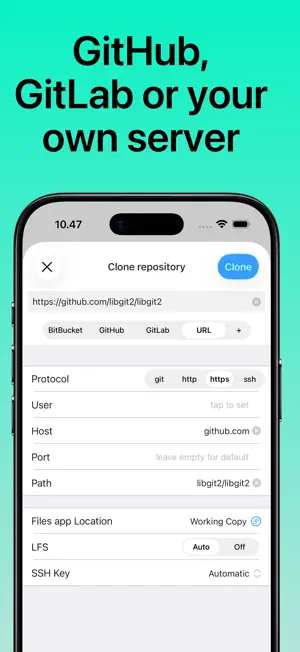
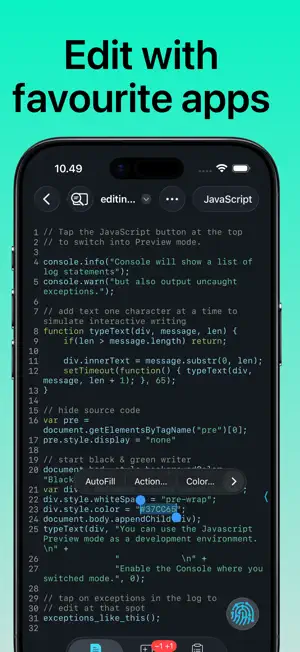
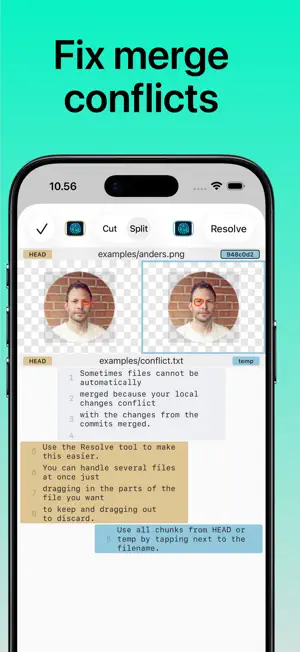
Access Git repositories on the go. Clone, edit, commit and push while allowing other apps access to repositories. Git is a important part of our work-life and iOS can take part in this. The ability to commit even when offline has added utility on a device that moves in and out of network coverage. Cloning repositories gets you a local copy on your iOS device with commits for all branches. You can browse the content from within the app and make changes. Other applications supporting the Files app, WebDAV or x-callback-url has access to these files. Changes made can be committed and the commits can in turn be pushed back to the remote. The idea of doing significant programming on iOS might seem far fetched when you are used to a large screen, a physical keyboard and a full IDE. But just as it turned out that not every email is serious prose, then not everything that goes on in Git is significant programming. Sometimes you just want to update a TODO file or make adjustments to your Jekyll site. Sometimes you just need to add a file the designer sent after hours. If you ever make reminders about small things to do with the code-base, then you should give Working Copy a try. You will spend less time moving stuff around and you will get much better commit messages when you write them for fixes that are still fresh in your mind. You won't be leaving your computer behind any time soon, but sometimes it is faster to just fix things with the device in your hand. When you do need to perform real work on iOS, Working Copy is a powerful tool. Editor has syntax highlighting for more than 50 programming languages and a built-in color picker. Preview images, Markdown and HTML files with a Javascript console pointing to errors in your code. Create new branches and merge or rebase them back, with a brilliant merge-tool for handling conflicts. If you need to automate your work there are Working Copy actions in the Shortcuts app for most operations. Even if you never edit a line of code on iOS, Working Copy is a great companion for reviewing and discussing code. Repositories are cross indexed and with powerful fuzzy search you can quickly jump from a symbol to the declaration or reverse from the declaration to all usages. A graph of your commits lets you zoom out for a overview of the commit tree or zoom in for specifics about each commit, with speed and beauty you won’t find in desktop Git applications. Review the changes your files have gone through with a diff viewer that is great for text and images. There is even hex-dump mode for that obscure occasion. Working Copy is a free download but you need to unlock pro features such as the ability to push commits and manage more than 5 repositories. There is no venture capital, large company or ads funding development and your support through in-app purchase directly sustains development. Try out pro features with a 10 day free trial. When you pay to unlock you get permanent access to all pro features at the time of purchase as well as any added the next year. When 12 months have passed you keep all existing pro features but any new ones introduced are locked until you renew your unlock.
Ratings & reviews
4.8
3.7K ratings
What’s new
Version 7.0.7 · Updated October 29, 2026
The history of a file continues past renames, and renamed files in a commit are shown as old → new. Dragging repositories into and out of folders is more reliable. The Live Activity for Shortcuts actions only appears for actions still running after 15 seconds. Choosing an image file for a repository icon works when the file is outside Working Copy, such as in iCloud Drive. Includes latest improvements to 7.0.5 Review pull requests from GitHub, GitLab, Bitbucket, Gitea and Forgejo without leaving Working Copy. Pull requests are listed from the repository screen, where you can comment on their changes, submit a review and merge them. Comparisons point out changes that only touch whitespace or rename something, and a Review button turns them into a short video to share. Commenting and reviewing is a pro feature available to anyone who purchased or upgraded their pro unlock within the last year. Ready for iPhone Duo. Unfolded, the repository and the file you are working on sit on either side of the fold, and files and the Repository Agent can open in windows of their own, as they also can on iPad. Held like a laptop, the editor keeps your code above the fold and puts Tab, Undo and the keyboard below it. Hosting providers for the same server can be signed in with different accounts. A repository cloned from a provider's list, or created on a provider, keeps using that provider's account. The Auto-Sync commit message can include the date, time and the files being committed. Links to headings in Markdown previews work the way GitHub, Typora and Obsidian name headings, so headings with punctuation, spaces or Chinese characters can be reached. After following a link, a back button takes you back to where you were.
App privacy
The developer, Anders Borum, reported these privacy practices to Apple.
Data Not Linked to You
The following data, which may be collected but is not linked to your identity, may be used for the following purposes:
- Usage Data: Product Interaction
Used for: Analytics
Alternatives to Git client - Working Copy
Looking for apps like Git client - Working Copy? Here are 6 similar apps on the App Store. The highest rated is Textastic Code Editor (4.7/5), and all 6 are free to download.
-
 Jayson
4.5
Jayson
4.5
-
 Swifty Compiler: Swift IDE
4.5
Swifty Compiler: Swift IDE
4.5
-
 Kodex
4.2
Kodex
4.2
-
 Rev for Vercel
4.4
Rev for Vercel
4.4
-
 Textastic Code Editor
4.7
Textastic Code Editor
4.7
-
 Blink Shell, Build & Code
3.1
Blink Shell, Build & Code
3.1
| App | Rating | Price | Last updated | Compare |
|---|---|---|---|---|
| Git client - Working Copy | 4.8 / 5 (3,791 ratings) | Free | October 29, 2026 | |
| Jayson | 4.5 / 5 (445) | Free | Sep 10, 2026 | Compare |
| Swifty Compiler: Swift IDE | 4.5 / 5 (203) | Free | May 11, 2026 | Compare |
| Kodex | 4.2 / 5 (208) | Free | Apr 1, 2024 | Compare |
| Rev for Vercel | 4.4 / 5 (89) | Free | Sep 10, 2026 | Compare |
| Textastic Code Editor | 4.7 / 5 (2,568) | Free | Oct 21, 2026 | Compare |
| Blink Shell, Build & Code | 3.1 / 5 (421) | Free | Sep 17, 2026 | Compare |