

RED Tools
RED Digital Cinema Photo & Video iPhoneiPadiPod touch
RED Tools is a free Photo & Video app for iPhone and iPad by RED Digital Cinema. Rated 3.4/5 from 16 ratings. Requires iOS 15.6. Updated March 30, 2026.
- Rating
- 3.4
- 16 ratings
- Price
- Free
- on the App Store
- Size
- 7 MB
- Age 4+
- Updated
- Mar 30
- 2026 · v4.0.0
Screenshots


About RED Tools
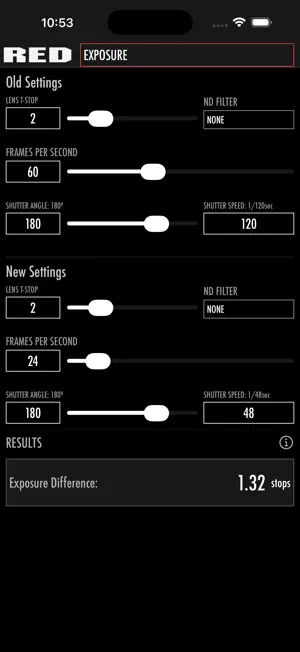
RED Tools is a convenient reference tool designed for use by filmmakers and camera operators to outline best practices in camera set-up for a variety of shooting situations. Each tool is customizable based on a selected RED camera and sensor type. Standard film formats are also included for comparison. RED Tools is also included in the RED Control app, which also provides free, full-featured camera control and video streaming for RED’s latest DSMC3 products. TOOLS INCLUDED: CROP FACTOR Preview how a given focal length will appear depending on resolution setting and sensor type. Illustration depicts viewable area relative to a traditional 35 mm stills photography sensor by default, but other reference sensors are selectable within the drop-down menu. R3D RECORDING TIME Evaluate the video data rate and available recording time based on your RED camera settings. This can help you understand media requirements and production costs in advance of a shoot. FLICKER FREE VIDEO Find a flicker-free shutter speed and frame rate combination when shooting under artificial lighting. DEPTH OF FIELD Understand how various camera settings influence depth of field. PANNING SPEED Estimate the panning speed where judder will likely become too pronounced. The goal is to provide a more accessible tool than the charts and tables commonly referenced in cinematography manuals. It uses the standard rule of thumb that camera panning should not cause objects to transit the entire horizontal extent of an image in any less than seven seconds. EXPOSURE Assist with exposure when one camera setting has to change. Example usage scenarios include when a higher frame rate needs to be used for slow motion, when the T-stop has to change for depth of field, or when the shutter angle has to change to minimize flickering in artificial light. NIKKOR Z Lens Coverage Use this tool to understand how NIKKOR Z lenses will look on your RED Z Mount camera bodies. The tool shows the extent the light will fall off at different sensor formats, and if any hard vignetting occurs.
Ratings & reviews
3.4
16 ratings
What’s new
Version 4.0.0 · Updated March 30, 2026
Brought up to date with the latest RED cinematography tools, matching the current RED Control apps and RED's official website.
App privacy
The developer, RED Digital Cinema, reported these privacy practices to Apple.
Data Not Collected
The developer does not collect any data from this app.
Alternatives to RED Tools
Looking for apps like RED Tools? Here are 6 similar apps on the App Store. The highest rated is LensKit: Lens Tools (4.9/5), and 5 of the 6 are free to download.
-
 CameraKit: Camera Tools
4.7
CameraKit: Camera Tools
4.7
-
 LensKit: Lens Tools
4.9
LensKit: Lens Tools
4.9
-
 ZoeLog
4.7
ZoeLog
4.7
-
 FinderKit: Viewfinder
4.9
FinderKit: Viewfinder
4.9
-
 Magic Reds ViewFinder
4.9
Magic Reds ViewFinder
4.9
-
 Cadrage Director's Viewfinder
4.7
Cadrage Director's Viewfinder
4.7
| App | Rating | Price | Last updated | Compare |
|---|---|---|---|---|
| RED Tools | 3.4 / 5 (16 ratings) | Free | March 30, 2026 | |
| CameraKit: Camera Tools | 4.7 / 5 (321) | Free | Sep 25, 2026 | Compare |
| LensKit: Lens Tools | 4.9 / 5 (56) | Free | Sep 25, 2026 | Compare |
| ZoeLog | 4.7 / 5 (35) | Free | Oct 15, 2026 | Compare |
| FinderKit: Viewfinder | 4.9 / 5 (13) | Free | Sep 25, 2026 | Compare |
| Magic Reds ViewFinder | 4.9 / 5 (23) | Free | Sep 8, 2026 | Compare |
| Cadrage Director's Viewfinder | 4.7 / 5 (374) | 19.99 USD | Oct 9, 2026 | Compare |
Compare RED Tools with the top alternatives: ratings, updates, ASO score and keyword gaps →