

Art Serigraphy - Photo Editor
TAIKI HIRATA Photo & Video iPhoneiPadiPod touch
Art Serigraphy - Photo Editor is a free Photo & Video app for iPhone and iPad by TAIKI HIRATA. Rated 4.0/5 from 1 ratings. Requires iOS 18.0.
- Rating
- 4.0
- 1 ratings
- Price
- Free
- on the App Store
- Size
- 9 MB
- Age 4+
- Updated
- Sep 4
- 2025 · v2.4
Screenshots
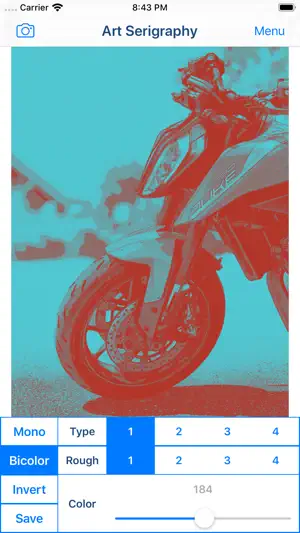
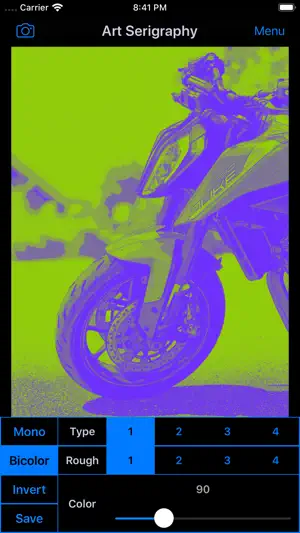

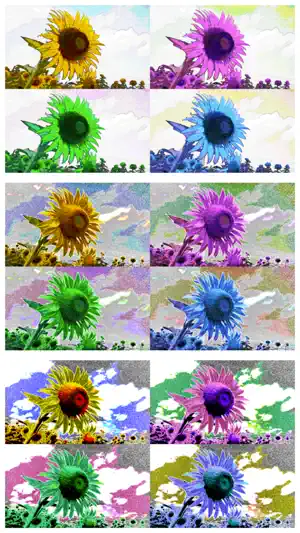
About Art Serigraphy - Photo Editor
"Art Serigraphy" is photo / video editor app to create Serigraph / Screen Print Art Style Image from photographs and illustrations. Serigraph / Screen Print is a kind of Art Print. Serigraphy / Screen Printing is technique often used in Modern / Contemporary art, because It is possible to make the Pop ,Modern and Contemporary Image. For example Artwork of Marilyn Monroe by Andy Warhol is famous. You will be able to create the Serigraph / Screen Print Style Art Image and Art Movie from photo / video stored on your smart phones or tablets by using photo editor app "Art Serigraphy". In addition, you can create "Art Image" that is combining images of four sheets with different color. If you purchase Add-on, you will be able to get closer to the style of painting of your choice by adjusting the density and color pattern. You will be able to create image / movie of various kinds for example Poster Art Style, Pop Art Style, Psychedelic Art Style and more. Let's create a nice Artwork from your Photo, Video, Illustration and Camera. ■Main function of App 1. Create Serigraph / Screen Print Style Art Image / Art Movie by editing photo and save it. 2. Create "Art Image" that is combining images of four sheets with different color. 3.Create Mono Color Serigraphy Image / Movie by editing photo. *Add-on is required in order to save. 4.Create Bicolor Serigraphy Image / Movie by editing photo. *Add-on is required in order to save. ■How to Edit 1. Select image you want to edit from "Camera" Button. When you select Image or Video, Image or Movie processed will display. 2. You can edit the image / video quality by changing parameters. *If you want to save Image that parameters is not "1", you need to purchase Add-on. 3. You can create Mono Color / Bicolor Image / Movie by "Mono Color / Bicolor" Button. *If you want to save Mono Color / Bicolor Image, you need to purchase Add-on. 4. You can create Inverted Image / Movie by "Invert" Button. *If you want to save Inverted Image, you need to purchase Add-on. 5. When you touch "Save" Button, current image / movie will be saved in "Photos(Camera Roll)".
What’s new
Version 2.4 · Updated September 4, 2025
Supported iOS18.
App privacy
The developer, TAIKI HIRATA, reported these privacy practices to Apple.
Data Not Linked to You
The following data, which may be collected but is not linked to your identity, may be used for the following purposes:
- Usage Data: Advertising Data
Used for: Third-Party Advertising
Alternatives to Art Serigraphy - Photo Editor
Looking for apps like Art Serigraphy - Photo Editor? Here are 6 similar apps on the App Store. The highest rated is SliceTimeCam (5.0/5), and all 6 are free to download.
-
 PhotoXo - Magical Photo Editor
4.3
PhotoXo - Magical Photo Editor
4.3
-
 The Frame Camera
3.9
The Frame Camera
3.9
-
 Slidezilla
4.2
Slidezilla
4.2
-
 Pop Art filters and effects
4.0
Pop Art filters and effects
4.0
-
 VideoPad Masters
4.4
VideoPad Masters
4.4
-
 SliceTimeCam
5.0
SliceTimeCam
5.0
| App | Rating | Price | Last updated | Compare |
|---|---|---|---|---|
| Art Serigraphy - Photo Editor | 4.0 / 5 (1 rating) | Free | September 4, 2025 | |
| PhotoXo - Magical Photo Editor | 4.3 / 5 (6) | Free | Nov 27, 2023 | Compare |
| The Frame Camera | 3.9 / 5 (15) | Free | Mar 16, 2024 | Compare |
| Slidezilla | 4.2 / 5 (251) | Free | Mar 22, 2025 | Compare |
| Pop Art filters and effects | 4.0 / 5 (3) | Free | Jan 29, 2026 | Compare |
| VideoPad Masters | 4.4 / 5 (33) | Free | Aug 23, 2025 | Compare |
| SliceTimeCam | 5.0 / 5 (1) | Free | Jan 28, 2025 | Compare |